wedding planning apps with a one-time purchase price instead of a subscription
Pay once for wedding planning tools without monthly fees or vendor-driven ads.
A small but real category of wedding planning tools now charges one flat fee instead of a monthly subscription. This piece breaks down what "one-time purchase" actually means across them, what each tool includes, and where the free ad-supported platforms still beat them on features you can't easily replace.
The bigger platforms in this space run on ads and registry commissions. That's not a criticism, it's just the business model: when a tool costs nothing upfront, something else pays the bills. Usually that something is a vendor or registry commission arrangement funding the platform. Couples aren't the customer in that setup. They're the audience.
That shapes the day-to-day experience more than most people expect going in. Vendor suggestions show up because someone paid for the slot, not because an algorithm decided it's your best local florist. Your data feeds a matching engine built to sell you more things. And the inbox fills up fast, because every interaction is a chance to surface another sponsored recommendation.
A quieter alternative has grown alongside all that: pay once, get the tool, no ads, no upsells, no recurring charge. The appeal isn't really about principle. It's about practicality. Couples want to type their guest list into a form once and not wonder who else has access to it, or whether the app's business model depends on selling their contact info somewhere downstream.
Subscription fatigue plays into this too. Most couples already juggle a streaming service, cloud storage, maybe a meal kit subscription they keep meaning to cancel. Adding a monthly fee for a tool they'll use for eight to eighteen months and then never open again feels wasteful, and couples are right to question it.
None of this means the free platforms are worse. They have scale, vendor directories, and years of community content that a small team charging $49 once simply cannot build overnight. Both models have real value. The rest of this guide lays out where each one wins.
What "one-time purchase" actually means across these tools, and where the definitions blur
"One-time purchase" gets used loosely, and three distinct pricing models hide under that one phrase.
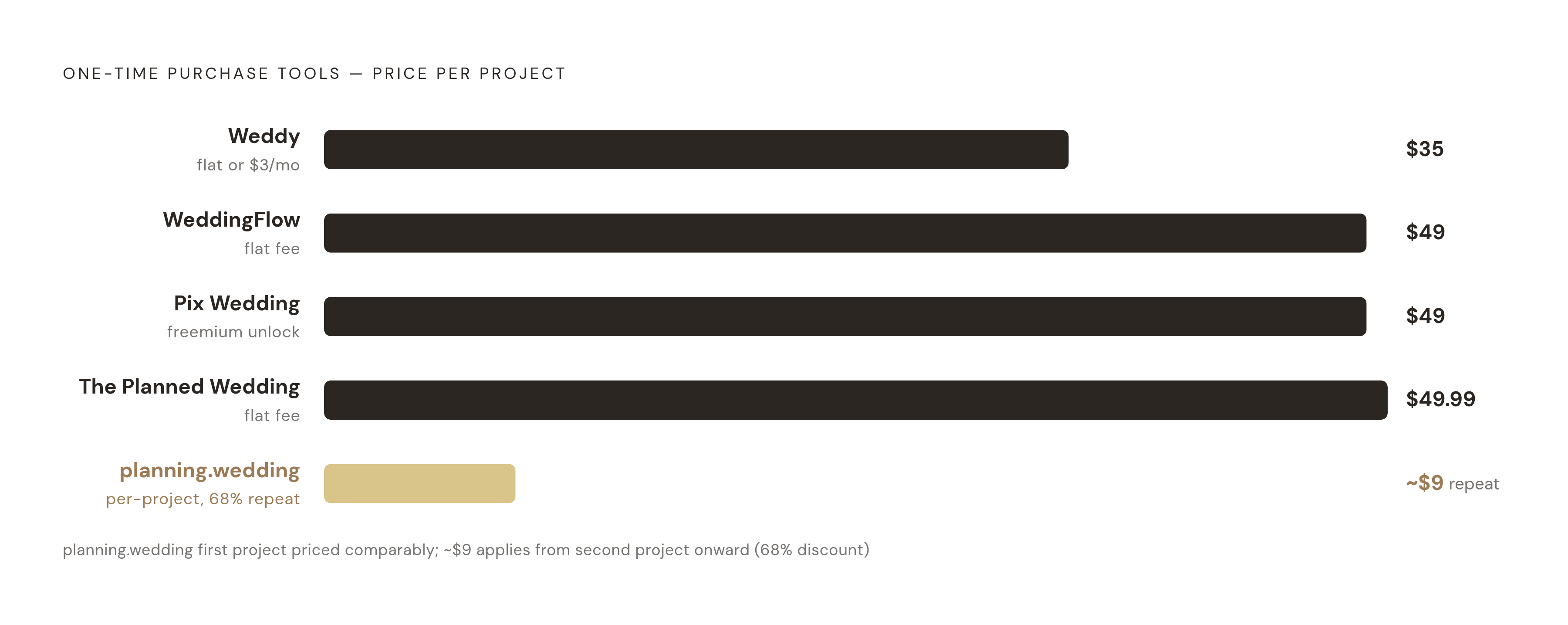
The first is true flat-fee: pay once, get everything, no expiration date. The Planned Wedding works this way at $49.99, unlocking the full platform for as long as the engagement lasts.
The second is per-project pricing, which sounds similar but isn't. planning.wedding charges per wedding rather than per year, and rewards repeat use: couples who've bought two premium projects get a 68% discount on future purchases, dropping the price to around $9 per project. That matters if a couple is planning a rehearsal dinner, ceremony, and reception as separate events.
The third is freemium with a one-time unlock. The core tool is free, and a single payment removes limits. Pix Wedding follows this pattern, with its free tier covering basics and a paid photo tier starting at $49 for unlimited uploads. Weddy does something similar but gives couples a real choice: choose between a one-time payment or a low monthly fee if the subscription model suits them better.
A few things worth watching for. "Lifetime" plans sound reassuring until the company changes ownership or rewrites its pricing policy, at which point "lifetime" can mean whatever the new owner decides. Trial windows can also be generous on paper while hiding which features stay locked until payment. WeddingFlow handles this well: a 24-hour free trial before the $49 charge kicks in, long enough to actually test the budget tracker and seating tool rather than just click through an onboarding screen.
For scale, it helps to compare against tools built for other markets entirely. Professional venue-modeling tools aimed at event planners, not couples, carry monthly subscription fees that dwarf what any one-time wedding tool charges. Next to those, a $49 flat fee that never recurs looks like a rounding error.
And "free" isn't really free in the same currency. The ad-supported platforms cost attention, data, and a layer of opacity around why a certain vendor keeps showing up in your recommendations. Run the math over a twelve-month engagement, and a $49 one-time tool can end up cheaper than the "free" option, once you count what the free option is actually charging for.
The confirmed one-time purchase tools: what each covers, what it costs, who it suits
Judging these tools fairly means applying the same yardstick to each: how much of the planning process they cover (budget, guest list, seating, timeline, checklist), how they handle RSVPs and dietary needs, seating chart quality, whether both partners can work in the account together, relevance to Australian couples, and price.
WeddingFlow is Swiss-made and runs entirely in a browser, no app download needed. It costs $49 one-time, with a 24-hour free trial first. The budget tracker has 12 standard categories plus room to add custom ones, tracks planned spend against actual spend line by line, and logs deposits separately. The guest list supports A/B/C list tagging, family and friend grouping, RSVP status, allergy notes, plus-ones, and lodging needs. Seating is drag-and-drop, works for round and rectangular tables, pulls RSVP data automatically, and exports as a print-ready layout. There's also a day-of timeline that exports as a PDF and a pre-built checklist. Because it's browser-based, it runs on any device without needing an app store. This suits couples who want one complete tool at a fixed, known price and don't need an Australian vendor directory baked in.
The Planned Wedding charges $49.99 for the entire platform, covering the length of the engagement. No subscriptions, no feature tiers, no ads. It includes a planning control center, budget tracking, guest management, venue comparison, and seating charts. Both partners get set up in the account from the start, sharing guest lists, budgets, and vendor notes in one place, so nobody's emailing spreadsheets back and forth. Good fit for couples who want a single shared workspace and don't want to think about which features are locked behind which tier.
planning.wedding charges per project rather than per year, which matters for couples managing multiple events under one wedding. The seating tool lets couples input actual venue measurements, including walls, inner walls, and columns, then use a ruler tool to position tables accurately. Guests get added to seats by clicking directly from the guest list, and the whole layout exports as a PDF with a few presentation options. As mentioned, the repeat-purchase discount brings each additional project down to roughly $9. This suits couples running a rehearsal dinner, ceremony, and reception as separate planning projects rather than one continuous event.
Pix Wedding leans free-first. The free tier includes a budget allocator, seating chart, guest list manager, RSVP tracker, AI-assisted vow and speech writing tools, and a countdown timer, all usable without entering a card. The free photo tier allows up to 20 guest uploads. Paid plans start at $49 one-time and unlock unlimited photos and video, original-quality downloads, and longer album access. This one's really built around guest photo sharing at the reception, with the planning tools functioning more as a bonus than the main draw.
Weddy runs on both Android and iPhone/iPad and gives couples a genuine choice between payment models: $35 once, or $3 a month, or a limited free version to test first. That flexibility suits couples who aren't sure yet how long their engagement will run and want to decide later which pricing model actually saves money.
Where free ad-supported tools still win, and what couples give up going one-time only
Vendor discovery is the clearest gap. Australian-specific vendor directories, built by companies with years of supplier relationships and thousands of reviewed businesses, simply don't exist yet in the one-time purchase category. That's not a small omission for a couple still choosing a photographer or caterer.
Template libraries tell a similar story. Some of the larger free platforms offer wedding website template counts in the hundreds, while one-time purchase tools tend to ship with a far smaller selection. If the wedding website is guest-facing and needs to look a certain way, that gap is visible immediately, not theoretical.
RSVP data export also varies in quality. Some free platforms export guest RSVP data to CSV, though the export can merge names into a single column and drop household grouping, so there's still manual cleanup involved even on the "free" side. It's worth knowing that going in rather than discovering it the week invitations are due.
Then there's community: forums, real-wedding photo galleries, and crowd-sourced vendor reviews. That kind of content builds up over years and a large user base. A small team charging $49 for a focused tool isn't trying to replicate that, and probably shouldn't.
The honest read here: if vendor discovery in Australia is the main job to be done, the free platforms are harder to walk away from. If the main job is budget discipline and keeping the planning process organized, the one-time tools hold up well. Plenty of couples end up running two tools side by side, one for finding vendors, one for the actual planning grind. That's not indecision. It's just using the right tool for each job.
Australian-specific context: why platform origin matters when planning a wedding in Australia
Plenty of the biggest wedding planning platforms are built around US vendor listings, and their budget tools default to US pricing assumptions. Wedbuild, an Australian-made app that handles RSVPs, guest lists, and budgets in one place, is one example of a tool built from the ground up for the local market. That's a real problem for Australian couples, because the numbers simply don't match.
A 2026 report based on surveys of Australian couples and suppliers puts the national average wedding spend at $38,252. That figure moves a lot by state: NSW sits higher at $42,322, while Tasmania comes in lower at $25,423. A budget tool calibrated to US costs gives an Australian couple a completely wrong starting point before they've booked a single vendor.
Venue costs make up the single biggest line item nationally, averaging $17,518. Victorian couples average $17,988 on venue alone, Queensland couples average $15,849. None of that shows up in a tool built around American venue pricing, and that's not a minor inconvenience. It's the kind of gap that leads a couple to underbudget by thousands of dollars before the invitations even go out.
Currency display matters more than it sounds like it should. Seeing AUD pricing directly in an app beats doing mental USD conversion every time a number pops up, especially when tracking a budget across dozens of line items.
A few Australian-relevant tools stand out in the broader market. Ivory Lane is Australian-built and uses AI-powered budget forecasting calibrated to Australian pricing data. It's free to start planning, with a single optional payment to unlock the full feature set, no subscription attached. That model lines up closely with the core argument here: couples shouldn't be locked into recurring fees for a tool they'll use once and then close forever.
Dietary requirement handling is another spot where Australian-built tools show their advantage. Some collect dietary needs directly at RSVP through the wedding website, then save that data alongside each guest's record and export it as a clean attendee list ready to hand off to caterers. No manual reconciliation the morning of the wedding, no cross-referencing a spreadsheet against a guest list at midnight. That's a structural fix, not a workaround.
The practical takeaway: an Australian couple pairing a global one-time purchase tool for planning with a dedicated Australian vendor directory for supplier discovery ends up better served than a couple relying on one US-built free platform to do both jobs at once.
Seating charts and dietary data: the planning task where tool choice has the most day-of consequences
Seating is where a fragmented toolkit causes actual damage on the wedding day, not just mild annoyance during planning. Guest list in one app, RSVPs tracked in another, dietary notes scribbled into a separate spreadsheet, and a seating chart built by hand from all three sources: that's a recipe for someone getting seated at the wrong table, or worse, served a meal they can't eat.
A handful of tools handle this differently, and the differences matter.
Some free platforms handle this integration well, pulling confirmed guests into the seating chart and letting couples tag guests by meal choice or dietary restriction, with layouts downloadable as print-ready files. WeddingFlow offers drag-and-drop seating with RSVP sync built in, covering both round and rectangular table layouts, though its sources don't confirm whether dietary tags carry through automatically the same way. planning.wedding takes a more hands-on approach: couples enter actual venue measurements, place inner walls and columns, then click guests into seats directly from the guest list, with a ruler tool for precision and PDF export at the end.
A couple of standalone seating specialists deserve a mention too. Seat Puzzle, available on iOS and macOS, offers seating chart and floor plan tools alongside guest list management. SeatPlan.io takes a slightly different approach: couples upload a photo or PDF of the venue, and the tool uses that as a starting point to build the layout, with QR codes so guests can find their own table, wallet passes that update automatically if a seat changes, and a check-in link for whoever's working the door.
The real dividing line is whether dietary data flows automatically from RSVP into the seating chart, or sits as a separate module the couple has to reconcile by hand. Tools that connect the two remove a step that's genuinely easy to miss under wedding-week stress. Tools that don't leave it to the couple, usually the week the caterer needs final numbers.
For larger Australian receptions, the ability to update the seating chart in real time as late RSVPs trickle in matters more than it might for a small backyard wedding. And regardless of which tool gets chosen, calling the venue for exact layout dimensions before building anything digital is worth doing first. No app can guess wall placement or column spacing from nothing.
How to choose: matching tool to couple based on what actually varies
A few honest questions do most of the work in narrowing this down.
Is vendor discovery in Australia something the couple still needs, or have they already booked most of their suppliers? Do the planning tools need to talk to each other automatically, or is the couple fine running two or three separate apps side by side? Is the engagement short, under six months, or long, twelve months or more, because that changes whether a monthly subscription actually costs less than a flat fee? And is the seating chart genuinely complicated, with over 100 guests, several dietary categories, or an oddly shaped venue, or is it simple enough that any tool will handle it fine?
The answers point in different directions for different couples, and that's the whole point of a category this varied.
For a couple that wants a complete, ad-free planning suite at a known price with no surprises later, WeddingFlow at $49 and The Planned Wedding at $49.99 sit close together in price with slightly different feature emphasis. WeddingFlow's 24-hour trial gives an edge to couples who want to test the seating tool before paying.
For a couple whose main priority is sharing photos with guests during the reception, Pix Wedding's free tier covers the basics without asking for a card, with the paid photo tier available later if the guest list turns out bigger than expected.
For couples juggling multiple events under one wedding, planning.wedding's per-project pricing and repeat-purchase discount make more financial sense than paying for one all-in-one platform per year.
And for Australian couples specifically, pairing a one-time purchase planning tool with a dedicated Australian-built vendor directory tends to beat relying on a single US-focused free platform to do everything. The two jobs, planning organization and vendor discovery, are different enough that splitting them across two tools isn't a compromise. It's usually the more efficient path.