Wedding Seating Chart Tools With Drag-and-Drop Table Editors
Drag-and-drop tools keep meal assignments accurate when RSVPs shift right up until service starts.

The seating chart is the document a caterer works from on the wedding day. That single fact changes how couples should think about building one. Venue and catering together make up roughly half of the average Australian wedding budget, and the seating chart is what tells the catering team how to execute against that spend. Get it wrong, and the consequences appear at the table: a guest with a nut allergy served the wrong plate, a vegan meal handed to someone who ordered the beef, a gluten-free order lost between the kitchen and the floor. A clear chart lets the service team match pre-ordered meals to the right seats, manage dietary requirements safely, and serve special meals without singling anyone out in front of their table. None of that is possible from a guest list alone. It requires a chart that ties names to seats to meal choices, correctly, before service starts.
Before any of that, there's a floor plan question that has to be settled first. If you carve the dance floor, the stage or DJ position, the bar queue, and the service aisles out of the room, a venue's advertised maximum guest count is almost never the number a couple can comfortably seat. Couples should get the real working number from their venue before assigning a single guest to a single table, because a seating chart built against the wrong capacity has to be rebuilt from scratch. Caterers generally ask for the floor plan at least a week out from the wedding, so they can flag logistical problems and work through solutions with the couple before the day arrives, not during it.
Why paper and spreadsheet methods break down under RSVP volatility
A seating chart is rarely built once and left alone. Guests change their minds, swap plus-ones, cancel, or get added at the last minute, and the chart has to absorb every one of those changes without falling apart. That is where paper charts and spreadsheets run into trouble. If a couple moves one guest from Table 4 to Table 7 on paper, they have to recount both tables, check that neither exceeds capacity, and rewrite the layout by hand. A spreadsheet is faster, but still demands manual recalculation every time a row moves. A drag-and-drop tool handles the same swap in seconds: drag the guest, the seat counts update immediately, and the chart stays accurate.
The timing of a wedding's planning calendar makes this kind of change unavoidable. Couples are generally advised to set a firm RSVP deadline four to six weeks before the wedding, follow up with anyone who hasn't responded, and finalise the seating chart two to three weeks out once the deadline has passed. That's a narrow window, and it sits right up against the day itself, so the chart has little room to settle before it needs to be locked. Locking it too early creates its own risk: a last-minute cancellation or a late RSVP after the chart is finalised leaves couples scrambling to rework tables days before the wedding. A tool built for fast rearrangement removes the cost of waiting until the guest count is as accurate as it's going to get, instead of forcing an early guess that has to be corrected later.
Drag-and-Drop Seating Tools vs. Design Tools Like Canva
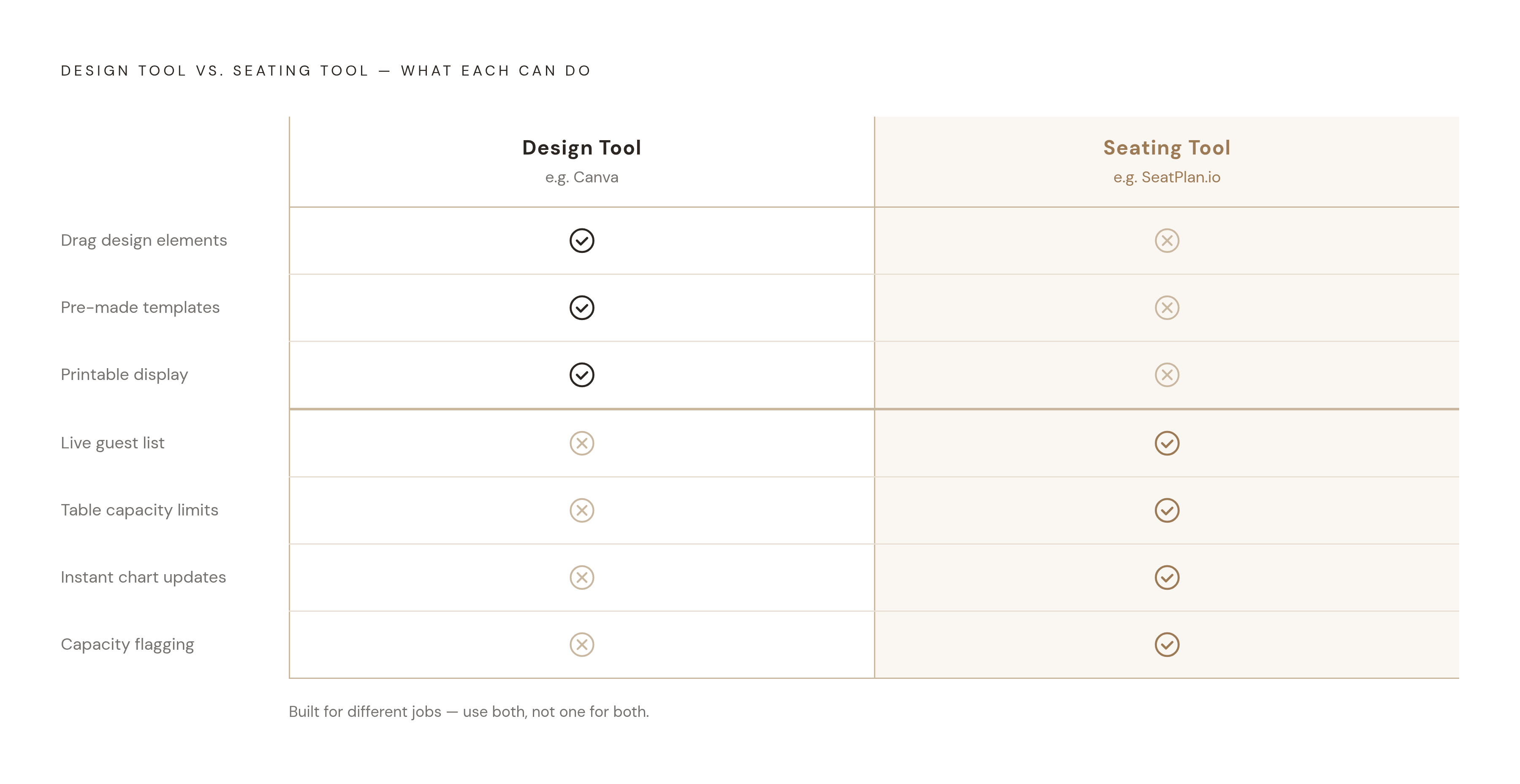
Not every tool marketed around seating charts does the same job. A seating tool assigns guests to tables and tracks seat capacity as changes happen. A design tool produces a polished, printable document. Confusing the two leads couples to pick the wrong one for what they actually need.
Canva's wedding seating chart feature is a legitimate, well-built tool for what it's designed to do: dragging design elements like text, graphics, and table shapes around a canvas, using pre-made templates, to produce a seating display that looks good printed or framed at the venue entrance. What it doesn't do is hold a guest list that enforces seat counts or flags an overfilled table. Canva has no sense of how many guests are on the chart and can't track table capacity, because that was never the job it was built for.
A purpose-built seating tool, such as SeatPlan.io, Pix Wedding, or SeatingPlannerApp, works differently from the ground up. It holds a live guest list, enforces table capacity limits as guests are placed, and when a couple moves people between tables, the whole chart updates immediately. Canva is the right tool for printing the beautiful sign guests read on their way into the reception. A seating tool is what assigns every guest to their seat before that sign gets made.
Comparing what the leading standalone drag-and-drop tools give you for free
Once a couple understands what a functional seating tool actually does, the next question is practical: which free tier covers what they need. It depends on guest count, whether exporting and saving matter, and whether the couple wants a true scaled floor plan or just a working assignment board.
Pix Wedding, as of 2026, needs no account to use. You get an unlimited guest list with full drag-and-drop on phone or desktop, round and rectangular table shapes, a free QR code per table so guests can scan it and upload photos to a shared album, and a free copy or email of the finished plan. What it doesn't produce is a scaled floor plan of the venue. Its seating board tracks who sits where, but it isn't drawn to the actual dimensions of the room.
SeatingPlannerApp.com is free to start and leans on AI-powered auto-arrange, which looks at social groups such as family, friends, and colleagues, weighs their relative importance, and suggests a layout from there. Couples can lock in placements they're happy with, so when they re-run auto-arrange it only touches the guests still unassigned. The tool tracks dietary requirements and carries them into exports, and it supports CSV import along with PDF and shareable read-only link export.
WeddingSeatingChart.app, published in June 2025, has a free tier that covers a small number of guests and tables, with CSV import and export built in. Its Premium tier is a one-time lifetime purchase rather than a subscription, and it unlocks unlimited guests, unlimited tables, Excel and PDF exports, notes attached to tables and guests, and shareable links for family, friends, and vendors.
Seating Chart Maker, updated in April 2026, runs on a drag-and-drop canvas with multiple chair and table styles, including trapezoid, diamond, and delta desk shapes added that same month. You get guest portraits or avatars, group-based auto-seating suggestions, multiple saved versions of a chart, and share-via-link access. Unlike the other three, it runs on a recurring subscription rather than a one-time fee, a Personal plan billed monthly or annually, or a Team plan at USD $25 a month for a group of users, with a 14-day refund window on either.
Why AI auto-arrange cannot replace manual drag-and-drop refinement
AI-suggested seating is the headline feature across much of this category, and for good reason. Tools like SeatingPlannerApp and Seating Chart Maker can take a raw guest list, read the social groupings, family, friends, colleagues, and generate a first-pass layout that would otherwise take a couple an hour or more to sketch out by hand. For the first draft of a chart, auto-arrange earns its place. It gets a couple from a blank canvas to something workable fast, and if they lock confirmed placements, future auto-arrange runs leave them untouched, which is a genuinely useful safeguard.
What auto-arrange can't do is replace the judgment a couple applies by hand. No algorithm knows that two cousins haven't spoken in three years, or that a grandmother needs to sit near the exit, or that the best man's new partner should go nowhere near the ex he brought to the engagement party. These are the details that decide whether a reception runs smoothly or turns into a minefield, and they live in the couple's own knowledge of their guest list, not in a grouping algorithm. Every couple using one of these tools, regardless of how good the auto-arrange suggestion is, ends up back in drag-and-drop mode: nudging two or three guests at a time, table by table, until the chart reflects what they actually know about the people on it. AI gets a couple most of the way there. The last mile is still manual.
Where standalone tools stop on dietary data
Dietary requirements are collected at the RSVP stage. Weeks later, the seating chart gets built in a completely separate tool. That gap between where the data is collected and where it's used is where most standalone seating tools stop.
Some of the tools covered here, SeatingPlannerApp among them, track dietary information within the seating chart itself and include those details in its exports. But tracking dietary data inside the seating tool still requires someone to have typed that data in manually, after pulling it from wherever the RSVPs actually came in, a separate form, a spreadsheet, an email thread, or a wedding website's guest responses. That's a transcription step, done by hand, usually by one half of the couple, late at night, weeks before the wedding, cross-referencing two documents that were never built to talk to each other. Every manual transfer is a chance for an error to slip through: a name misspelled between systems, a dietary note missed, a guest moved to a new table without their allergy information following them. The caterer only sees what's on the final chart handed over on the day. If a gluten intolerance didn't make the trip from the RSVP form to the seating assignment, the caterer has no way of knowing it existed.
What a connected seating workflow looks like
A connected seating workflow means RSVP data and the seating chart live in the same system, so a dietary requirement entered when a guest responds to an invitation appears automatically next to that guest's name on the seating chart, without anyone retyping it. That's a meaningfully different proposition from a standalone drag-and-drop tool, even an excellent one. The standalone tools covered here, SeatPlan.io, Pix Wedding, SeatingPlannerApp, WeddingSeatingChart.app, and Seating Chart Maker, are all genuinely capable at the job of assigning guests to tables, tracking capacity, and producing a usable export. What none of them do is eliminate the handoff between RSVP collection and seating assignment, because that handoff happens in a different product.
Wedbuild's seating chart tool is built around closing that specific gap: dietary requirements captured when a guest submits their RSVP sync directly into the seating plan, so the information travels with the guest automatically rather than depending on someone copying it over by hand. That's the kind of safeguard that matters most in the final two or three weeks before the wedding, exactly the window when charts are being finalised and handed to caterers under time pressure.
For a couple with a smaller guest list, a venue that's already locked in, and no need to manage RSVPs through the same platform as the seating chart, a standalone drag-and-drop tool is entirely sufficient, and free tools like Pix Wedding or SeatingPlannerApp cover that need well. The right choice is about whether a couple's planning process needs the seating chart to stand alone, or needs it to stay in sync with everything collected before it.
Sources
- Free Wedding Seating Chart Generator & Export | Drag & Drop Wedding Table Planner App
- Free Seating Chart Maker for Weddings & Events | SeatPlan.io
- Seating Chart Maker
- wedbuild.com
- Wedding Seating Chart Maker, Generator & Tool 2026 (Free)
- Free Online Wedding Seating Chart Maker
- Wedding Seating Chart & Table Plan Generator