Seating Chart Workflow for Large Wedding Receptions
A five-phase workflow that prevents seating chaos at large receptions.
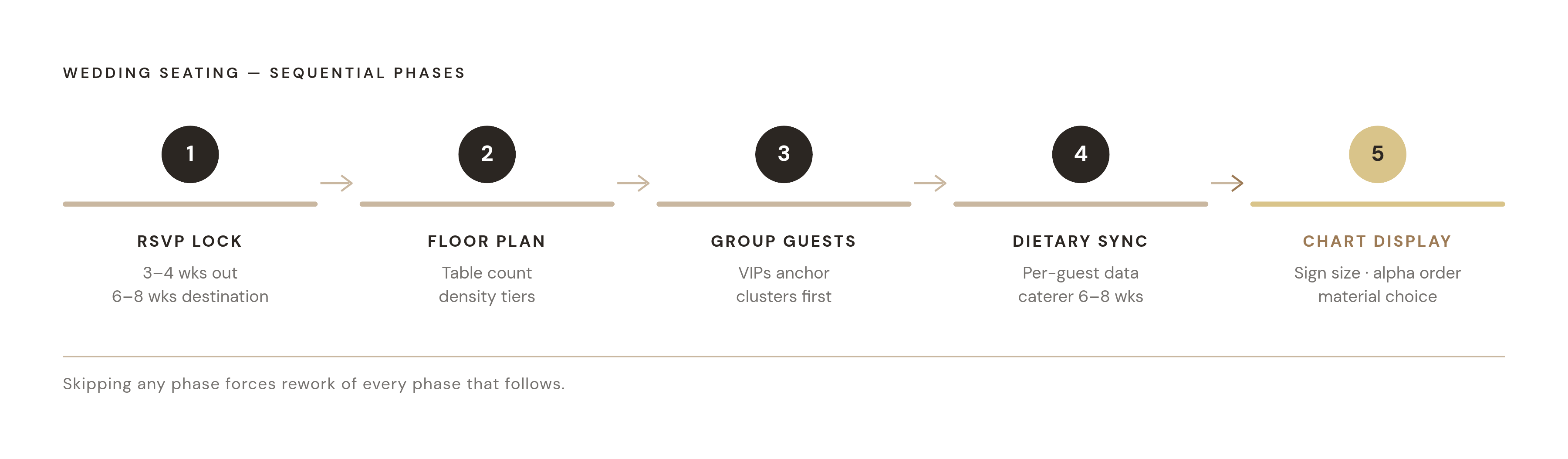
A seating chart built on instinct collapses the moment real guests show up to a real room. Picture the first ten minutes of a 150-guest reception with no chart: a line backs up at the entrance as people scan tables looking for their names, a caterer holds a gluten-free plate with no idea which of four identical place settings it belongs to, and a grandparent who needed an aisle seat near the restroom ends up wedged at a cocktail table near the speakers. None of that is bad luck. It's what happens when a room full of people is asked to improvise seating assignments in real time. Open seating works fine for a backyard dinner of 40 or 50 people, where everyone can read the room and sort themselves out. The couples who get this right build their chart in the right order rather than simply working harder on it. Starting too early means redoing the whole thing when RSVPs shift the numbers, and starting too late means rushing decisions that touch real family tension. That's why Bespoke Bride names the seating chart as the task couples put off longest and regret putting off the moment RSVPs close. What follows is the sequence that avoids both failure modes: five phases, each one a precondition for the next.
Phase 1 — RSVP lock: why the seating workflow cannot start before this moment
Nothing in the seating process should start before RSVPs are finalized, and that rule holds even when the pressure to get ahead of the work feels strongest. Bespoke Bride's 2026 guide puts the decline rate at roughly one in five invited guests, so any chart built before that deadline is a chart built on a guess, and at the scale of a large reception that guess will be wrong often enough to force a rebuild. Waiting keeps every later phase from turning into repeated work, because a draft built on unconfirmed numbers gets touched two or three times before it's ever finished. The timeline that governs the rest of the workflow runs on a fixed countdown. Three to four weeks before the wedding, the RSVP deadline gets set, venue capacity gets confirmed for the final time, and the scaled floor plan with table positions comes in from the venue. On that same three-to-four-week mark (stretched to six to eight weeks out for destination weddings or very large guest lists), RSVPs close, the confirmed list gets compiled, and draft seating assignments begin. The chart itself goes to print three to four weeks out, leaving room for production and delivery. In the final one to two weeks, the printed display arrives, and any last-minute changes get handled on individual place cards rather than triggering a full reprint, backed up by a digital PDF version kept on hand for the day itself. Paperlust's 2026 guide flags the gap that trips up this timeline most often: couples wait until the week before the wedding to start chasing guests who never responded. Building in a full week of follow-up after the stated RSVP deadline, before treating the guest list as final, closes that gap before it costs time later. The same logic applies to table capacity: leaving 2 to 3 extra spaces per table in the initial layout means a late confirmation slots in with a single adjustment in a digital planning tool, rather than forcing a redraw of the entire chart.
Phase 2 (Floor plan first): getting the room geometry right before any name goes down
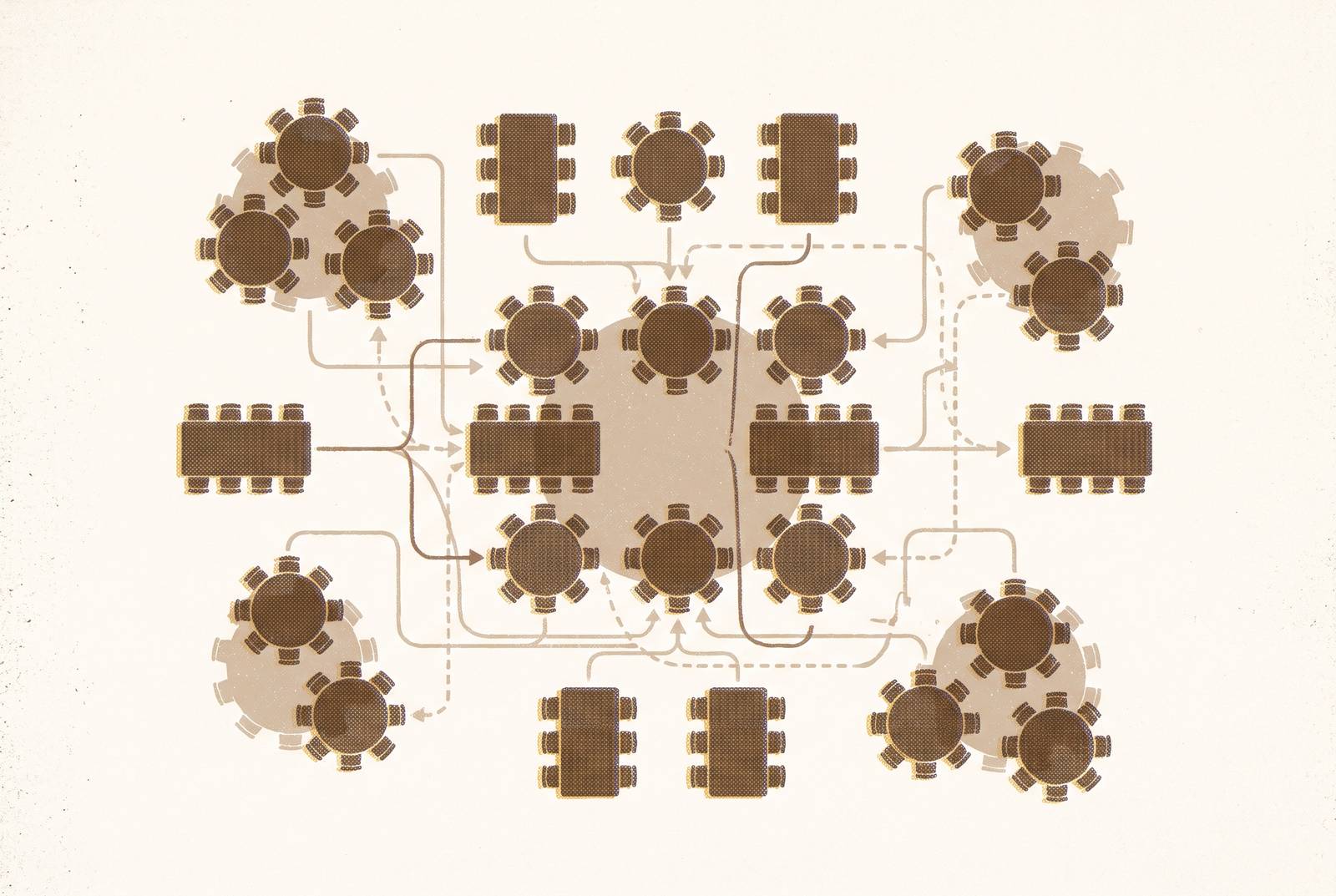
Once the guest list is locked, the next mistake is to start writing names before the room itself has been solved. A floor plan isn't a parallel task to run alongside seating assignments, it's the constraint that every seating assignment has to fit inside, and skipping it means discovering too late that the room can't hold the table count the chart assumes. The math starts with net usable area, not the gross square footage listed in a venue brochure: the dance floor, service corridors, the head table area, DJ or band space, and a buffer zone around the entrance all come out of the total before any tables get placed. Superior Seating's 2026 guide sets the standard allocation at 10 to 12 square feet per guest for banquet-style round tables, so even a sizable dinner guest list needs a seating field built on that per-guest math before a separate buffer gets added for aisles and service paths. Aisle widths matter beyond comfort. Wheelchair access requires 72 inches of clearance on any route a mobility-impaired guest will use, and that number should be treated as a floor, not a target. Table choice then shapes everything downstream: a 60-inch round seats 8 guests comfortably and takes a 90-to-108-inch linen, while a 72-inch round stretches to 10 comfortably, 12 at a push, with a 120-inch linen to match. The head table decision carries its own weight. A sweetheart table for the couple takes up less linear space and simplifies the rest of the chart, while a traditional head table seating 8 to 12 needs a wide, unobstructed front wall and constrains how the rest of the room can be arranged around it. None of this should be guessed at. Request the venue's scaled layout before opening any seating tool, and make sure it includes the dance floor, the DJ or band area, the bar, kitchen access points, and restrooms, since each of those eats into the usable floor in ways a generic room diagram won't show. Superior Seating's recommended approach is to build the floor plan at three density tiers, comfortable, standard, and maximum, so the actual table count for the room is settled before any guest, VIP, or family dynamic enters the picture.
Phase 3 (Grouping guests): starting with clusters, not individuals
With the room's geometry settled, the hardest part of the whole workflow begins: deciding who sits where. It helps to think of this phase as a kind of fixed-slot puzzle, fitting families, friend groups, and coworkers into a fixed number of slots while keeping the peace among people who've known each other for decades. The single biggest mistake at this stage is trying to place individual guests one at a time before any natural groupings exist, because that approach produces paralysis and a chart that falls apart the moment one placement changes and drags five others with it. The method that scales starts with the people who anchor the room. VIPs go first: parents, grandparents, and the bridal party take the seats closest to the head or sweetheart table, and everything else gets built outward from that anchor. From there, whole clusters move onto tables as single units, friend groups, cousins, work colleagues, and only after the clusters are placed does any attention turn to the individuals within them. That ordering matters because it contains the damage from any late change: a last-minute addition or cancellation affects one cluster, not the structure of the entire chart. Accessibility placement belongs inside this phase as a checklist item, not something handled after the fact. Elderly guests and anyone with mobility needs get seats near the aisle and close to restrooms, away from speakers and the louder end of the room. Tables that will eventually get cleared for dancing later in the night should hold the most energetic guests, so they're already positioned to move when the floor opens up. The genuinely difficult calls, divorced parents who can't sit near each other, estranged relatives, plus-ones nobody has met, get resolved here, worked out on paper well before the wedding day rather than improvised in the room.
Phase 4 (Dietary sync): collecting requirements at the individual level and passing them to the caterer on time
Seating and catering run on the same clock, and treating them as separate tasks is where a lot of charts quietly fail. Dietary information collected at the household level, or chased down by email after RSVPs have already closed, arrives at the caterer with holes in it: a party of four can easily carry four different answers, one vegetarian, one with a nut allergy, two with no restrictions at all, and the only way to catch that is to ask per guest, directly on the RSVP form, not per invitation. That means this phase actually begins at the point the RSVP form gets designed, before a single guest has responded, not after the deadline has passed. The form itself needs two parts working together. A short checklist covers the common cases: vegetarian, vegan, gluten-free, nut allergy, kosher, halal, dairy-free. Alongside it, a single free-text field catches everything else, since allergies and medical conditions rarely fit cleanly into a dropdown menu. The distinction between a preference and an allergy carries real operational weight. A preference can usually be handled with a standard menu substitution, but a medical allergy, celiac disease, a tree nut or shellfish allergy, dairy, peanuts, requires the kitchen to take actual precautions: dedicated cookware, no shared oil, ingredient tracing, and a briefing for serving staff so the right plate reaches the right seat. Getting that distinction wrong isn't a minor service hiccup, it's the highest-stakes data handoff in the entire workflow. The timeline matters as much as the form design. Six to eight weeks out, when invitations go out, estimated counts and any known dietary complexity should already be shared with the caterer, so the kitchen has lead time to plan rather than scrambling once the final numbers land.
Phase 5 (Chart display): sign size, ordering, and the format decisions that control the entrance bottleneck
Once the seating logic is settled, the chart becomes a physical object guests interact with the moment they walk in, the one piece of wedding signage every single guest stops to read. A display that's too small or confusingly organized doesn't just look like a missed design choice, it creates an actual line at the entrance while guests squint and search. Size needs to match guest count. Younique Gifts' 2026 guide recommends A1, at 60 by 84 centimeters, as the default for 80 to 150-plus guests, making it the standard choice for a full reception. A2, at 42 by 60 centimeters, suits a mid-sized list, and A3, at 30 by 42 centimeters, works for smaller gatherings. A4 is sized for table numbers, not for a full guest list, and using it for the main chart is a common oversizing mistake in reverse. Once the table count climbs high enough, the better move is splitting the list across two matching signs rather than shrinking the text to fit one, and two readable signs placed side by side also cut the entrance queue roughly in half by letting guests scan in parallel. A dim or outdoor venue calls for sizing up one step from whatever the guest count alone would suggest. Ordering is a functional choice, not an aesthetic one. Past a certain guest count, alphabetical ordering lets each guest find their own name and move on, while organizing by table forces every single arriving guest to scan the entire sign before finding their seat. For smaller guest counts, a hybrid works well: group by table, then list names alphabetically within each table, which keeps some of the visual structure while still cutting down the scan time. Full names, first and last, should appear throughout the chart, since a guest list with three people named Sarah turns a first-name-only entry into a genuine problem at the door. Column layout affects readability directly: three to four columns suit an A1 sign, two suit an A2, and adding a fifth column onto an A1 shrinks the text below a distance most guests can comfortably read. Table headings should be legible from farther away than the names themselves, since guests spot their table before they confirm their name. Clean, high-contrast type should carry the names, with decorative script reserved for the heading alone. Before approving any design, print one column at full scale on A4 paper and hold it at arm's length, the same distance a guest will actually stand from the sign.
Material choice comes down to how the sign will be used and how much lead time is available. A polyboard sign with digital printing, priced at A$205 for an A1 size through Paperlust, takes 5 to 7 working days to produce and works as the practical default: rigid enough to stand on an easel, light enough to carry, and capable of full-color printing without compromise. Adding vinyl foil to a polyboard sign extends the production time beyond the standard option in exchange for metallic lettering. A fabric panel, sized to a similar large-format footprint, produces faster and hangs with a softer look suited to relaxed or outdoor settings. Acrylic, at A1 size, takes the longest production lead time among the standard options but delivers the clean, modern look that suits a minimal reception design. Each of those trade-offs, cost, lead time, look, comes down to the same question the rest of this workflow has already answered: what does the room, the guest list, and the day actually need, decided early enough to act on it.