Wedding website builders with built-in RSVP and seating chart tools
Skip the spreadsheet shuffle and keep guest data flowing from RSVP straight through to seating.

A couple builds a wedding website. Guests RSVP, note their dietary needs, confirm plus-ones. Then the couple opens the export and finds a PDF, a static list with no connection to anything else, and realises they now have to retype every name, every meal choice, every allergy into a separate seating chart tool by hand. That moment is the real test of a wedding website builder: not whether the site looks good, but whether the data guests enter actually goes somewhere useful afterward.
Couples often miss that two products can look similar but do different jobs. A wedding website is built around story, venue details, a photo gallery, travel information, with RSVP tucked in as one feature among several. A wedding RSVP website is built the other way around: guest list management is the core job, and everything else is secondary. Couples who don't see this difference end up stacking two or three tools that were never designed to talk to each other, and they land right back in the spreadsheet they were trying to avoid.
The chain that actually matters runs in one direction: a guest RSVPs and lists a dietary need, that entry becomes a row in the guest list, the guest list becomes a seat on the chart, and the chart becomes a printed dietary legend the caterer can read at a glance on the day. Every place that chain breaks (every point where one tool stops and a human has to copy data into the next one) adds manual work in the final weeks before the wedding, which is exactly when couples have the least time and patience to do it. Judging a wedding website builder on this chain, rather than on its templates or fonts, is the only way to know what buying it actually gets you.
Australian couples face a sharper version of this problem than most
Search for the best wedding planning tools and most of what comes back is built for an American audience. Registry integrations assume a US bank account. Vendor directories stop cold at the US border. Pricing is quoted in USD. The platforms that rank first in these searches, often praised for exactly the kind of RSVP-to-seating connection this guide is measuring, fail Australian couples on function, not just on style or branding.
Pricing structure adds a second layer of friction. Many of the platforms with the strongest RSVP-to-seating integration charge a recurring subscription. Couples use these tools hard for a few months of planning and then never open them again, yet they keep paying for access long after the wedding is over, if they don't remember to cancel.
Average wedding costs in Australia are rising going into 2026, and couples routinely start with one budget figure and finish well past it. Against that backdrop, a modest monthly tool subscription stops looking trivial. It starts looking like one more line item working against a budget that's already stretched, for a feature the couple only needed for four or five months. If budget tracking is built into the planning tool instead of bolted on afterward, it keeps the single most common planning failure, quietly spending more than intended, from happening unnoticed.
What the RSVP-to-seating-chart workflow requires, step by step
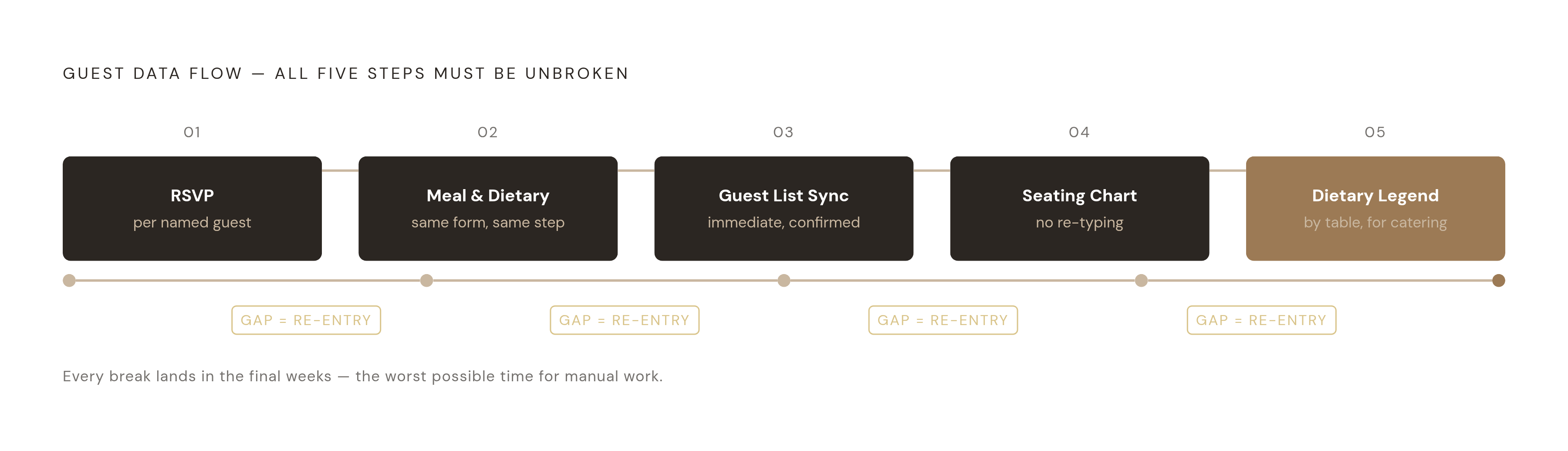
A properly connected workflow has five steps, and all five need to run through the same data layer for the chain to hold. First, RSVP collection has to happen per named guest, not per household, because a household RSVP can't tell a caterer that one person at that table eats gluten-free and another doesn't. Second, the same form that collects the RSVP needs to capture meal choice and dietary requirements at the same time, in the same step, rather than as a follow-up email. Third, when a guest confirms, they need to sync into the guest list right away. Fourth, you need that guest list to feed the seating chart directly, with no re-typing. Fifth, the system needs to print a dietary legend, organised by table, so catering and serving staff can read it and use it while plates go out.
Timing matters as much as the tools themselves. Set the RSVP deadline four to six weeks before the wedding. Finalise the seating chart two to three weeks out, once the headcount is locked in. Export the list for the caterer three to four weeks out, then confirm it again once final numbers are in. Skipping any of those windows compresses the whole schedule into the week everyone can least afford to lose.
The most common mistake in that sequence is starting the seating chart before the guest list has settled. A cousin cancels. A colleague adds a plus-one at the last minute. Whole groups of guests have to shift tables. In a connected tool, that's a drag-and-drop fix that takes seconds. In a disconnected one, it means finding the right row in a spreadsheet, correcting it, then finding the matching entry in the seating tool and correcting that too, hoping nothing gets missed.
Dietary information has to travel the full length of the chain: captured at RSVP, carried into the seating chart, and printed on the place cards or table plan itself, rather than compiled by hand afterward from two separate documents. Grouping guests with shared dietary needs at the same tables is an operational necessity, not a nice touch. Servers need a glance at which tables need the vegan plate or the gluten-free plate, so they don't have to check every single seat. Scatter five gluten-free guests across five different tables and the caterer is left solving, mid-service, exactly the problem the seating chart was supposed to have already solved.
WedBuild: the connected flow built for Australian couples
WedBuild covers that entire chain in one platform: website, digital invitations, RSVP forms, guest list, seating chart, vendor comparison, and budget planner, each piece feeding directly into the next. It's built in Australia and priced in AUD. None of the US-shaped friction described above (foreign currency, vendor directories that stop at a border) applies.
The seating chart tools support round and rectangle tables, drag-and-drop placement, and the ability to seat an entire party in a single click rather than placing each guest one at a time. Couples can save multiple layout versions as plans change, and they can print table cards with the dietary legend already built in. If you don't need a full floor plan view, a simpler drag-and-drop list mode covers the same ground without the extra visual layer.
Guest list management supports bulk import from Excel or CSV, quick-add for individual guests or whole households, tracking for plus-ones and parties, filtering by RSVP status, and export at any point in the process. None of that requires leaving the platform or reconciling a second file.
Digital invitations sit on the same canvas as the rest of the workflow. Save the Date, Invitation, and Thank You cards get designed visually, with open and click tracking built in, so couples can see who has engaged with an invitation before the RSVP deadline even arrives, rather than guessing who might respond late. A day-of QR seat finder lets guests scan their way to their seat, which removes the paper seating board that normally bottlenecks everyone at the entrance when a large share of guests arrive within the same short window.
WedBuild was built by Henry and Elise, an accountant and an engineer who planned their own wedding using a pile of disconnected tools and had to manually reconcile dietary data against the seating chart themselves. The budget planner reflects the accountant's background, and the automatic sync between dietary data and the seating chart reflects the exact gap the two of them hit while planning their own day. One review from the platform puts it simply: the visual seating chart "was a lifesaver, printed the dietaries straight for the caterer." That's what the workflow looks like when it works, from someone who used it under real deadline pressure.
Ivory Lane: the other AU-built all-in-one
Ivory Lane is the other genuinely Australian-built all-in-one planner on the market, solo-built by a Melbourne founder, priced in AUD, with an AI engine trained on Australian wedding budget benchmarks rather than adapted from a US dataset. Pricing runs to A$99 as a one-off payment (higher with the Share option), after a seven-day trial that includes full access to every feature.
Its AI is built for Australian conditions specifically: AU pricing, AU vendors, AU wedding conventions, and it comes included as a standard part of the platform rather than as a paid upsell layered on top.
Where Ivory Lane differs from WedBuild is in how the chain connects. Budgeting is a genuine strength, with AI-assisted suggestions built against Australian benchmarks. Seating is built into the platform. Vendor management, including payment tracking and contract notes, is included as well. But this guide treats the RSVP-to-seating connection as the deciding factor, and Ivory Lane doesn't fully wire it through the same way, so couples may still need to manage part of that handoff themselves. Registry support is listed as "coming" for a future quarter in the source material, so couples should check the current status directly before relying on it.
Ivory Lane suits couples whose top priority is AI-assisted planning with genuinely Australian vendor and budget guidance, and who don't mind pairing it with a separate seating tool, bridging that one gap by hand as the cost of getting the AI and budget features they want most.
SeatPlan.io and Seat Puzzle: standalone seating tools
Standalone seating tools solve the layout and assignment problem well, but they solve it on their own, separate from RSVP collection. Couples bring their own guest data in, usually through a CSV export from whatever tool collected the RSVPs, then build the seating chart on top of it.
SeatPlan.io is free to start, with no signup required to design a layout and try the full tool before paying anything. It supports CSV import for the guest list, drag-and-drop placement across round and rectangular tables, real-time collaboration between partners or planners, and export to PDF or Excel, along with printable name cards. One standout feature is AI floor-plan import: upload a photo or PDF of the actual venue and the AI builds a layout around it, which saves real time for couples working with an oddly shaped room or an irregular floor plan. A guest QR seat finder is included, and Apple and Google Wallet seat passes come with the paid Collaborate tier. Pricing runs in GBP: Solo is free indefinitely, Pro is a one-time £8, Collaborate is a higher one-time fee, and Event Manager is a monthly rate billed annually, aimed at professional planners rather than couples. Australian couples should treat that GBP pricing as a foreign-currency purchase and check the converted cost before buying. SeatPlan.io does track RSVP status and dietary data natively, and guest lists with dietary notes can also be imported by CSV from an external RSVP tool. Either way, the RSVP-to-seating connection runs through a manual join rather than an automatic one.
Seat Puzzle runs on the iOS App Store, as a web app on any modern browser including Windows, and natively on Mac. It covers seating chart and floor plan design, guest list management, RSVP tracking, and per-guest meal assignment with per-table counts, plus tagging for dietary needs, accessibility needs, VIP status, children, and plus-ones. Couples can share a photo of the finished floor plan or print the seating chart directly for day-of use. It's free in its simplest form, but pricing for its fuller features isn't specified beyond that, so check current pricing directly before you commit. The feature set is dense enough that it's popular with professional wedding planners managing several clients at once, which tells you where its design priorities sit. The same gap applies here as with SeatPlan.io: RSVP collection is a feature, but there's no wedding website or invitation layer behind it, so couples still need a separate tool to get guests to the RSVP form.
There's a genuine case for these standalone tools. If you've already collected RSVPs somewhere else and only need the seating design step, you can go straight to SeatPlan.io or Seat Puzzle without paying for capability you won't use. The same goes for couples pairing a free wedding website that has no seating function with one of these tools instead. The trade-off is one manual CSV transfer, accepted as the cost of using the best tool available at each individual step rather than one tool that does everything at a slightly lower ceiling. That's a fair argument: no single platform is simultaneously the strongest Australian vendor directory, the strongest website builder, and the strongest seating tool, and best-of-breed choices at each stage can genuinely produce a better result at that stage. The cost appears on the calendar, though. The manual join between systems lands in the week before the wedding, when the schedule has the least slack, so if you re-enter dietary data by hand under that pressure, a wrong allergy note can slip through.
Matching the right tool to your guest count and planning stage
The right choice depends on where a couple sits in the planning timeline, and whether they can absorb the cost of bridging the RSVP-to-seating gap by hand if they choose a tool that doesn't close it automatically, not on which tool has the longest feature list.
Couples just starting out, venue booked and no tools chosen yet, are best served by the integrated approach. Starting in WedBuild means the website, RSVPs, guest list, and seating chart are connected from the first day, and dietary data never has to be typed in twice. The Free plan covers smaller guest lists at no cost, and the Standard plan, a one-time A$99 payment, unlocks unlimited guests once the list grows past that point.
If you're already mid-planning, with RSVPs already collected through some other platform, you don't need to start over. A standalone seating tool like SeatPlan.io, free to try with no signup required, or Seat Puzzle can handle the layout step on its own. The cost is a one-time CSV export and import, which is a reasonable price for switching tools partway through rather than scrapping work already done.
Couples with a guest list under 50 can run the entire chain through WedBuild's Free plan at no cost. You only need to upgrade once the list grows past 50 guests, or once you want the dietary legend printed directly onto the seating chart.
If you're an Australian couple, AUD pricing and AU-built design in platforms like WedBuild and Ivory Lane matter in practical ways, not as a matter of national preference. A USD-priced platform can still technically be used. But if a tool is built around Australian venues, Australian seasons, and Australian vendor categories, it fits your planning process, and you don't have to adapt someone else's assumptions to your own wedding.
The timeline holds the whole decision together. Set the RSVP deadline four to six weeks out. Finalise the seating chart two to three weeks out, once headcount is confirmed. Couples who pick disconnected tools and only discover the manual reconciliation gap three weeks before the wedding are out of good options by the time they find it.