Managing Wedding Plus-Ones and Dietary Data in One Place
Guest data entered once at RSVP stays accurate through seating, place cards, and service.

What the connected chain looks like when it works
A wedding guest list only earns its keep if the data on it keeps moving. A dietary note or a plus-one's name gets typed once, at RSVP, and from there it has to show up correctly at the seating chart, in the caterer's brief, and on the night when a guest is standing in a reception hall looking for their table. A properly connected setup carries that guest record through every one of those stops automatically, so a note entered in March still reads correctly in November.
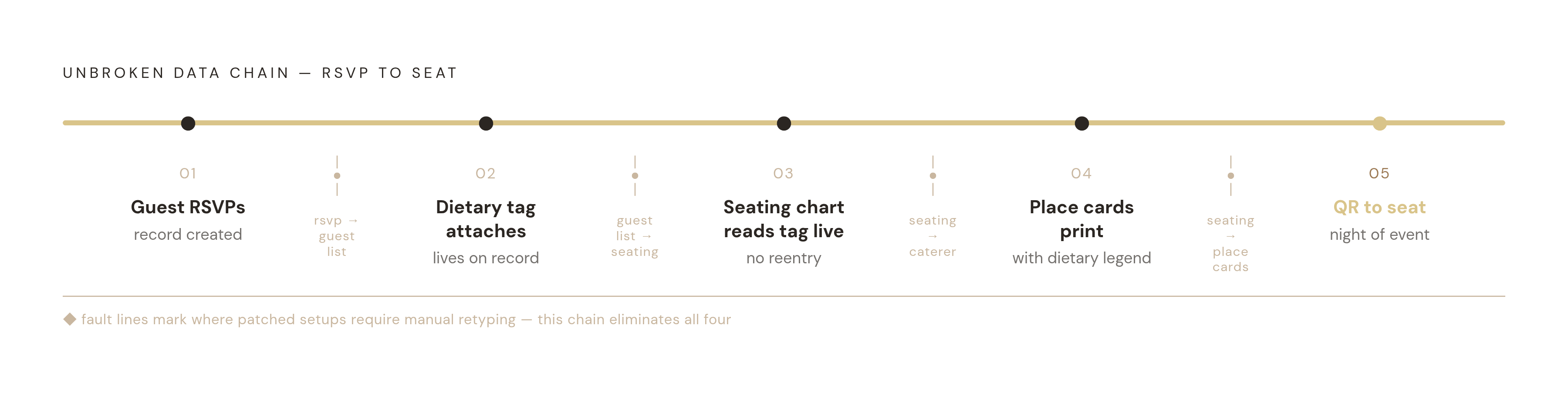
A guest RSVPs, and the guest list updates. A dietary tag attaches to their record. The seating chart reads that tag directly. Place cards print with the right dietary legend already on them. A QR code on the night sends the guest straight to their seat. Nobody retypes anything at any point in that sequence.
Plus-ones are where this either holds or falls apart. A working RSVP form captures the plus-one's name and dietary need the moment the primary guest responds, and both records land in the guest list together, as a pair.
The dietary-to-seating link carries the same weight. Once a dietary tag lives in the guest list, a seating tool reading from that list can flag which tables carry which requirements, so the couple can put the gluten-free table near the kitchen service route without cross-checking a spreadsheet by hand. And on the day, a QR seat finder replaces the printed board entirely: if a table gets reshuffled at the last minute, the record updates and the code still points somewhere true. Nobody's reprinting a chart at 9pm the night before.
That's the standard everything else in this piece gets measured against. Ask one question of any tool or any RSVP field: does it keep this chain intact, or does it snap somewhere in the middle?
What breaks when couples patch together separate tools
Most weddings run this wrong, and it's almost always the same setup: guest list in a spreadsheet, dietary notes scattered across email replies or crammed into a spare column, seating chart built in a completely different tool that's never seen either one. That's four separate handoff points, and each one is a place data quietly disappears.
RSVP to guest list is the first break. If the form doesn't feed straight into the list, someone has to copy responses over by hand, and plus-one details are usually the first casualty: logged as "and guest" with no name, no dietary note, nothing to attach.
Guest list to seating chart is the second. A seating tool that imports a spreadsheet once, rather than reading the guest list live, goes stale the moment a single response changes. Any RSVP or dietary update after that import is invisible to whoever builds the chart.
Seating chart to caterer is the third. A PDF or printed chart handed to the caterer is a snapshot in time. Any change made after it's sent means a phone call or a new document, and until that call happens, the caterer is cooking off old information.
Seating chart to place cards is the fourth, and it's where the damage actually lands on a plate. If place cards get made by hand from the chart, dietary legends get retyped, and that's how a guest whose allergy was recorded correctly at RSVP ends up served the wrong meal, because someone dropped a line copying names into a template.
Scale makes every one of these worse. The average wedding runs around 145 guests, which works out to roughly 12 to 15 tables. At that size, reconciling a dietary list against a seating chart by hand takes real time, and every round of manual cross-checking adds another chance to get something wrong. The same pattern appears in budgeting: without a live, connected tracker, couples lose sight of actual spend, which is part of why the average wedding overshoots budget by around 23%. Disconnected data causes damage everywhere it lives, not just at the dinner table.
Structuring your RSVP form to collect plus-one and dietary data correctly the first time
The RSVP form is where this chain starts clean or starts broken. Whatever gets typed in here travels through every step after it, so the fields need to be right before the first invite goes out, not patched later.
Plus-one fields need the plus-one's actual full name, never "and guest," a dietary field of their own kept separate from the primary guest's, and their own email address if the day-of QR finder needs to work for them individually.
Dietary fields should be structured, not left as an open text box. Checkboxes for vegetarian, vegan, gluten-free, halal, kosher, and nut allergy, with an "other" option and a short text field for anything unusual, produce data that can be filtered and tagged without anyone reading a paragraph and interpreting it by hand. That manual reading step is what this whole chain exists to remove.
For weddings with multiple events, ceremony, a pre-reception gathering, the reception itself, ask about attendance and dietary needs per event rather than once overall. Not every guest attends every part, and meal requirements can shift between events. A single flattened RSVP answer loses that distinction completely.
Finalize the seating chart two to three weeks before the wedding, once the RSVP deadline has passed and the headcount is final. Setting the RSVP deadline too close to the date collapses that window, leaving no real time to build the chart properly. Nearly every couple runs RSVPs through a wedding website now instead of paper cards, so the form is almost always digital already. What actually matters is what that digital form does with the response afterward: either it connects straight into the guest list, or it drops answers into an inbox someone has to read and retype later. The inbox is the worst place this data can land.
Moving dietary data from the guest list into the seating chart without losing anything
Start the seating chart as soon as the venue floor plan is in hand. Finalize it two to three weeks out, once the RSVP deadline has closed and the numbers are locked.
Get the floor plan from the venue first, not from memory or a guess. Dance floor placement, buffet table, DJ setup: all of it shifts where tables can actually sit. Ask the venue coordinator about restrictions on display fixtures too. An A1 seating chart on a 6-foot floor easel needs real floor space, and not every venue has room to give it.
Dietary-aware placement is a practical move, not a nice gesture. Guests sharing a dietary requirement can sit near the kitchen service route, so serving staff aren't hunting across the room for the one gluten-free plate. Elderly guests go near accessible exits. Families with small kids go near an exit too. It cuts down on caterer mistakes on the night, not just guest comfort.
Whether any of this actually works comes down to one thing: a seating tool that reads live from the guest list picks up the dietary tag on its own. A tool that needs a separate import, or manual re-entry, breaks the chain right there, and all that dietary data collected carefully at RSVP never makes it downstream.
Table numbers beat table names once guest count passes a certain size. Numbers are unambiguous and easy to check against a caterer's run sheet. Names add a personal touch, but they're a layer guests have to decode while arriving in a group and trying to find each other in a crowded room.
Prismm (formerly AllSeated) offers 3D venue visualization with drag-and-drop seating across a range of plan tiers. Its guest list module includes dietary tracking, though dietary data requires a separate import step rather than flowing in automatically, making it a floor-plan-first tool with the dietary layer added alongside rather than wired in end-to-end.
Whatever tool gets used, the export matters as much as the chart itself. The venue needs something workable on the night, an A3 PDF or a seat list sorted by table. The caterer needs a dietary breakdown sorted by table or by guest. The couple might want printable name cards on top of that. A properly connected tool produces all three from the same underlying data. Anything less forces someone to rebuild each version by hand.
What the day-of QR seat finder requires from the data upstream
More couples are replacing the single printed seating board with one or two QR code cards guests scan to find their table. It cuts printing costs, and it updates instantly if a table gets reshuffled the morning of the wedding, which a printed board never can.
Three things have to be true for a QR seat finder to work. The guest record needs the name exactly as it appears on the invitation, so the lookup matches. The seat assignment needs to be final and live, not a snapshot from last week. And it needs to run in a mobile browser without asking anyone to download an app, because nobody's installing something new while standing in a reception foyer.
The dietary link runs through the same record. If the QR finder pulls from the guest record holding the dietary tag, the caterer's run sheet and the guest-facing display stay in sync without anyone lifting a finger. A last-minute correction made in the guest list updates everywhere at once, with no second document to fix separately.
The failure mode is predictable and avoidable. A QR finder built off a static export, a PDF or spreadsheet snapshot from a week earlier, goes stale the moment any seat changes after that export was taken. Couples who make a last-minute swap then have to reprint or patch the file by hand, and until they do, the code is confidently sending guests to the wrong table.
For Australian couples specifically: check with the venue that guests will actually get mobile signal or WiFi near the reception entry. A QR system is dead on arrival in a rural venue or a basement function room with no reception. A printed backup, or a venue-supplied WiFi code on the invite, belongs in the plan no matter how good coverage looks on paper.
The QR finder is also the most exposed moment in the whole chain. Every guest sees the data at once, and a wrong name, a wrong table, or a missing plus-one gets noticed immediately, by the guest and by everyone standing near them. Clean data upstream is the only thing standing between a smooth arrival and an awkward scene at the door.
Which planning tools support this connected flow for Australian couples
Feature count is the wrong way to judge a planning tool, and couples who shop by feature list usually end up with the disconnected mess described earlier. What matters is whether dietary and plus-one data stay connected from RSVP straight through to the seating chart and the day-of finder, with nobody retyping a single line along the way.
One option builds around multi-event RSVPs with structured dietary tracking, paired with a drag-and-drop visual seating designer, a floor plan editor, and a card designer with email campaigns and vendor comparison tools built in. Pricing runs free for weddings up to 50 guests, then a one-time fee of $99 or $199 AUD, no subscription. It skips a vendor directory, so it helps compare vendors found elsewhere rather than surfacing them itself, and there's no native mobile app, though the web version works fine on a phone. It suits couples who want the full chain, RSVP through seating through QR finder, without stitching separate tools together themselves.
An Australian vendor-discovery platform covers a large share of AU wedding suppliers and throws in a free seating planner and guest list tool. Those pieces aren't deeply wired together, though: its planning tools aren't deeply wired together end-to-end. It works better as the vendor-discovery layer, sitting alongside a more connected tool for the actual seating and dietary work.
An Australian tool leans into AI-powered budget forecasting built on Australian pricing data, alongside a guest list that tracks dietary requirements and meal selections, plus vendor payment tracking with reminders. Its dietary-aware guest list is included from the start, and Smart RSVP collection unlocks with a one-off upgrade. There's no native mobile app as of mid-2026, though a dedicated app has been announced for later in the year. It suits couples who care more about automated budget forecasting and collaborative planning than about seating-chart depth specifically.
Whichever tool a couple picks, the test never changes: does a dietary note or a plus-one's name, entered once at RSVP, show up correctly everywhere it's needed later, without anyone going back to check it by hand?