Honeybook vs. Dubsado for Wedding Planners
Payment processing fees and automation depth separate these platforms for high-volume planners.

HoneyBook raised its prices in February 2025 across all three tiers. Not a small tweak. A real jump. A lot of planners who had been sitting on the fence about switching finally got off it.
Dubsado runs a two-tier structure, and on annual billing it comes in cheaper than HoneyBook's mid-range plan depending on how you're set up. But honestly, the subscription cost isn't the most interesting pricing difference between these two.
The bigger deal is payment processing.
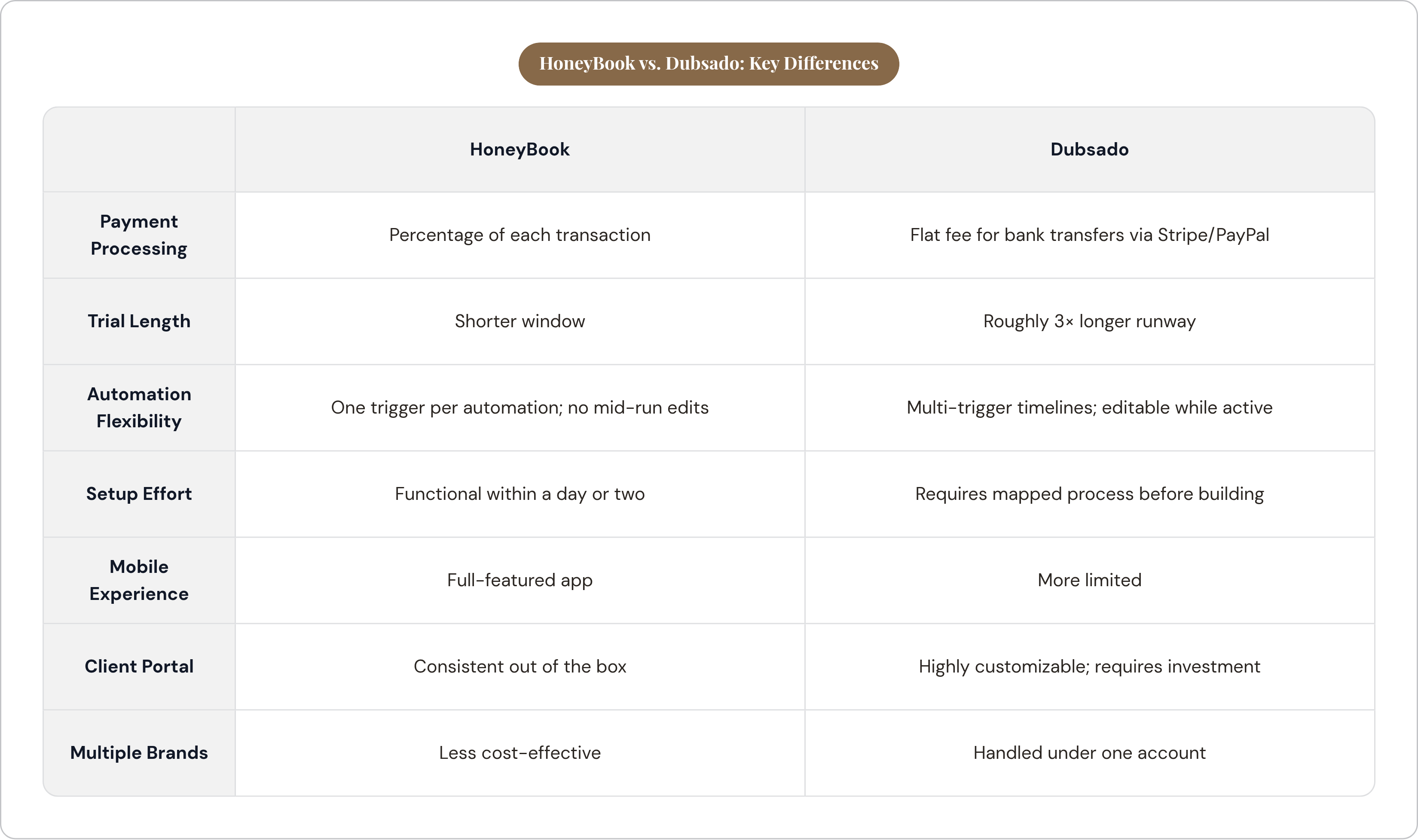
- HoneyBook charges a percentage of each transaction
- Dubsado routes payments through Stripe and PayPal, with a flat fee for bank transfers
When your invoices are clearing five or six figures, that distinction stops being abstract fast. A percentage fee on a $30,000 invoice is not a rounding error. Run that math across a full season and you're looking at enough money to fund another tool in your stack entirely. Planners billing smaller retainers often don't feel it enough to care. Planners processing larger invoices absolutely do.
One more thing on pricing: the trial length gap. HoneyBook's window is shorter. Dubsado gives you roughly three times as long before you have to commit. That extra time isn't padding — it's a runway, and you'll need every inch of it. Dubsado requires genuine configuration work before you can actually evaluate it. A half-built Dubsado setup tells you almost nothing. You need enough runway to build something real, not just click through the dashboard for an afternoon and call it research.
Workflow automation is where the two platforms diverge most sharply
If you've run a wedding planning business for more than a season, you already know why automation matters. Engagements run a year or longer, there are a lot of touchpoints, and a lot of things need to go out at the right time without you manually tracking every single one.
Dubsado was built with exactly that kind of long engagement in mind. You can set triggers at specific points across a multi-month timeline, assign internal tasks to yourself, and pause or edit a workflow mid-run. That last piece is the one nobody talks about until they need it. Being able to adjust an active automation without scrapping the whole thing is like having an undo button on a live wedding day. You don't think you need it until you're staring at your phone at 11pm three weeks before the wedding wondering why an email went out to the wrong vendor.
HoneyBook has closed the gap meaningfully in 2025. They added conditional logic, which lets automations branch based on what a client actually does or doesn't do. They also added an approval step before anything sends automatically. Both are features that were missing before, and their absence was a real complaint.
The constraint on the HoneyBook side is structural: one trigger per automation, and you can't edit emails or forms once a workflow is running. Planners work around this by chaining multiple automations together. It works, but it's something you want to understand before you commit, not after you've already built your whole system.
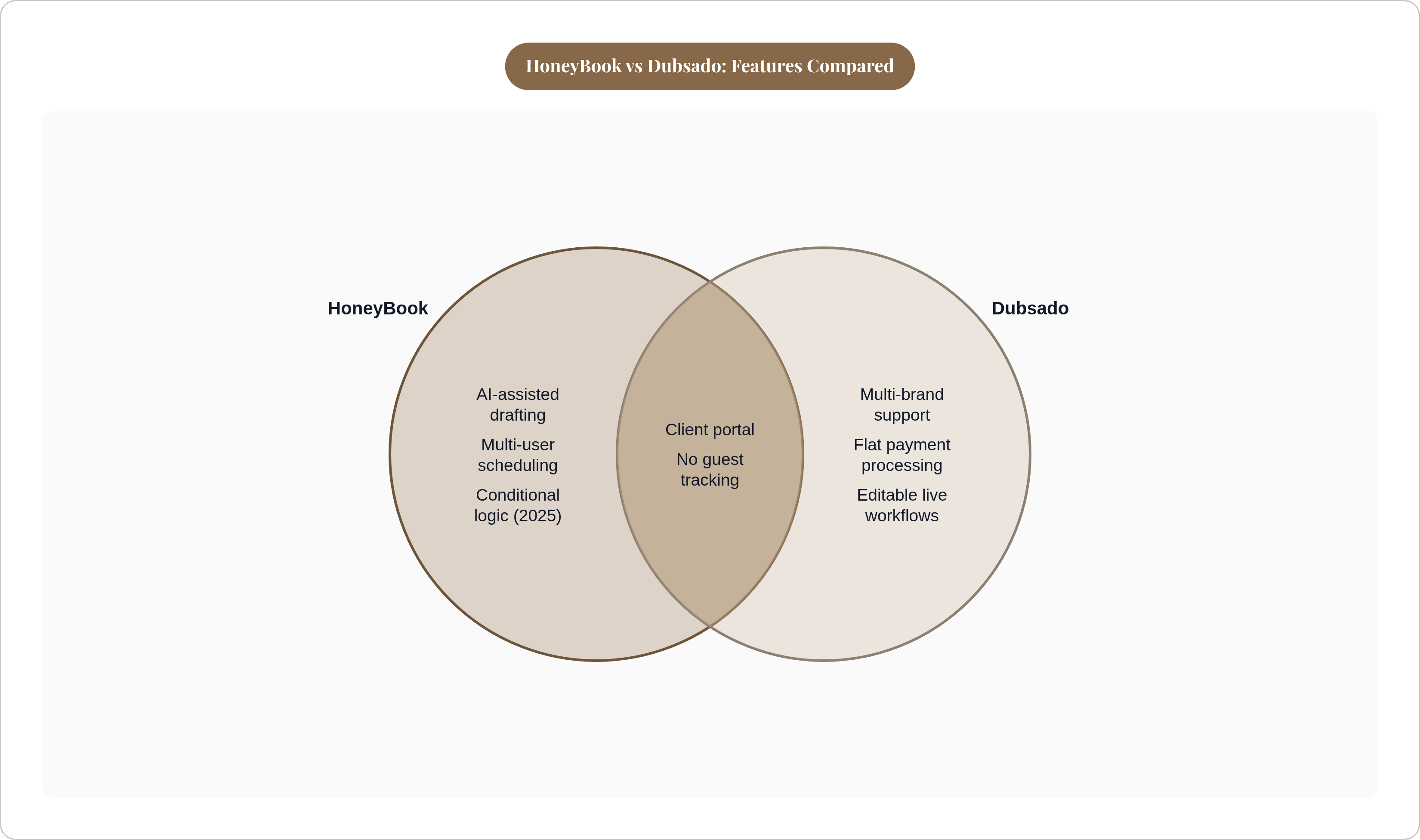
HoneyBook also added AI-assisted drafting in 2025 for communications and workflow management. For a solo planner who wants to move fast without engineering elaborate systems, that's genuinely useful.
Dubsado still leads on raw automation flexibility. But HoneyBook has gotten close enough that the real question isn't which platform has more features. It's whether you actually need that depth, or whether something cleaner would serve you better.
How easy each platform is to set up and use day-to-day
Most planners can get HoneyBook to a functional, working state within a day or two. The platform has enough structure built in that you're filling in your details rather than inventing the whole thing from scratch.
Dubsado is a blank canvas. That is genuinely its strength. It is also, for a lot of planners, its trap.
The power is real, but Dubsado requires you to have your own process mapped out before you start building inside it. Planners who skip that step and dive straight into configuration usually end up somewhere unpleasant: a partially built system that creates more confusion than it solves. That's not a Dubsado flaw. That's what happens when you hand someone a professional kitchen and no recipe. The equipment can do extraordinary things. The cook still has to know what they're making.
The mobile experience is also worth thinking about, especially if a meaningful chunk of your working day happens away from a desk.
HoneyBook's mobile app handles real work. You can manage inquiries, send files, and communicate with clients from your phone during a site visit. Dubsado's mobile experience is more limited. That's a practical consideration, not a minor footnote, if you're the kind of planner who's never actually at a desk.
The client-facing experience each platform delivers
For a long time, one of the most cited frustrations with HoneyBook was that clients had to create an account just to view a proposal. For planners working at a luxury price point, that friction felt genuinely mismatched with the experience they were trying to create. It was a fair complaint.
HoneyBook's 2025 public proposals feature removes that requirement. That specific objection is largely resolved.
There's a separate issue that's less talked about. When a vendor replies to a client email, it opens a new thread rather than adding to the existing conversation. Across a twelve-month engagement with multiple vendor threads running, that gets messy quickly. You have to be deliberate about logging into projects directly to keep the full communication history in one place. Your inbox will not do that work for you.
On the Dubsado side: the client portal is highly customizable. You can brand it, design it, and make it look like something you built specifically for your business. The ceiling on the client experience is genuinely higher than HoneyBook's. But that ceiling only exists if you've put in the work to get there. Out of the box, Dubsado takes real effort to feel polished, and some planners never quite get there because setup stalled somewhere around month two.
HoneyBook is more consistent from day one. Dubsado, when it's actually been invested in, can be better.
Which business profile fits HoneyBook and which fits Dubsado
There isn't one right answer here. There are two different answers for two different kinds of planning businesses.
HoneyBook fits you better if:
- You're a solo planner or small team who needs something functional without a long setup runway
- You're earlier in your business and need to look professional to clients immediately
- You have assistants or second planners who need to book time with clients. HoneyBook's multi-user scheduling is strong here
- You want a clean, consistent client-facing interface and you're comfortable working within the platform's structure rather than customizing everything from scratch
Dubsado fits you better if:
- You have a clearly mapped process and want your software to reflect it exactly
- Your client engagements are complex and multi-phase across a year or more
- You work internationally or outside the US and Canada, where Dubsado has broader coverage
- You run multiple brands under one roof. Dubsado handles this more cost-effectively
- You process large invoices where the flat payment processing fee saves you real money across a season
What neither platform covers — and why that gap matters operationally
Here's the part that doesn't get enough attention in most comparisons.
Neither HoneyBook nor Dubsado tracks guests. No RSVP collection. No dietary restrictions. No seating assignments. No day-of coordination layer. Both platforms manage the planner's relationship with the couple. They do not manage the couple's relationship with their guests. That's the scope they were built for, and it's not a criticism. It's just the reality.
The operational cost of that gap is concrete. Dietary data collected in one tool has to be manually re-entered or reformatted before it can go to a caterer. Seating decisions live in a spreadsheet or a separate tool. The planner becomes the manual transfer point between systems, doing data work that shouldn't require a human at all.
HoneyBook in particular is frequently used alongside dedicated wedding planning software for exactly this reason. That solves the coverage problem, but it adds complexity. Another login. Another export. Another place for data to go stale if you don't stay on top of it.
How planners handle guest management and seating when their CRM cannot
The most common approach is a two-tool stack. You use HoneyBook or Dubsado for the client management layer, and you add a dedicated guest and RSVP tool on top. A few of the tools planners use in this role:
- AllSeated (now Prismm) combines guest list management with three-dimensional seating visualization. You import a guest list, assign seats on a to-scale floor plan, and track RSVPs in one interface
- Planning Pod includes a seating chart builder that ties names and meal choices to specific seats in a scaled layout
- Some tools handle conditional form logic that simpler options can't: branching questions based on a guest's responses, meal selection, dietary restriction capture, and export formats designed for caterers
- WhiteClover is built specifically for professional planners managing multiple clients, with a single dashboard showing RSVP tracking and guest counts across events
- Some self-serve wedding organizer tools for couples cover the wedding website, RSVP collection, guest list, seating charts, and budget tracking in one place, so couples can manage the layer a planner's CRM does not handle.
Every additional tool in your stack is another login, another export, and another place where data can drift out of sync with everything else. The goal is the minimum number of tools that actually cover your scope. Not the maximum number that theoretically would.
Dietary requirement tracking as a logistics and duty-of-care issue
A significant share of wedding guests have at least one dietary preference, restriction, or allergy. The proportion is large enough that no planner can treat it as an edge case anymore. For guests with severe allergies, it's not just about what's on the plate. Cross-contamination during food preparation is a genuine hazard, and managing that requires explicit, accurate communication with the catering team well before the event.
The format in which dietary data gets collected determines how usable it actually is.
Checkbox fields produce sortable, exportable data. Open text fields produce free-text entries that require manual review, often at scale, often under real time pressure. The difference between structured and unstructured collection, on a larger guest list, is the difference between a clean five-minute handoff to the caterer and a morning-of scramble where someone is reading through a column of notes trying to figure out what "no dairy kind of" means in practice.
Most caterers need final counts and dietary breakdowns weeks before the event. Planners who collect this data late, or in formats that are hard to parse, create avoidable risk for themselves and their clients. The tool a couple uses for RSVP collection has a direct effect on the planner's day-of operations. That makes it a legitimate part of what a planner recommends, not just a polite suggestion.
Making the decision based on where a planning business actually is right now
The right tool is not the one with the most features. It's the one you'll actually configure, use consistently, and not abandon six months in because setup got overwhelming.
A few questions worth sitting with before you commit:
- How many clients do you take on per year, and how complex is each engagement?
- Are you willing to invest real setup time upfront, or do you need something functional within days?
- Do you process large invoices where a flat payment fee would save you real money over a percentage?
- Do you run multiple brands, work internationally, or need multi-user scheduling?
- Will your clients need a guest management tool, and how will that data reach you?
Both platforms offer trials. Use them properly. Build something real during Dubsado's longer window. Clicking through the dashboard for a few days will tell you almost nothing about whether the platform will actually work for your business — and a CRM you never fully set up is about as useful as a GPS with no maps loaded.
The guest management question is a separate decision from the CRM decision, but it deserves the same amount of thought. Because here's what the midnight-before-the-wedding version of you actually cares about: the data is where it needs to be, in the right format, and nobody is manually moving information between systems while trying to finalize a floor plan. That only happens when the CRM side and the guest management side were both chosen with the whole picture in mind.