Wedding Planner CRM Features Worth Paying For
Automation for contracts and proposals converts recurring time costs into one-time setup work.

Every booked wedding starts with a proposal and ends with a signed contract. These two documents are the most repeated, most legally consequential tasks in the entire workflow. For most planners operating without automation, they're also the most manually exhausting.
Here's what automation actually means in practice:
- Template-based proposals that auto-populate client and event details, so you're not rebuilding the same document from scratch for every inquiry
- Integrated e-signature so contracts close without chasing PDFs through email chains
- Automatic deposit invoice triggered the moment a contract is signed, not three days later when you finally get back to it
- Reminders for outstanding signatures that fire automatically, without a manual nudge each time
Platforms like HoneyBook and Dubsado treat this as a first-class workflow. Proposal, contract, payment becomes one linked sequence rather than three separate tasks that each need your active attention.
The argument for paying is simple. A planner running a full calendar is recreating and chasing these documents over and over again, every single season. Automation converts that recurring time cost into a one-time setup cost. You build the template once. It works every time after that. The time saving compounds with every booking, and the downside risk of a missing signature or delayed deposit is real money.
The thing to check before paying: how customizable are the contract templates? Can your actual clauses, package structures, and pricing tiers be reflected accurately? Generic templates that need heavy manual editing every time undermine the whole point. That's not automation — that's a slightly fancier Word doc, and you paid monthly for it. A well-built contract workflow is like a good sous chef: you do the prep once, and it serves you every time after that.
This one earns its cost. Full stop.
Client communication logs. Why a complete, searchable record is worth more than a shared inbox
Wedding planning runs over many months. Conversations happen across email, phone calls, in-person meetings, and the occasional late-night text. Without a single centralized record, "we discussed this in October" stops being a fact and starts being an argument.
A proper communication log does a few specific things:
- Centralizes all couple interactions (emails, call notes, meeting summaries) in one place per project
- Makes the record searchable, so you can find the exact exchange where a menu change was approved or a venue decision was made
- Lets a team member or assistant step in without needing a full verbal debrief on the entire relationship
HoneyBook's Gmail integration and the client portal model used by Dubsado and others are genuine attempts to solve this. The real question is whether everything actually lands in one place, or whether you're still toggling between the CRM and your regular email client to piece together a conversation history. A log that only captures messages sent inside the CRM is worth significantly less than one that pulls in external email. Test that before committing.
Here's the angle most planners undervalue. In a dispute over a vendor choice, a scope change, or an unapproved expense, a timestamped communication log isn't a minor convenience. It's evidence. That distinction matters enormously when the conversation turns from planning to accountability, and in this industry, it eventually does. A missing record at that moment is a lot like a missing witness — you can describe what happened all you like, but you're working without backup.
Timeline and task management built for weddings. Not repurposed project management
A wedding has a fixed, non-negotiable deadline. Every task, every milestone, every vendor confirmation has to work backward from that date. Generic project management tools are built for flexible timelines that can shift when priorities change. Wedding timelines cannot shift. The florist doesn't care that you had a busy week.
Wedding-native timeline tools do a few things differently:
- Pre-loaded milestone structures (venue deposit, invitation send date, catering final count, rehearsal schedule) rather than blank task lists you have to build from scratch
- Shareable client-facing checklists so couples can see progress without emailing for an update every week
- Task triggers tied to wedding-specific events, so a task fires automatically when a contract is signed or an RSVP deadline passes
Planning Pod and Aisle Planner both orient their task architecture around the wedding day as the anchor point. That matters when you're managing several weddings at different stages in the same week, which is exactly what peak season looks like.
The multi-wedding management problem is real. You have one wedding two weeks out, another three months out, and two more in early stages, all active simultaneously. A CRM that surfaces what needs attention across all of them without requiring you to manually check each project is doing genuine, unglamorous work. The value isn't saving time on any single task. It's not dropping anything when you're deep in the chaos of week-of logistics for one wedding while the other three are quietly accumulating decisions that need to be made.
One thing to watch for: timeline tools that are visually polished but disconnected from the contract, payment, or vendor data in the same system. A beautiful Gantt chart that still has to be updated manually is a display, not a tool. It looks like it's helping. It isn't.
Vendor coordination inside the CRM. When it helps and when it's redundant
A planner typically coordinates many vendors per wedding. Each one has their own contract, timeline, payment schedule, and day-of requirements. Tracking all of that outside a CRM means scattered emails, spreadsheet rows, and a lot of mental overhead that lives entirely in your head.
Good vendor coordination inside a CRM looks like this:
- A vendor record linked to the specific wedding, not just sitting in a standalone contact list somewhere
- Key details attached: contract status, payment milestones, confirmed arrival time, direct contact name
- Alerts when a vendor payment is due or a confirmation is still outstanding
Some platforms include vendor portals so suppliers can log in, see their timeline slot, and access their documents directly. The idea is to reduce the planner's role as information relay. It's a reasonable idea. In practice, adoption is often low. Small local suppliers who have been doing this for fifteen years tend to prefer a simple email. Paying for that portal feature and expecting vendors to meet you there is optimistic.
Where it earns its cost: keeping your own records clean and payment reminders automated, even if the vendor never opens the portal once. That's the actual value, not the portal itself.
Where it doesn't: if you work with a tight pool of trusted vendors and already have a system that functions well for managing them, a vendor portal adds platform cost without reducing friction. It's a solution to a problem you don't have, and recognizing that distinction before you sign up will save you from paying for features you'll ignore.
Payment tracking and invoicing. The feature most planners underestimate until a payment is missed
Wedding engagements run for months. Milestone payments are spread across the entire timeline: retainer, mid-point instalment, final balance, vendor disbursements. Each one is a receivable with a due date. A missed payment, whether from a couple or to a vendor, can destabilize the logistics of an entire wedding in ways that are much harder to fix than the payment itself.
The cost of a single missed retainer almost always exceeds the annual cost of a CRM subscription. This feature pays for itself the first time it catches something that would have slipped.
For it to actually earn that cost, it needs to do the following:
- Automated payment reminders sent to clients before due dates, without you having to remember or manually draft the message
- A real-time view of what's been received versus what's outstanding across all active weddings at once
- Integration with accounting tools like QuickBooks or Xero, so you're not reconciling the same data in two places
Dubsado's invoicing and recurring payment automation and HoneyBook's built-in payment processing both sit in this space. The key test is whether the payment record lives in the same place as the contract and communication log, or requires a separate login and a separate mental context switch.
One distinction worth making: built-in payment processing (meaning the ability to take card payments directly inside the CRM) adds convenience but also adds transaction fees. Before treating that as a premium benefit, calculate whether the fee structure is actually cheaper than your current payment processor. Sometimes it is. Sometimes it isn't. Run the numbers before assuming it's a win, because that assumption has a way of quietly costing money.
Lead capture and inquiry management. Valuable for growing businesses, less so for established ones
Lead capture means an inquiry form embedded on your website, responses flowing automatically into the CRM, and an initial follow-up sequence triggered without you manually re-entering anything or drafting a reply from scratch each time.
For a planner actively building their client base, the case is strong. Speed of first response is a genuine differentiator in this market. An automated follow-up lets you respond with the speed and polish that would otherwise require you to be watching your inbox constantly. The first touchpoint often determines whether a couple stays interested or moves on to the next planner in their search.
HubSpot CRM and Zoho CRM are oriented toward this use case. Strong lead management, marketing automation, analytics on where inquiries are coming from. Right fit if you're running marketing campaigns and tracking conversion from inquiry to booked wedding.
For an established planner operating at or near capacity, lead capture automation is padding. You're not volume-managing a flood of inquiries. You're qualifying a small number of high-value ones carefully. The feature adds cost without reducing load, and the time it saves is time you weren't spending in the first place.
Ask yourself whether your current business problem is converting more leads or managing more weddings. The answer tells you which feature tier you actually need, and it's a more useful question than any comparison table will give you.
Reporting and analytics. When data earns its dashboard and when it's just decoration
Most CRM platforms include reporting dashboards. Revenue by period. Lead source breakdown. Conversion rates. Task completion rates. Standard in platforms like Zoho CRM and HubSpot. They look impressive during a product demo, and then most planners never open them again.
Here's the honest test. A solo planner or small team managing a fixed number of weddings per year rarely has enough data volume for trend analysis to mean anything. A dashboard showing a handful of weddings' worth of data does not reveal patterns you don't already know. You lived through all of those weddings. You were there.
Analytics genuinely earn their cost in a few specific situations:
- Managing a team and delegating tasks, where completion rate data reveals where handoffs are breaking down
- Running paid advertising or referral programs, where lead source data shows what's actually driving bookings
- Scaling across multiple planners or venues, where financial reporting replaces manual spreadsheet reconciliation
For most independent wedding planners, the reporting tab gets checked once after setup and then ignored. It is a demo feature, not a workflow feature.
What to look for instead: does the CRM surface actionable prompts at the right moment? An overdue payment, an unsigned contract, an approaching milestone. Those real-time alerts are more useful than retrospective dashboards for most planning operations. That's the version of "analytics" that actually matters on a Tuesday morning when you have three weddings in the next six weeks.
The features that rarely justify their premium price
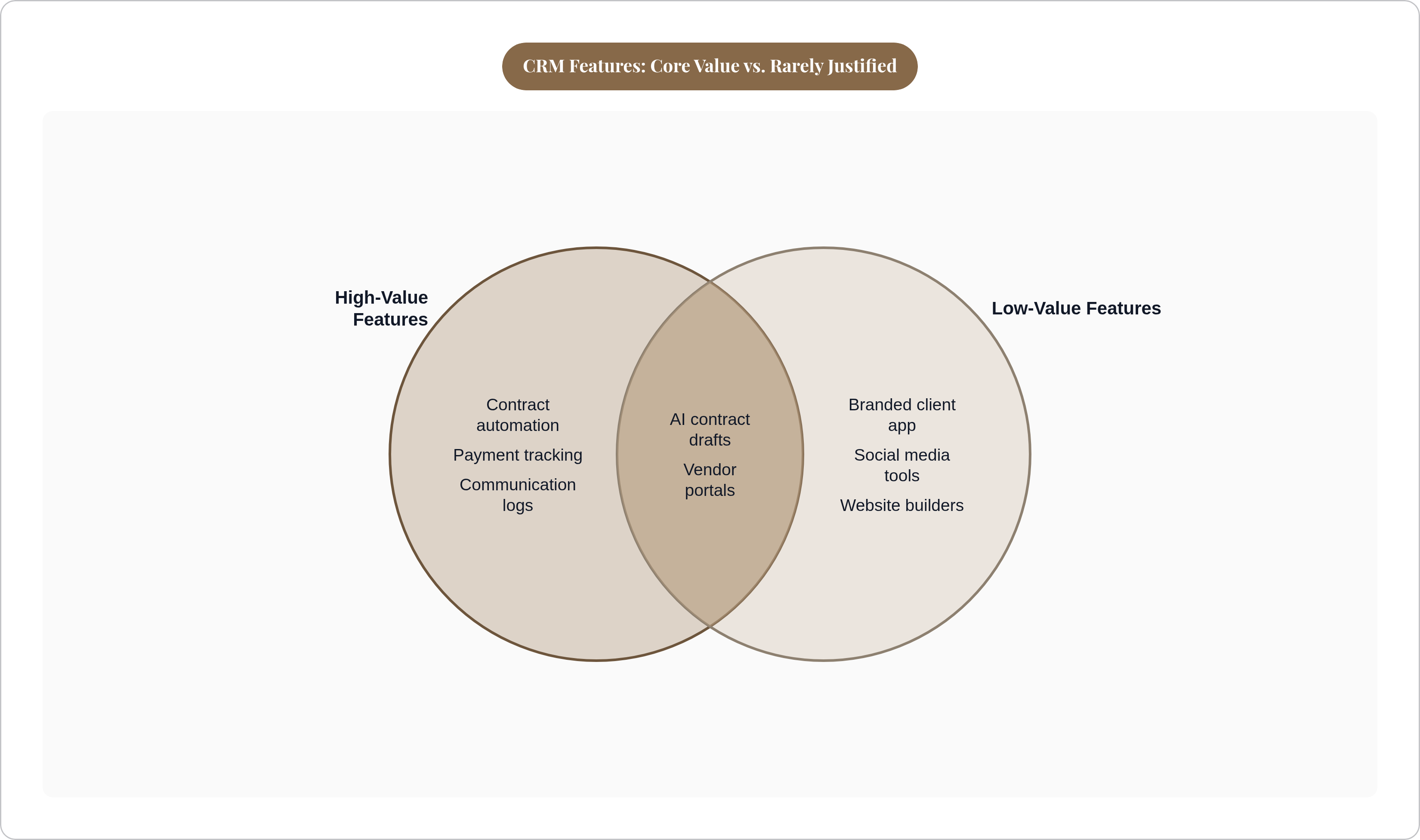
Some features exist to make a platform look complete in a comparison table. They are not solving a problem you actually have.
- Branded client app. Some CRMs offer a white-labeled mobile app so couples interact with "your brand" rather than the platform's name. Most couples find portal links sufficient. This is a feature for the planner's sense of polish, not the couple's experience.
- Social media scheduling. Occasionally bundled into CRM platforms targeting creative businesses. Has no functional connection to wedding logistics. Belongs in a dedicated tool if it's needed at all.
- Built-in website builders. Offered as a bundle by some platforms. Planners with an existing website gain nothing. The quality rarely matches dedicated website tools, and you'll probably be annoyed by the limitations within a month.
- AI-generated contract clauses and proposal copy. An emerging upsell in newer platforms. Useful as a starting point, but it requires professional legal review regardless of how polished the output sounds. Paying a premium for what amounts to a first draft is not a smart trade.
- Unlimited storage tiers as a selling point. Relevant only for planners storing large media files inside the CRM, which most don't. Photo and video handoffs typically happen through dedicated delivery platforms, not a CRM folder.
The general pattern: features that solve a problem you don't have, or that replicate a tool you already use well, are cost additions dressed up as value. Before any upgrade, ask one question. Which specific task takes more time than it should right now? If the feature doesn't directly address that task, skip it.
How to evaluate a CRM's actual cost against the operational load it removes
The wedding planning software market is large, growing, and getting more crowded. Pricing and feature bundles vary enormously. That makes comparison difficult. Three questions cut through it.
First: identify the tasks that actually cost you time or have caused a real problem. Not the tasks that are theoretically annoying. The ones that have eaten hours or caused a genuine mistake. That's your list.
Second: check whether the CRM automates or eliminates each one specifically. Not whether it has a feature in that category. Whether it removes the actual friction. A platform can have "contract management" and still require manual PDF editing every time. That's not automation. That's a subscription fee for the illusion of a system.
Third: do the math. If a platform saves a meaningful number of hours per wedding across a full year of bookings, and you apply any reasonable hourly value to your time, the math is usually not complicated. The subscription pays for itself or it doesn't.
One real caveat on platforms with deep customization (Dubsado is the clearest example here): the cost is not only the subscription fee. It's also the hours spent configuring it. A planner who starts the setup and never finishes it doesn't realize any of the benefit. Factor in implementation time before signing up, because that setup phase has a way of sitting half-finished for months while you're paying for it.
Most leading platforms offer free trials or limited free tiers. Use them. Use them specifically to test the features that matter to your actual workflow: contract automation, payment reminders, timeline sharing. Not the features that looked interesting in the product video. The trial period is not for exploring. It's for confirming that the thing you're about to pay for actually works the way you need it to.