Free Wedding Planning Apps Worth Using
These apps handle one job well but leave gaps where coordination actually happens.

I planned my own seating chart at 1am the week of the wedding, cross-referencing a text message thread against a Google Sheet against a caterer's PDF, and I can tell you exactly where free wedding apps fall apart. The features mostly work, but the seams between them don't. Every tool does one job fine and assumes some other tool is handling the rest.
What the free-app market actually looks like in 2025
Money's pouring into this space, and wedding planning apps were worth something like $1.07 billion in 2026, with projections putting that near $4 billion by 2035. That's a lot of companies competing for the same engaged couples, which means a lot of different ways to dress up "free" so it still pays the bills somehow.
The Knot and WeddingWire share a parent company, The Knot Worldwide, so when either one waves a "free" tool at you, the real business is vendor referrals and lead generation sitting quietly behind it. Both names dominate search results the second you type "wedding planning help" into Google, and that kind of reach is real. It just doesn't mean either one does the whole job.
Somebody pays, somewhere, since free never really means free. Maybe it's a referral fee when you book a photographer through the directory. Maybe it's ads wedged into your checklist, or a paywall the moment you want a template that doesn't look like it's from 2014. Fine, as long as you know the deal going in. A handful of tools skip that entirely and charge one flat fee up front instead, no ads, no vendor marketplace nudging you toward a DJ you never asked about. You trade away some of that directory reach, but you stop getting sold to every time you log in.
Couples are already trying to outsource the coordination headache, too. Nearly double the number of engaged couples used AI to help plan in 2025 compared to the year before. The instinct is right, and less busywork sounds great. Whether these tools actually deliver that, or just relocate the busywork somewhere less visible, is the real question.
All-in-one free platforms: what The Knot and WeddingWire actually include
The Knot makes the strongest case for doing everything. Website, guest list, RSVP manager, checklist, budget tracker, a vendor directory somewhere around 300,000 listings deep, registry, day-of timeline, countdown clock. Millions of couples run their whole wedding through it. The checklist even adjusts based on your wedding date, which sounds minor until you're eighteen months out and grateful the app isn't dumping "book your florist" on you in week one.
WeddingWire throws in an interactive checklist, budget tracker, guest list manager, and a seating chart tool. It feels busier than the others, mostly because vendor promotions are stitched into the interface rather than kept off to one side where you could ignore them.
Notice what's actually happening here: the vendor marketplace is the product, and the planning tools are the doorway. There's a ceiling on all of it, too. None of these platforms links dietary requirements to your seating chart automatically. None generates a day-of QR code so guests can find their seat without squinting at a poster. Moving between tools inside the same platform usually still means retyping guest information you already entered once, somewhere else, five minutes ago.
Free tools built specifically for guest lists and RSVPs
Guest list management looks easy on paper. Then RSVPs trickle in over six weeks, dietary notes show up in a dozen different formats, and your "final" headcount changes three times before the caterer needs a number.
The big platforms collect RSVPs through your wedding website, so your data lives wherever you happened to build that site first. Simple enough, until you want to move it somewhere else.
Here's the actual test for any RSVP tool: does dietary info land in a structured field you can sort and filter, or does it just get dumped into a text box? Most tools do the latter. Someone writes "vegetarian, also allergic to shellfish, plus-one eats gluten-free" into a comment field, and now you're the one retyping that onto a seating chart and a catering sheet at eleven at night, three days out.
Some lighter apps skip guest-list depth entirely and focus on tasks and payments, tracking vendor deadlines and milestones instead. Fine in its own lane, but not built to be your guest-data home base.
Nobody's closed the gap between a structured dietary answer and an automatic seating assignment or catering brief. That step is manual, every single time, unless the platform was built specifically to connect those two dots.
Free seating chart tools and what each one handles
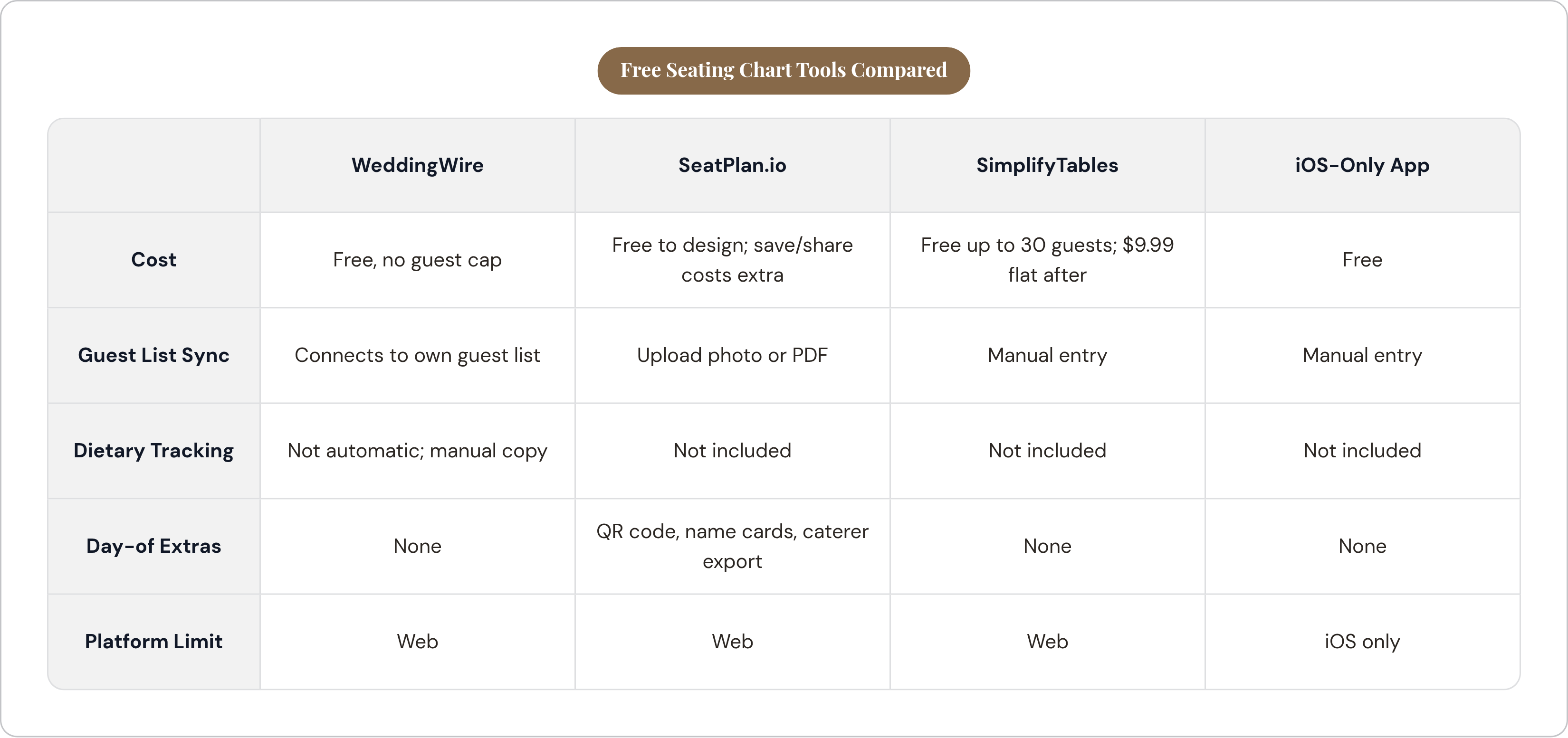
Ask any wedding planner what the worst task is, and seating wins by a mile. You need the guest list, the venue floor plan, dietary notes, and live RSVP status all in front of you at once, and most tools only hand you one or two of those.
WeddingWire's seating tool is free with no guest cap and connects directly to its own guest list, drag-and-drop style. Dietary info from RSVPs doesn't flow into the seat assignments though; that's still a manual copy job.
A well-known iOS-only app offers a free drag-and-drop builder with relationship mapping, so you can flag "these two should never share a table" before it becomes a whole thing at the reception. Handy, but locked to one platform and one operating system, which rules it out if either of you carries an Android.
SeatPlan.io lets you design for free, though saving or collaborating with your partner requires payment. It builds an AI-assisted floor plan from a photo or PDF you upload, and the output includes A3 PDFs, an Excel sheet for the caterer, printable name cards, and a QR code guests can scan to find their table. Of the free-to-try options, this one's the most complete package.
SimplifyTables stays free up to 30 guests, then it's a one-time $9.99 per event after that. It offers simple drag-and-drop functionality, with no dietary tracking and no day-of extras.
Then there's Google Sheets: free, endlessly flexible, and still the most common fallback for couples who've given up on apps entirely. Zero automation, and whoever edited it last wins, version control be damned.
The real headache shows up on the wedding day itself. However you built the chart, guests still have to physically find their table, and a printed chart goes stale the instant someone swaps seats that morning. Standing in front of a poster scanning a hundred names for your own is nobody's idea of a good time. QR-based seat finders help here, since whatever's on the guest's phone is current, while the version somebody printed a week early has usually gone out of date by then.
Even the seating tools with the best output, catering exports, per-table meal counts, sit apart from wherever your RSVP data actually lives. "Guest said no beef" becomes "table 7 gets a chicken plate" by hand, almost every time.
Free budgeting tools and the real cost of undertracking
Most couples spend more than they planned, and a real chunk of them go into debt over it. That's what happens when a budget gets set once, back in January, and then never gets checked against what things actually cost, rather than any particular bad luck.
Venue, food, and alcohol eat up 45 to 55% of total spend, combined, and every one of those three scales with your guest count. Add twenty people to the list, and your food and alcohol line items jump right along with it, which means your budget tool needs to recalculate in real time rather than sit there as a static spreadsheet from four months ago.
Real numbers help here. Average venue costs run around $8,573, average catering around $6,927. Those two line items alone can eat most of a mid-range budget before you've booked a single flower arrangement.
The Knot's budget advisor gives you percentage targets by category once you plug in your total. Fine as a starting map, but it won't flag when your actual florist quote blows past what it allocated, because it isn't connected to your real vendor quotes at all; it's guessing based on averages, same as any calculator would.
Honeydue, on the other hand, wasn't built for weddings at all. It's a couples' finance app that connects to roughly 20,000 banks for real-time spending tracking. It's useful as a companion, watching what you're spending against a number you set somewhere else, but limited as a wedding budget builder on its own.
Task-and-payment trackers tell you what's paid versus what's promised, which matters, but that's not the same as allocating a full budget from scratch.
You get a PDF in your inbox and a number in an app, and those two things stay strangers forever unless you're the one dragging them together by hand. No free budget tool connects a vendor's quote directly to a line item.
Free wedding website builders and what they cost in flexibility
A wedding website does two jobs. It tells guests what they need to know (date, venue, dress code, hotel blocks), and it pulls information back in (RSVPs, meal choices, song requests for the DJ).
The major platforms offer free sites, no subdomain fees, mobile-friendly templates, and you can have one live within a day. The templates genuinely look good, so the limitation isn't looks, it's control. Custom domains, the nicer templates, an ad-free page: all of that usually sits behind an upgrade prompt.
Here's the catch that matters more than aesthetics: whatever platform hosts your website also holds your RSVP data. Decide halfway through planning that you want to switch tools, and congratulations, you're re-entering your entire guest list from scratch, by hand, at whatever hour you happen to notice this.
Some website builders lean toward guest communication and photo sharing rather than deep planning features, worth knowing if your site's main job is just telling people where and when, not collecting structured RSVP data you'll use later for the seating chart.
Ask one question before picking any website tool: does the RSVP form feed into a guest list you can actually export, and does dietary info land somewhere usable, or just a comment box nobody's reading carefully at 1am?
Vendor comparison without a structured tool
Here's how vendor shopping actually goes. An email inquiry here, a PDF quote there, a follow-up text, a phone call you forgot to take notes on. None of it lives in the same place, and by week three you genuinely can't remember which florist quoted the lower number and which one quoted the higher number for what looked like the same package.
The big directories are good at surfacing who exists; WeddingWire and The Knot both do that well. What they don't do is help you compare vendors once you've found them. That part happens in your inbox, manually, the way it's always happened. Curated vendor search cuts down on discovery time, sure, but the second you're weighing two photographers on price and inclusions and availability, you're back in a spreadsheet you built yourself at midnight.
A real vendor comparison needs a consistent set of fields across every quote: price, what's included, payment terms, cancellation policy, availability. It needs somewhere to attach the actual contract or PDF, and it needs a live connection to your budget, so accepting a quote updates the number automatically instead of you remembering to go do it three weeks later.
Vendor discovery is handled well by the big platforms, but vendor decision-making is still mostly on you, and that gap is where a lot of the actual stress in planning quietly lives. No free tool gives you all of what a real comparison needs.
One number worth carrying into those vendor conversations: photography typically runs 10 to 12% of total wedding spend. Knowing that benchmark before quotes start rolling in is exactly the kind of guardrail a good budget tool should hand you automatically. Most don't bother.
How to build a free toolkit that doesn't collapse under its own weight
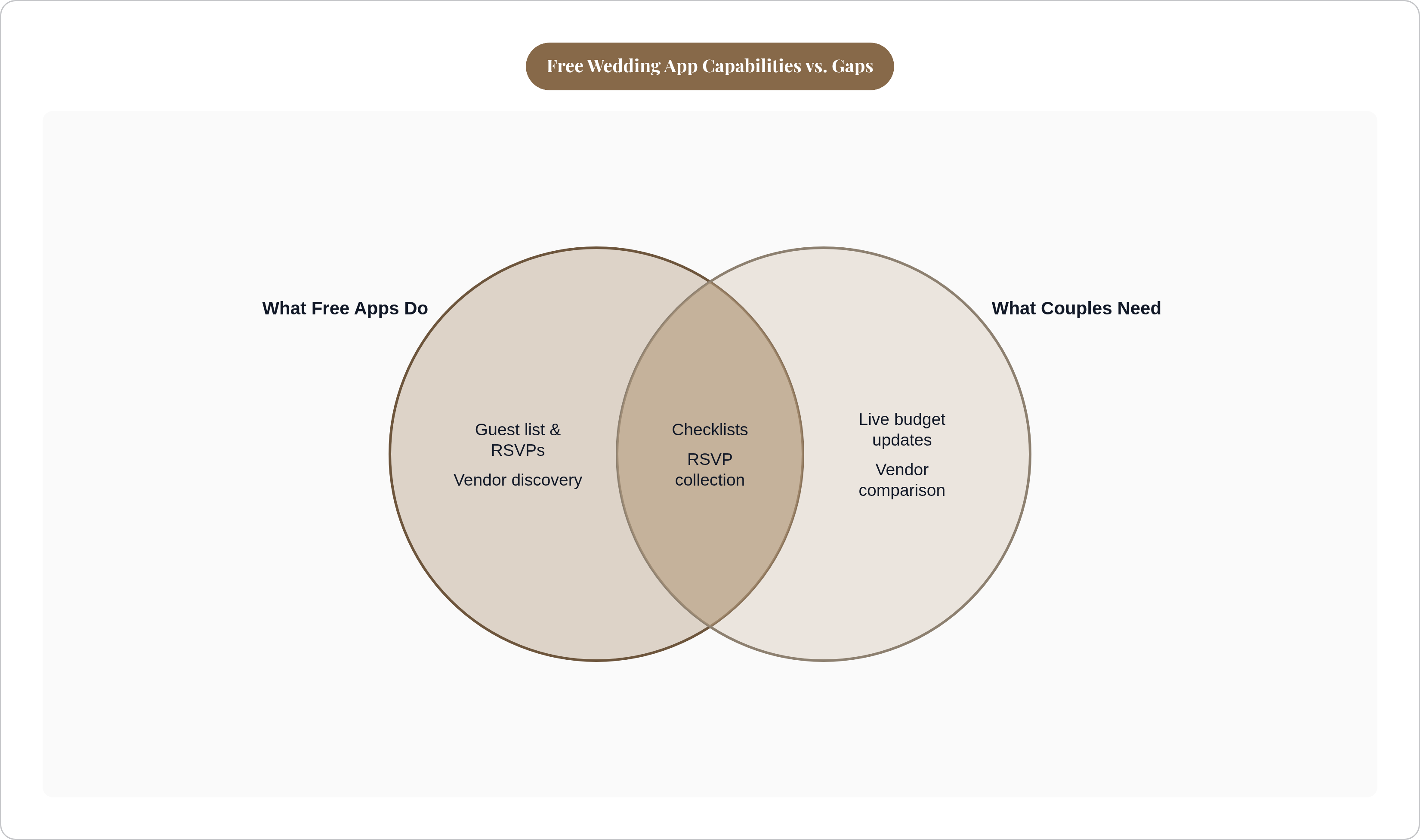
Free tools cover almost every piece of the job: checklist, website, guest list, RSVP, seating, budget, vendor discovery. What they don't do is talk to each other, and that silence between tools is where three-hour Sunday night reconciliation sessions come from.
A workable free stack looks like this. Pick one all-in-one platform, such as The Knot, for your website, RSVP collection, and checklist, and commit fully. Don't split your guest list across two platforms; that's the fastest route to two different headcounts on the morning of the wedding. Layer in a seating chart tool, either the one baked into your guest list platform or SeatPlan.io if you want better exports, keeping in mind saving your work there costs money. Run your budget through a dedicated spreadsheet or Honeydue alongside whatever your main platform offers. Build a simple vendor comparison template, even a basic spreadsheet does the job, because this is the one layer no free app has replaced.
One rule makes any of this survivable: a single platform owns the guest list, and everything else just reads off it. The second guest data lives in two places at once, you've built yourself a reconciliation job, and those jobs have a habit of surfacing at 11pm three days before the wedding, never at a convenient hour.
The goal was never to collect the most apps. It's keeping your guest's name from being typed in five separate times across five separate tools that don't know each other exist. Whatever stack you land on, that's the test to run before you commit to it.