QR Code Photo Sharing Apps Compared for Wedding Day Use
QR codes beat apps for wedding photos by removing friction that stops guests from uploading.
Wedding photo chaos has one real fix at this point, and it's a QR code, not another app download. This piece walks through which QR-based photo platforms actually hold up on the day, what separates a good one from a glorified upload form, and where to stick that little black-and-white square so people actually scan it.
You've probably lived some version of this mess already. Your cousin's dance floor video is sitting in a WhatsApp thread that got compressed into mush. Your college roommate AirDropped you three photos and gave up on the rest. Someone's aunt posted the ceremony to Instagram but never sent the file, and that Google Drive link you set up expired weeks ago. WhatsApp compresses images by as much as 70%, according to an analysis from Snapeen, so that great shot of your dad crying during the toast shows up looking like it was taken through a screen door.
Your photographer catches the posed stuff, the first look, the aisle walk, the cake cutting. They can't be at every table when the best man tells the story that got cut from his speech, though, and guests catch that kind of thing every time. The hard part was always getting those photos out of forty different phones and into your hands in something better than a screenshot of a screenshot. A survey from WedPicsQR found a third of couples aren't happy with their wedding photos. That gap, between what actually happened and what you have left to show for it, is the whole reason QR sharing exists.
Why QR codes outperform app-based sharing for wedding guests
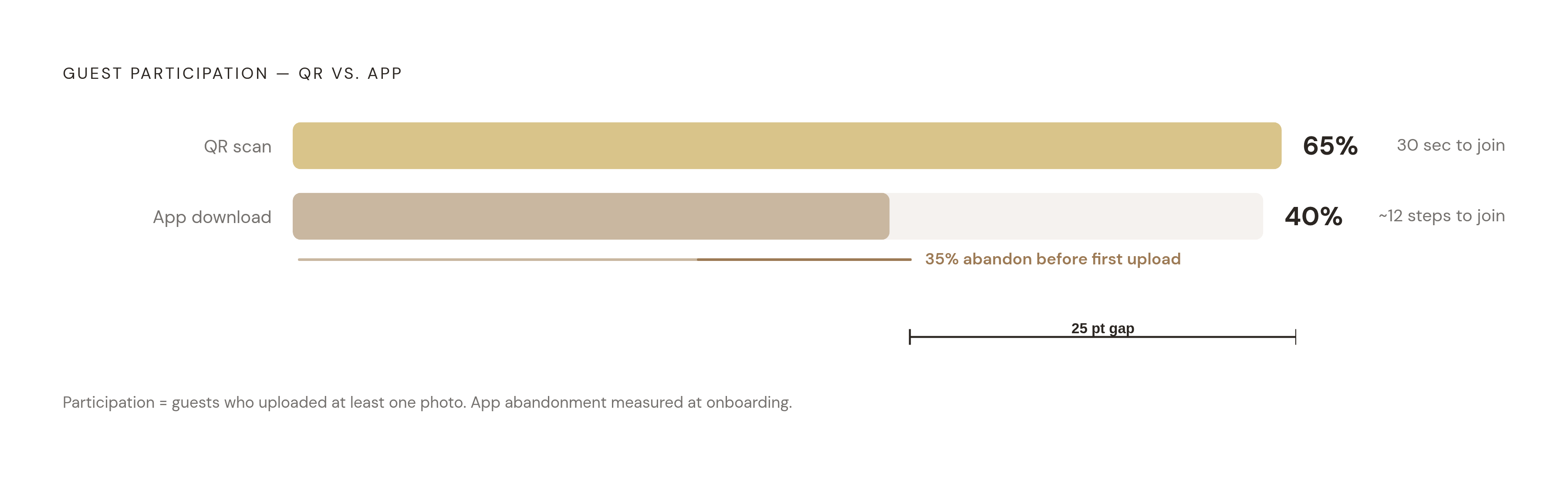
Do the math on friction for a second. Asking a guest to download an app means something like a dozen steps: find it, download it, wait for it, make an account, verify an email, accept an invite, remember a password they'll forget by dessert. A QR scan takes about 30 seconds, based on data Snapeen pulled from more than a thousand weddings. That gap is the difference between "sure, I'll do that real quick" and "I'll get to it later." At a wedding, later means never.
The app download step alone causes 35% of guests to bail before they upload a single photo. You can't design your way around that one. It's just how people behave when a phone asks them to commit storage space to something they'll open once and forget about.
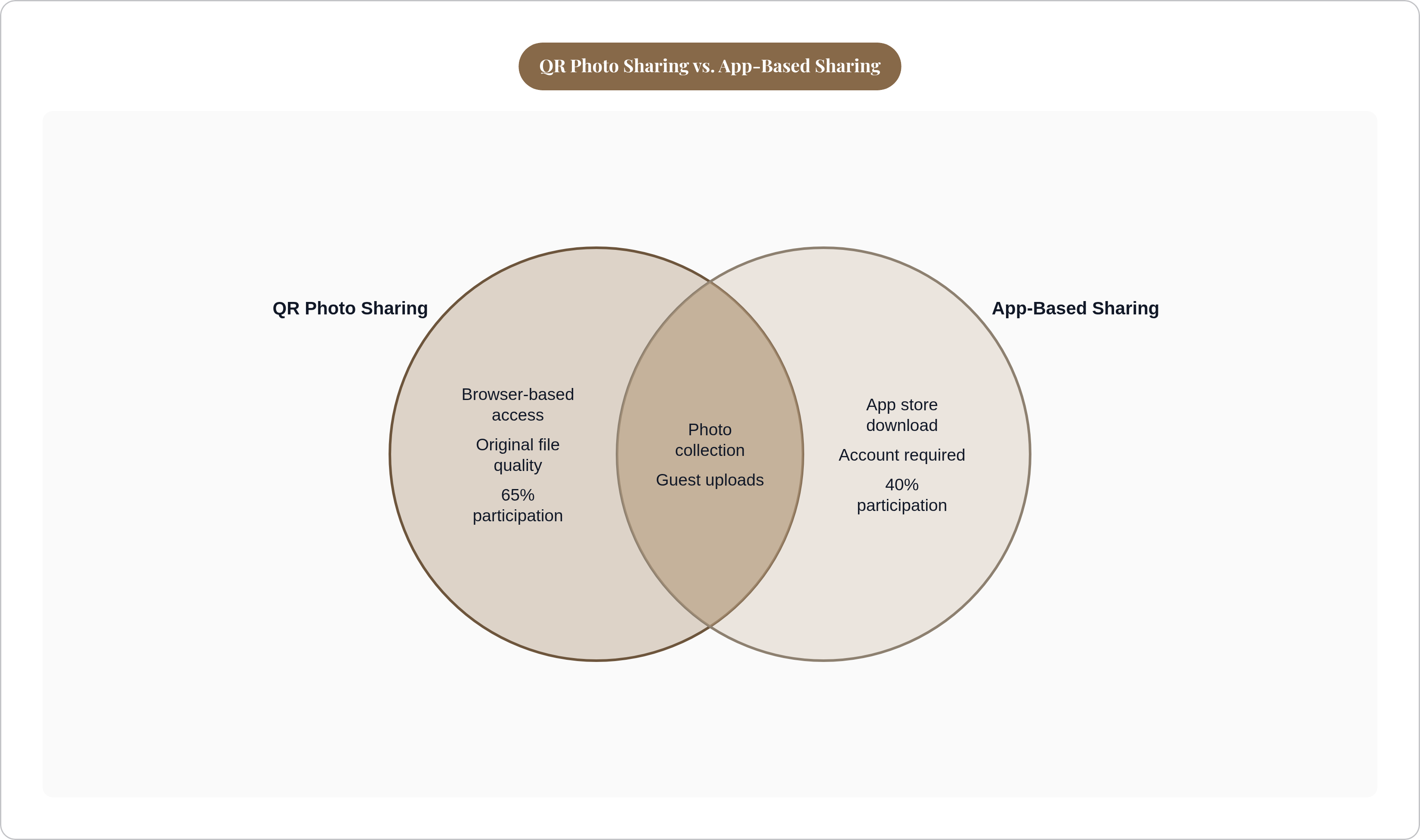
QR platforms average around 65% guest participation. App-based tools land closer to 40%. Run that across a real guest list and you get two to four times more photos collected, just from switching formats, no other changes required.
Think about who's actually in the room on the day. A grandmother who still calls it "the Facebook." A ring bearer's mom juggling a diaper bag with one free hand. An uncle visiting from another country on a data plan that charges him per megabyte. The lowest common denominator at a wedding is a browser, not an app store, and QR codes meet people right where they already are.
Most QR platforms also serve the original file instead of a compressed one, which matters the second anyone tries to print something bigger than a phone screen.
The QR-versus-app argument is over, honestly. What's still worth arguing about is which QR platform fits your wedding, and that turns out to be the more interesting question anyway.
The four variables that actually separate one QR photo platform from another
Once QR is the format, four things decide whether a platform works or quietly falls apart halfway through the reception.
Storage limits and upload caps come first. Some free tiers stop at 50 uploads. Some mid-tier plans cap at 500. Others go unlimited. Five hundred sounds generous until a 150-guest wedding blows past it in a single afternoon, which happens more often than you'd guess once a few guests decide they're the unofficial second photographer.
Time windows matter too, and there are actually two hiding inside that one word. The active upload window is how long guests can keep adding photos, and that ranges from a single month to a full year depending on the platform. Storage duration is how long the gallery stays alive before it vanishes, and across the platforms here that runs from 3 months to 14. Your college roommate who forgot to upload on the day will remember two weeks later, usually around 11pm, usually right after seeing someone else's wedding post online. A 24-hour window isn't a wedding product. It's a demo wearing a wedding product's clothes.
Guest friction is the simplest one to explain and the easiest to get wrong. No account, no password, no download, and it works the same on an iPhone as it does on a ten-year-old Android somebody's dad refuses to replace.
Privacy controls round it out: who can see what's uploaded, whether there's a password on the gallery, whether you get to moderate before Uncle Kevin's questionable photo goes live for all 150 guests to see.
Cost sits outside the four but shapes all of them. One-time fee, subscription, or per-event charge, and whether "free" actually means free or just means a 50-photo, 24-hour trial wearing a free label for marketing purposes.
Capacity, time, friction, privacy. Every platform below gets measured against those four, whether it wants to be or not.
How the leading platforms compare on those variables
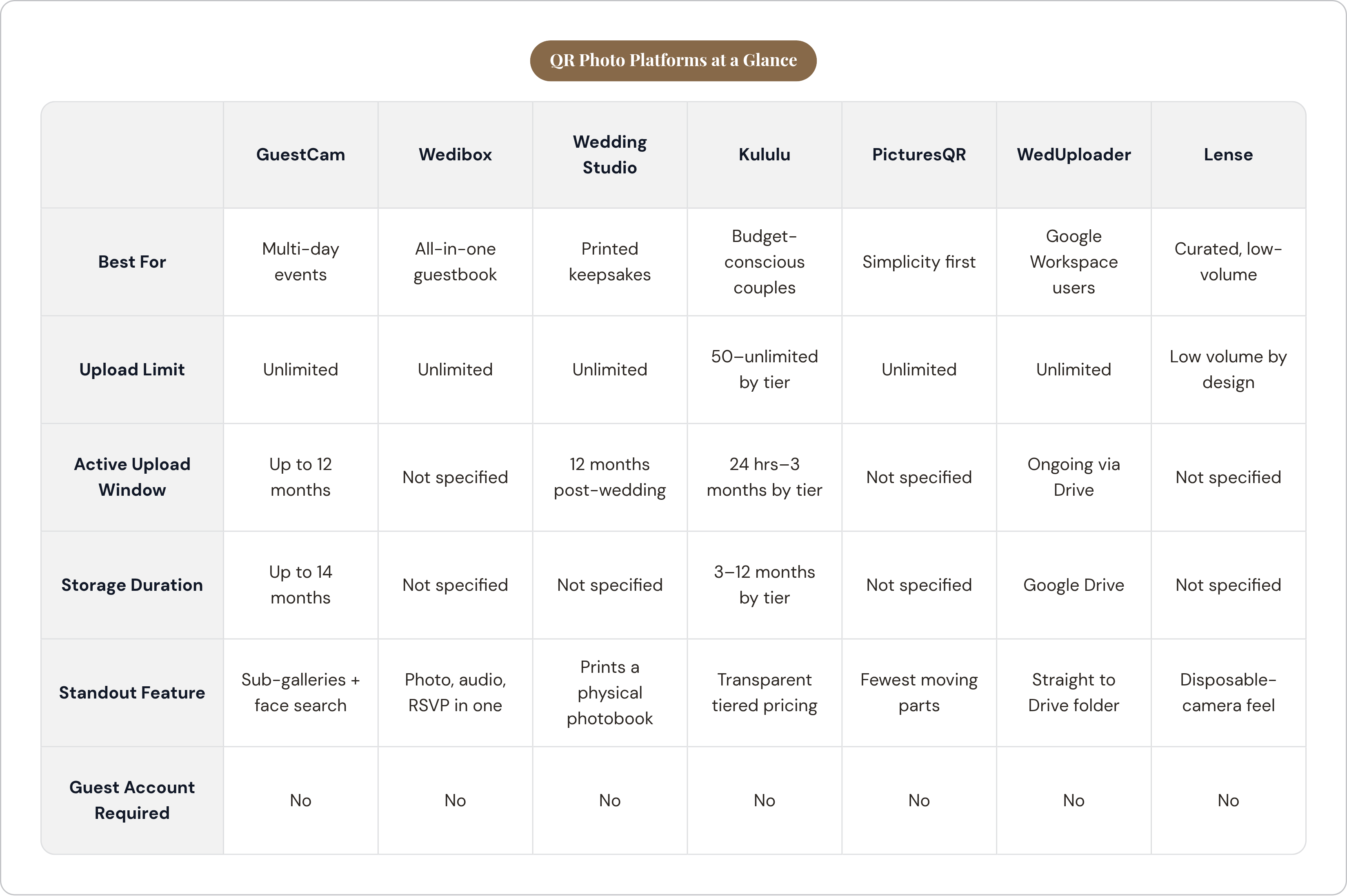
GuestCam runs entirely in the browser, no account or password needed from guests. Its standout is sub-galleries: one main gallery splits into separate QR codes for the rehearsal dinner, ceremony, reception, and brunch, which is genuinely useful if your wedding is really a wedding weekend in disguise. It also has a face-recognition tool called MagicFind, where a guest uploads a selfie and the platform finds every photo they're in, plus an audio guestbook and a live slideshow for the reception. Uploads stay open for up to 12 months, storage for up to 14. If you want full coverage of a multi-day event, this is built for exactly that.
Wedibox turns the QR scan into a personalized event page holding photos, videos, audio clips, and written guestbook notes in one place. It offers a live slideshow, multi-album organization, a ZIP download after the event, and it even folds RSVP collection into the same page, so one QR code can, in theory, do double duty before and after the wedding. If you want the photo tool and the guestbook to be the same object, Wedibox is built around that idea specifically.
Wedding Studio calls itself the leading QR wedding album tool, and the volume backs it up somewhat: more than 20,000 weddings ran through it in 2025. It stays active from purchase through 12 months after the wedding date, so there's no separate window to track in your head. Its real edge is physical, though: it prints and delivers table cards and turns guest uploads into an actual photobook. Nothing else on this list gives you something you can hold in your hands.
Kululu is upfront about tradeoffs through its tiered pricing, and I appreciate that about it. Free gets you 50 uploads and a 24-hour window, fine for testing the interface and not much else. Plus, at $39, gives you 500 combined photos and videos, a 1-month upload window, and 3 months of storage. Pro, at $99, goes unlimited on uploads with a 3-month active window and a full year of storage. Know your guest count before picking Plus, because 500 sounds like plenty until three cousins refuse to put their phones down all night.
PicturesQR (Pix Wedding) keeps it simple: browser upload, no app, no account, one private gallery per event, unlimited uploads, original quality, a live slideshow option. Fewer features than GuestCam or Wedibox, sure, but fewer moving parts also means less to explain to a guest mid-reception who's already had two glasses of champagne. A solid baseline if simplicity is the whole point.
WedUploader skips the "platform" idea entirely. Guests scan, and their photos land straight into a connected Google Drive folder. If you're already living inside Google Workspace and don't want another login to manage, this cuts out a step nobody asked you to keep. The tradeoff: no live slideshow, no event page, no guestbook layer riding along, because it's just Drive doing Drive things.
Lense takes the disposable-camera idea and applies it to QR sharing, nudging guests to be selective instead of shooting fifty photos of the same cake from slightly different angles. It's built for a curated, nostalgic feel over raw volume. Low volume is the design here, not a flaw, so if you want a thousand-plus photo archive, look elsewhere on this list.
Honcho isn't a guest upload tool at all, and it's worth pulling out from the rest of this list for that reason alone. It uses AI face recognition to deliver your photographer's shots to you in real time as they're taken, no QR code and no guest uploads involved anywhere in the process. Think of it as sitting next to whichever guest platform you pick, not replacing one.
Google Photos shared albums remain a popular, genuinely free option plenty of couples still reach for. The catch: guests need a Google account to contribute, which quietly excludes people the same way an app download does. No live slideshow, no event page, no wedding-specific layer of any kind. Just a general tool wearing a wedding hat for the occasion.
What real couples have actually collected using these tools
Real numbers tell you more than any feature list ever will. On TheKnot forums, one couple using Guestlense reported over 200 photos back the same night. Another, using Eventoly, collected 850 photos and videos and called it worth every dollar spent. One guest mentioned a wedding favor with a QR code, no app required, that pulled in more than a thousand photos and videos by the time the gallery closed for good.
WedPicsQR's research puts the realistic range at 80 to 1,000 extra photos beyond whatever the photographer hands over. That spread comes down to guest count, how many places the QR code shows up, and how early in the day people actually notice the thing exists.
A thousand photos is more than most professional wedding galleries contain. Guest photos aren't a nice bonus anymore; they're their own archive, running parallel to the professional one, sometimes outpacing it.
The floor is real too, and it reads more like a warning than a benchmark. Couples who lean on app-based tools, or who tuck the QR code into one out-of-the-way spot, tend to land closer to 80 than 1,000. The platform matters, obviously. So does where you actually put the thing.
Where to put the QR code so guests actually use it
Placement might matter as much as the platform itself, maybe more. Guests scan when they're standing still and the code is right in front of their face, not when they have to go hunting for it across the venue.
GuestCam's own guidance matches what most planners will tell you anecdotally, for what that's worth. The welcome sign at the entrance catches people before the day gets busy and phones get buried in a clutch bag somewhere. Table cards work at reception because guests are already seated with a phone in hand, usually scrolling anyway. Near the bar works for the same reason, plus people are relaxed and staring at their screens regardless. Ceremony programs get held the entire time, so a code there, backed by a plain URL for the truly QR-averse relative, covers your bases. Thank-you cards mailed after the wedding catch the stragglers who meant to upload and never got around to it.
For guests who genuinely can't manage a QR scan (and every family has at least one), NFC tags work as a backup. One couple paired QR cards with NFC stickers from Dots Memories so guests could just tap their phone instead of aiming a camera at anything.
Repetition helps more than people expect it to. Put the code in two or three spots and participation climbs, because you're catching people at different moments, different moods, different levels of patience with technology in general. If your platform supports sub-galleries, like GuestCam's, run a separate code at the rehearsal dinner and another at the reception. Guests never have to think about which folder their photo belongs in, because they shouldn't have to think about it at all.
Say it out loud, too. Have the MC mention it between toasts. Print a line on the menu. A QR code nobody knows about doesn't collect a single photo, no matter how good the platform behind it happens to be.
How to match a platform to your actual wedding situation
Start with headcount, since that decides more than people expect. Under about 80 guests, Kululu's Plus plan at $39, with its 500-upload cap, probably covers you and saves some money doing it. Bigger guest list, or a crowd you already know will be trigger-happy with their cameras? Go unlimited. GuestCam, PicturesQR, and Wedding Studio all remove the risk of hitting a wall mid-reception.
Multi-day wedding, rehearsal dinner through brunch the morning after? GuestCam's sub-gallery setup is the clear answer here: separate codes per event, one organized gallery on the back end holding it together.
Want something you can hold afterward, something with actual weight to it? Wedding Studio is the only one here that turns guest uploads into a printed photobook as part of the package.
Already living in Google Workspace for everything else in your life? WedUploader drops photos straight into a Drive folder you already use daily, no second platform to manage or remember a password for.
Want guestbook notes, audio, and photos all under one roof? That's Wedibox's whole pitch, more or less.
And if what you actually want is fewer, more intentional shots instead of a firehose of a thousand near-identical candids, Lense's disposable-camera approach delivers that on purpose.
On budget: QR-first tools run from free to around $45, while app-based platforms tend to land between $39 and $99. For most weddings, the QR-first options at the lower end of that range deliver better participation for less money. That's rare, a case where the cheaper option just wins outright, no asterisk attached. Double-check the fine print regardless. Some of these are annual subscriptions, not one-time event fees, and nobody wants to discover they're still paying for a wedding photo app three months into the honeymoon glow.
Every platform on this list skips the guest app install, though, so pick any one of them and you're already ahead of where most weddings stood five years ago.
Where QR photo sharing fits inside a wider wedding planning setup
The photo platform handles one afternoon. Everything else, the guest list, RSVPs, seating chart, dietary restrictions, vendor timelines, plays out over the months leading up to that afternoon, usually across a pile of tools that have never once talked to each other.
Follow the actual data trail and the connection gets obvious fast. RSVPs confirm who's coming, and that guest list drives seating. Seating decides where the table cards go, and table cards are exactly where the QR code lives. It's one thread, guest list to seating chart to QR placement, but most couples stitch it together by hand across three or four apps that have no idea the others exist.
RSVP data sits in one tool. Seating lives in a spreadsheet, or a different app entirely, who knows why. Vendor notes sit in a Google Doc somewhere, half-updated. And the QR code gets ordered as a separate, last-minute task, printed on a card that knows nothing about any of that other planning happening around it.
Some tools do tie those pieces into one system, guest list, seating, and day-of details like QR placement, so the data carries through instead of getting re-typed four times across four tools that were never built to sync up in the first place.