Wedding Photography Delivery Platforms Reviewed
The platforms that store your wedding photos matter more than the photographer you choose.
Wedding photography is one of the biggest checks most couples write, and almost none of that money goes toward the part that actually decides whether they keep their photos: the delivery platform. Couples spend months picking a photographer based on portfolio, vibe, Instagram grid. Nobody asks what happens to the files after the shoot, which is a little like obsessing over the wedding cake and never asking where it's stored before the reception.
The wedding is one day, but the way your photos get delivered, stored, and protected is the part that lasts decades, and that part rides on infrastructure nobody thinks to ask about until it breaks.
Here's what actually decides whether you're still holding your photos in ten years: download limits that expire before your mom gets around to saving her copies, gallery expiry dates that quietly wipe everything after a set window, and platform subscriptions that die the day your photographer stops paying their bill. None of that shows up on a mood board. All of it shows up three years later when you go looking for your first dance photo and get a dead link instead.
Turnaround for wedding photos usually runs four to six weeks, and that's plenty of time for things to go sideways between the shutter click and you actually having the files in hand, safely, for good.
The three dominant photographer-facing gallery platforms and what couples experience inside them
Three platforms handle most wedding photo delivery in 2026: Pixieset, ShootProof, and Pic-Time. Your photographer picks one, not you, but knowing what's running under the hood tells you what your experience is going to feel like.
Pixieset gives you a clean, simple gallery that works well on your phone. Guests click one link, browse, tap hearts on favorites, download. There's a print shop built right into the gallery, so don't be shocked if you feel a gentle nudge toward ordering a canvas print of your first kiss. Pixieset also runs AI-generated alt text on the back end for search purposes, but you'll never see it and it changes nothing about your experience.
ShootProof treats the gallery as one piece of a bigger toolkit. The same platform handles the photographer's contracts, invoices, and payments too. It's commission-free on every paid plan, which matters more than it sounds like it should: it means your photographer isn't quietly counting on you to buy prints just to cover their software bill. ShootProof also runs an AI watermark protection feature on the photographer's side, guarding images from theft, and again, it's invisible to you.
Pic-Time is the most polished-looking of the three, hands down. Where it gets interesting is the marketing running behind your gallery: an early-bird discount that fires the moment you first open it, an abandoned-cart nudge if you don't buy anything, an anniversary email a year later. Clever from the photographer's side of the business, and worth knowing from yours, so the "flash sale" email that lands three days after your gallery goes live doesn't feel like a personal betrayal. Pic-Time also lets guests search photos by face or by scene using AI, which is genuinely useful, since grandpa doesn't need to scroll through 800 photos to find the six he's actually in.
You don't pick the platform. Your photographer does. But you can, and should, ask which one they use, how long the gallery stays live, what happens if they cancel their subscription, and whether there's a download cap per photo or per session. Thirty seconds of questions, one less headache in three years.
Real-time delivery during the event — what Honcho actually offers
Honcho sends photos from the photographer's camera straight to an online gallery while the wedding is still happening. Guests pull up real, professional shots on their phones during cocktail hour instead of waiting six weeks for a link they'll half-forget they're expecting.
It also runs face recognition so guests can find photos of themselves, runs a live slideshow at the reception, and supports wireless printing on-site, so someone's aunt can walk away with an actual paper photo before dessert lands on the table. Starting at $39, it's one of the cheaper add-ons in this whole category.
Two limits worth knowing. Honcho only runs one direction: it pushes the photographer's images out to guests, it doesn't pull guest-taken photos or video back in. It only works if your photographer sets it up and runs it during the event itself, since you can't switch this on from the guest side, no matter how badly Uncle Dave wants real-time slideshow glory.
Who actually wants this? Couples who like the idea of everyone seeing the good shots while the party's still going, and out-of-town guests who flew in and want proof the trip paid off before they board a plane home. It's a separate deliverable from the final, curated, fully edited gallery that shows up weeks later. Real-time and final delivery aren't competing for the same job.
Guest photo sharing platforms — a separate category couples often conflate with photographer delivery
This is where couples get tangled up, so let's untangle it. Photographer delivery gives you professional, edited images from one source, curated and controlled. Guest photo sharing means dozens of phones, unedited, more about volume and candid chaos than quality. One is a curated gallery; the other is a group chat with better lighting.
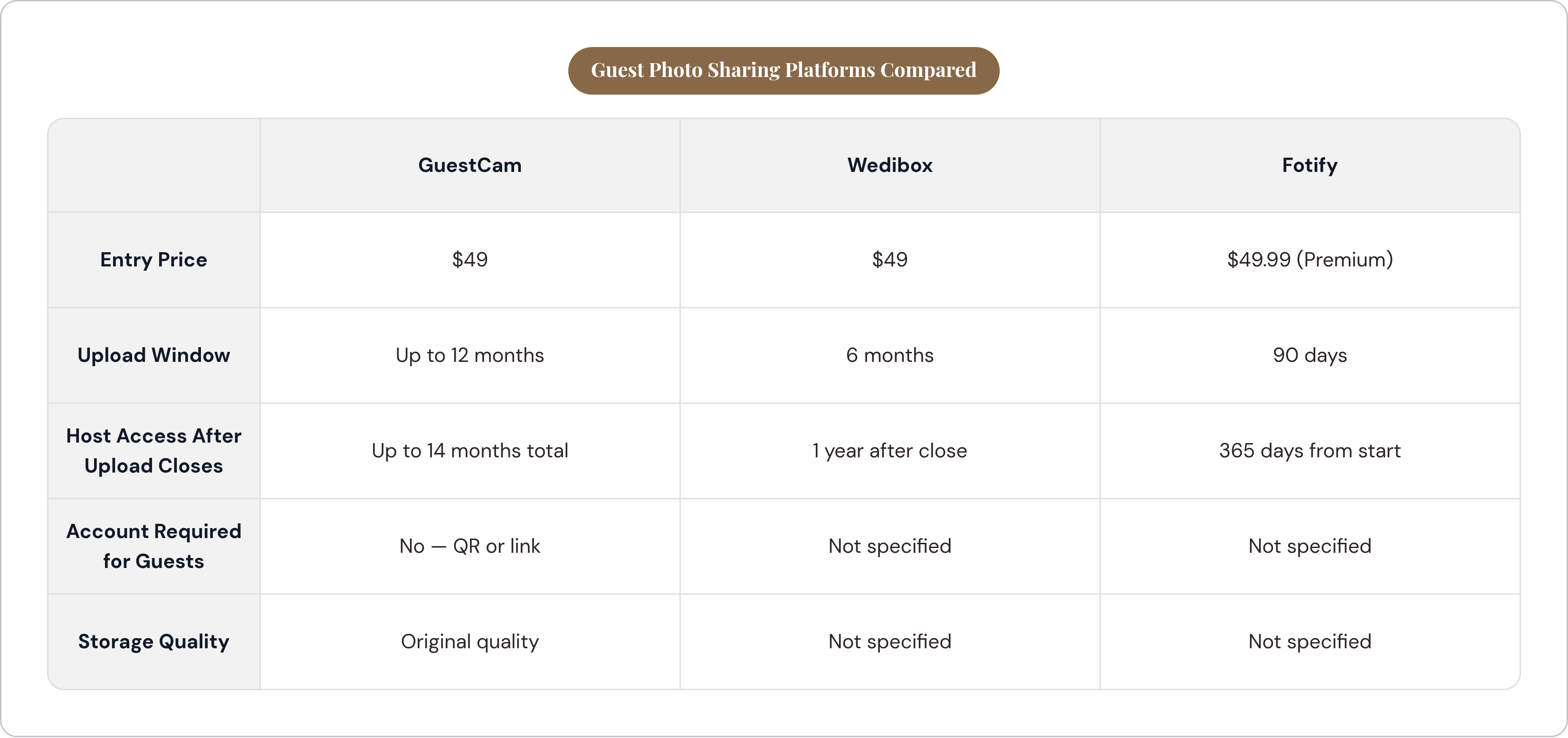
GuestCam wins on access and storage window. No app, no account, since guests scan a QR code or click a link and upload. Its $49 plan allows unlimited uploads at original quality, with an upload window running up to 12 months and host access lasting up to 14. Longest window in this whole comparison.
Wedibox sits at the same $49 price but gives you six months to upload and one year of storage after that closes. Half the upload window of GuestCam, same cost.
Fotify runs $49.99 for its Premium Event plan: 90 days to upload, 365 days of gallery access. Ninety days sounds fine until you remember Uncle Dave doesn't open his phone gallery until Thanksgiving. By then the window's shut, and his 40 blurry-but-charming photos never make it in.
This window comparison matters more than it looks like it should, since couples usually share the guest-upload link in a thank-you card or a speech weeks after the wedding, not the night of. A 90-day cutoff can lapse before half your guests have even clicked the link. GuestCam's 14-month host access, by contrast, covers the stretch when couples are still digging back through the day, still finding a new favorite shot buried in someone's camera roll from March.
AI face recognition is showing up in guest-facing platforms now too, worth a mention. Guests scan a code, snap a quick selfie, and the system shows them only the photos they're actually in, no scrolling through 600 photos of strangers from the groom's side. VowPix builds its whole pitch around that face-matching model, and claims storage that doesn't compress images down to mush the way some free tools do.
Video delivery is a distinct problem that photo platforms handle inconsistently
Here's a scene that plays out at almost every wedding booking both a photographer and a videographer: two separate gallery links, from two separate platforms, that don't talk to each other. Nobody designed this on purpose; it's just what happens when photo tools and video tools grow up in separate houses.
OurStoria got built specifically to fix that, for videographers delivering both formats at once. Video leads the gallery as the main event, photos sit underneath, and the whole thing gets styled like a mini film premiere instead of a photo album. It includes automated anniversary emails, per-video viewing stats for the videographer, and a feature called Live Moments that lets guests upload their own photos via QR code straight into the same gallery. It also runs something called Safe Archive, aimed at the exact anxiety this whole piece is built around: what happens to your files long after the vendor relationship ends.
MediaZilla takes a different angle and leads with permanence. Files stay accessible even if your videographer cancels their MediaZilla subscription entirely, which kills the lock-in risk most platforms carry by default. Pricing runs $12 a month on the Creator tier up to $48 on Pro. Matters a lot if your videographer used the phrase "lifetime access" while selling you their package, since MediaZilla's structure is one of the few setups that actually backs that promise instead of just sounding nice in a sales call.
Pixieset, worth a second mention here, does support video alongside photos, for photographers who want to deliver a highlight reel bundled with the still gallery. Convenient, though video clearly isn't the format it was built around first.
Ask your videographer two direct questions before signing: will my video stay accessible if you switch platforms or leave the business, and is "lifetime access" something the platform itself is built to survive, or just a phrase that sounded good in the pitch?
The practical checklist — what to actually ask before signing a photography contract
Most photography contracts nail down the delivery timeline and how many edited images you're getting. Almost none spell out platform terms, expiry dates, or what happens if the subscription lapses. That's the blind spot, and here's how you close it.
On access and longevity: which platform will you use for my gallery? How long does it stay live, and what do I need to do before it expires? Can I download full-resolution files, and is there a cap on how many times? What happens to my gallery if your subscription to that platform ends?
On sharing and compatibility: can I send this link to my parents without them creating an account? Will downloads work from a phone, or do guests need an actual computer? Will the gallery support video too, if I'm also booking a videographer through you?
If real-time delivery matters to you, ask whether they offer any live or same-day preview during the event, and whether that costs extra on top of the package.
Then, whichever platform lands in your lap, protect yourself the boring way. Download the full gallery to your own hard drive the day it lands; don't leave it sitting on a cloud link and hope. Back it up again somewhere else entirely, a cloud account of your own choosing, not theirs. Get a parent or sibling to pull an independent copy too, cheap insurance. Set a calendar reminder ahead of any stated expiry date, because nobody remembers a deadline sitting six months out until it's six days out and everyone's panicking.
Run this the same way you'd run a venue or caterer comparison, line items side by side, nothing left to memory. You're just pointing that same instinct at the one vendor category everybody forgets to interrogate. The photos are the only receipt you get from the whole day, so it's worth a few extra questions before you sign.