QR Code Photo Sharing Tools for Wedding Guests
Collect uncompressed guest photos in one place instead of scattered across messaging apps.
Skipping a photo-sharing system means your guest photos scatter across iMessage threads, WhatsApp chats, and Instagram hashtags the moment the reception ends. Each channel does something different and annoying to your images — like a game of telephone where every retelling makes the story blurrier.
WhatsApp and iMessage compress automatically. Real quality disappears before the photo even arrives. Instagram hashtags push guests toward sharing things that look good for their followers, not honest moments. A meaningful chunk of your guest list will use the hashtag wrong or not at all. Disposable cameras cost real money to develop and come back mostly blurry. "Just text me the photos" turns into months of follow-up that goes unanswered.
You end up with a partial, low-quality record of your day from the people who were actually there. That completely unguarded moment your college roommate caught of your grandmother wiping her eyes during the first dance? Sitting in a WhatsApp thread right now, compressed beyond recognition, and staying there. QR code photo sharing tools exist to stop exactly that from happening.
The mechanic is simple. A QR code printed on your signage, table cards, or programs links to a browser-based gallery. Guests point their phone camera, tap the link, and upload directly. No app download required.
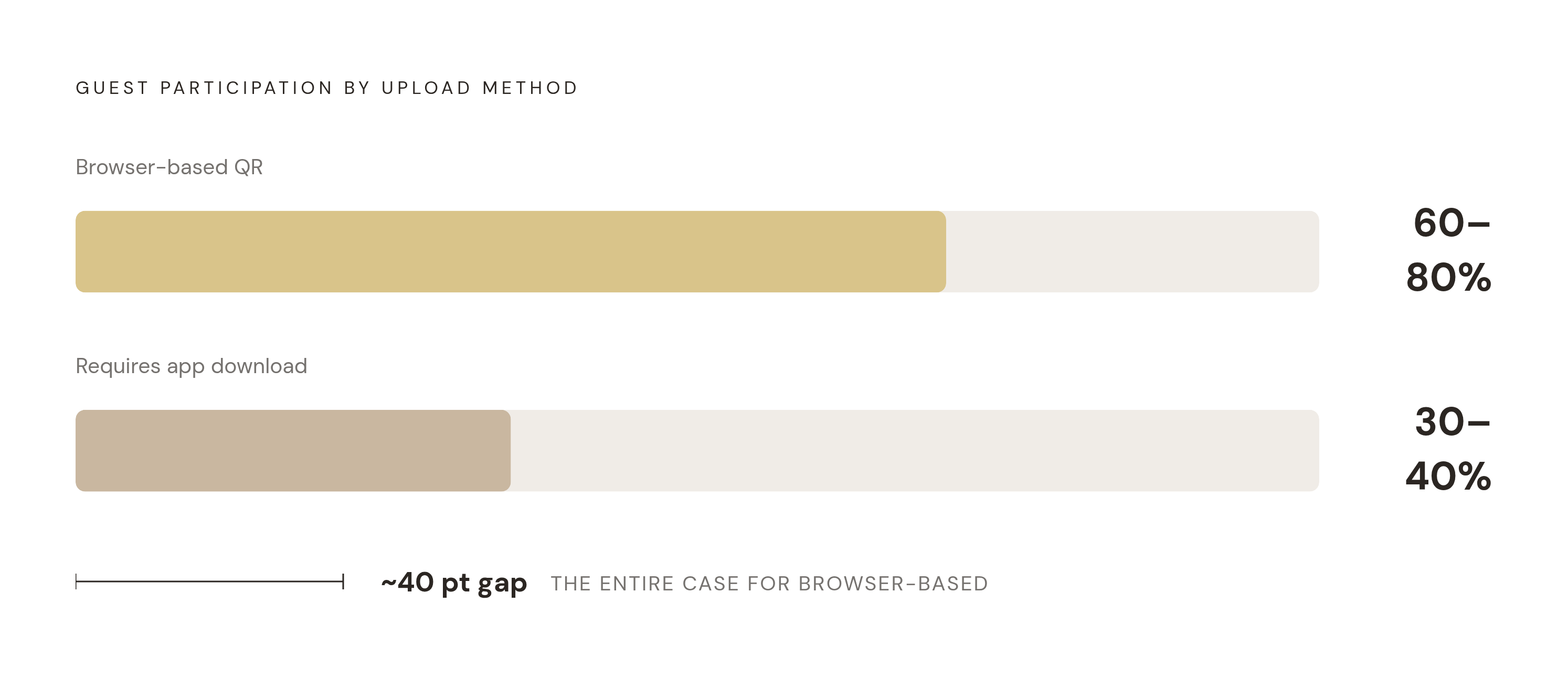
That last part matters more than anything else. Browser-based tools consistently pull 60 to 80% guest participation. Tools that require an app download land at 30 to 40%. Your guest list spans decades. An app install requirement quietly filters out older relatives whose candids you most want. The guest experience, when it is working right, looks like this:
Scan the code
Browser opens automatically
Enter name
Upload photos or video
Done in under two minutes
On your end, you get a live gallery filling in real time, uploads labeled by guest name and sorted chronologically. Some platforms extend the same QR scan to guestbook entries, voice messages, and video notes from people who could not attend in person.
One more thing worth knowing. Nearly half of couples already include a QR code on their save-the-dates or invitations. Your guests already know what to do when they see one. That part is handled before you even get to the wedding day.
The six platforms worth considering and what separates them
Not all of these tools are trying to solve the same problem. Some focus purely on photo collection. Others are building toward something closer to a full planning system. The features that actually change your outcome: no-download access, storage model, pricing structure, extras beyond photo upload, and how long you can access the gallery after the event.
Wedibox. Broadest all-in-one scope. A single QR code covers photo sharing, a digital guestbook, RSVPs, seating chart, and audio messages. Wedibox reports 100,000+ couples served and 100 million+ photos, videos, and messages shared across 50+ countries. One-time payment, no subscription, no per-guest fees. Good fit for couples who want one tool to handle multiple planning layers instead of juggling five separate logins.
GuestCam. Strongest photo-identification feature. Their standout feature is called MagicFind. Guests take a selfie and the system surfaces every photo they appear in across the full gallery, including professional photographer shots if you integrate them. Guests have up to 12 months to contribute, and all downloads come in original quality. Good fit for couples who want individual guests to easily find and keep their own photos from the day.
GUESTPIX. Clearest no-friction promise. No guest registration required. Uploads are labeled with the guest's name automatically. The platform includes links to 180+ Canva templates for welcome signs, table cards, and an "I Spy" game that gives guests a reason to actually take photos. One-time payment, no auto-renewal, gallery hosted for 12 months from the event date.
WedUploader. Ownership-first model. Files transfer directly to the couple's own Google Drive. No platform dependency, no expiry risk, no upload limits. Google's free 15 GB tier covers typical guest photo volumes plus a decent amount of video. Good fit for couples who want permanent, platform-independent file ownership from day one and do not want to depend on a third-party service staying operational indefinitely.
Kululu. Live display emphasis. Uploads stream to a live photo wall guests can watch during the reception. It turns the gallery into a shared moment rather than a post-event archive. Rated 4.7 stars from 500+ reviews, with thousands of couples served worldwide.
EventShare. Remote guest inclusion. Accepts video, audio, and written guestbook messages alongside photos. Particularly useful for capturing contributions from guests who genuinely could not be there.
Quick decision breakdown:
Want one login for photo sharing and planning logistics: look at Wedibox
Want guaranteed, permanent file ownership: look at WedUploader
Wide spread of guest ages and mixed tech comfort: prioritize any browser-based, no-registration option
Want a live, shared moment during the reception itself: look at Kululu
Where to place the QR code so guests actually use it
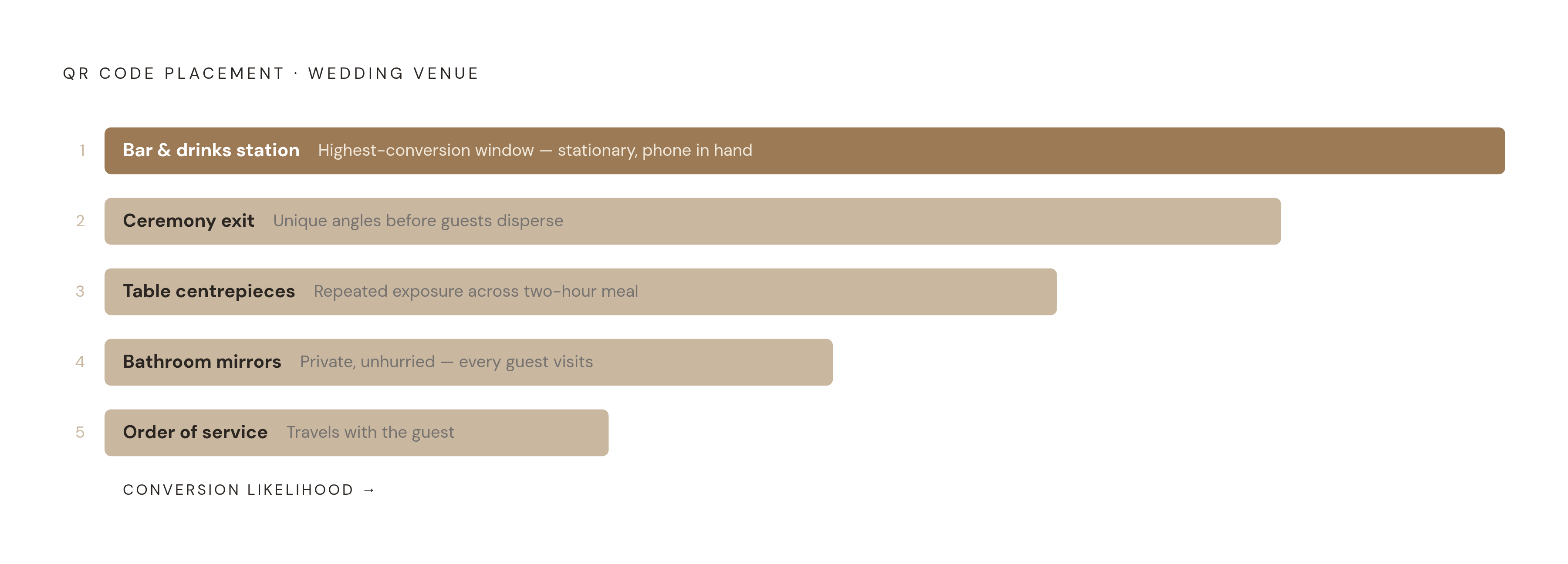
Placement drives participation more than platform choice does. A beautiful tool with one sign near the entrance will underperform a simpler tool placed at five touch points across the venue. Weddings are loud and fast and full of distraction. Guests are not going to go looking for instructions.
Strong placements and why each one works:
Ceremony exit. Guests in the back rows and balcony captured angles your photographer missed entirely. The window to prompt them closes the moment they walk out.
Bar and drinks station. Guests are stationary, phone already in hand, waiting. Highest-conversion window of the whole event.
Table centrepieces or place cards. Repeated exposure during dinner. Guests see the code multiple times over a two-hour meal without you doing anything.
Bathroom mirrors. Unconventional, but it works. Private, unhurried, and every single guest visits at some point.
Order of service or program insert. Guests hold it through the ceremony and carry it to their seat. The code travels with them.
Five placements is a system. One placement is a suggestion that most people will ignore — like putting up an umbrella after the rain has already started.
The single biggest force-multiplier is an MC announcement. A 30-second prompt from the microphone during the reception lifts scans more than any individual sign placement. Write the script yourself, keep it short, and time it for when phones are already out. That moment exists. Use it.
Two practical things before you print anything. First, QR codes need to be large enough to scan from a seated distance. Test at actual table height before you finalize anything. Second, add a short caption next to the code. Something like "Scan to share your photos. No app needed." That one line removes the last hesitation for guests who are not sure what happens when they tap it.
How photo sharing connects to the rest of the wedding planning stack
Most couples are running four or five separate tools by the time the wedding arrives. An RSVP platform, a photo sharing tool, a guestbook service, a seating tool, maybe a wedding website. Each one costs something. Each one stores guest information in its own silo. Every time you need to move data from one to another, you do it by hand, usually at the worst possible moment.
The fragmentation cost is real. Not just in dollars but in time and in errors that happen when you are already tired.
What "connected" actually looks like in practice:
Guest names collected at RSVP are already available to label photo uploads. No re-entry.
Dietary preferences collected at RSVP flow to the seating chart and caterer export without a separate spreadsheet.
A single QR code that handles photo sharing, guestbook, and seat-finding removes multiple printed signs and multiple sets of instructions your guests will not read anyway.
Think about the morning of the wedding. A last-minute RSVP change cascades into a seating update, a dietary note to the caterer, and a revised escort card. In a disconnected system, that is four manual steps. In a connected one, it is one. That difference is not small when it is 9 a.m. and you are already running late.
Platforms like Wedibox show the direction the industry is moving: a single QR code as an access point for photos, RSVPs, and seating. Couples using separate tools for each function can still close most of the gap by choosing platforms that export cleanly to each other and avoiding anything that traps data in a format only that platform can read.
Every time a guest's information has to be re-entered somewhere, there is a chance for error. The goal is a setup where data entered once serves every downstream use without anyone touching it again.
What to budget for a QR photo sharing tool and how it compares to the alternatives
The average U.S. wedding runs somewhere between $18,000 and $34,000 depending on which survey you trust, and most couples are living closer to the lower end of that range. Every discretionary line item is being evaluated against a tight total.
Photography already takes 10 to 12% of the total budget on average. That is the single biggest photo investment you will make. Guest QR sharing is the complement to that investment, not the competition.
What these tools actually cost: most of the major platforms, including GUESTPIX, Wedibox, and WedUploader, operate on a one-time payment model. No monthly subscription quietly accruing across a 12 to 18 month engagement. Against the cost of developing disposable cameras (roughly $200 or more for mostly unusable results) or paying a second photographer for extended hours, a flat-fee digital tool is both cheaper and more likely to produce something you will actually want to keep.
WedUploader's Google Drive model means some couples can get started with no direct tool cost at all. Worth knowing.
Before you commit to any platform, check the billing model. A tool that charges monthly from the moment you sign up adds up in a way a flat fee does not. Know which one you are agreeing to before you enter a card number.
For couples on tighter budgets, the simplest reframe is this: treat QR photo sharing as a direct substitute for disposable cameras, not an addition to them. You spend less, get more photos, and skip the box of blurry film entirely. That is a reasonable trade — you could say it is a photo finish for disposable cameras.
Setting up a QR photo sharing tool before the wedding day
Most platforms take under an hour to configure from scratch. Setup is not the hard part. The hard part is doing it far enough in advance to test properly and get the QR code into printed materials before anything goes to the printer. Couples who generate the code the week of the wedding and then realize it is pixelated on the table cards are having a bad time that was entirely preventable.
Steps in order:
Create and name the gallery. Include the wedding date and your names so guests recognize it when they scan.
Set upload permissions. Decide whether guests can see each other's uploads in real time (Kululu's live wall does this by design) or whether only you see the gallery until you choose to share it.
Generate and size the QR code. Download as a high-resolution file. Vector format (SVG) scales without pixelation for large prints. This matters if anything is bigger than a business card.
Test before printing anything. Scan from the distance at which a guest will actually see the sign. Test on both iOS and Android. Test on an older device if you can find one.
Integrate into printed materials. Table cards, programs, signage. GUESTPIX's Canva template links cut out the design step entirely for couples without a stationer.
Brief the MC. Two sentences is enough. Time the announcement for after entrees are served, when phones are already out and people are settled.
The post-wedding step most couples forget: download the full gallery in original quality before the platform's hosting window closes. Most platforms offer 12 months of hosting. Back up to your own cloud storage right after the honeymoon, not six months later when you finally remember it exists and start to panic.
If the platform integrates with your wedding website, publish the gallery link there after the event. Guests who missed the day-of upload window can still contribute. You end up with one permanent home for both professional and guest photos, which is the whole point.