What a Vendor Management System Does for Event Planners
Centralized vendor tracking replaces chaos-prone spreadsheets and scattered email threads.
Event planning is vendor coordination. Everything else is downstream of that. The beautiful tables, the perfectly timed first dance, the catering that somehow arrived hot. What guests never see is the planner who spent the three weeks before that event chasing twelve vendors across forty email threads, just hoping nothing fell through. And something always falls through when you're doing it manually. Always. A vendor management system exists specifically to close those gaps. What follows is a function-by-function look at what these systems actually do, and why winging it costs planners more than they usually realize. Until it's too late to do anything about it.
So what is a VMS, exactly? Think of it as the connective tissue between a planner and all their vendor relationships. Not decorative, not glamorous, but the thing that holds the whole body upright. Not a general inbox. Not a project management tool someone repurposed because they didn't want to pay for another subscription. A purpose-built system designed around how vendor relationships actually work in events: time-bound, contract-driven, and involving a bunch of external parties who each have their own timelines and payment terms and, frankly, their own ideas about what "confirmed" means.
The vocabulary gets blurry here, so it's worth separating a few things:
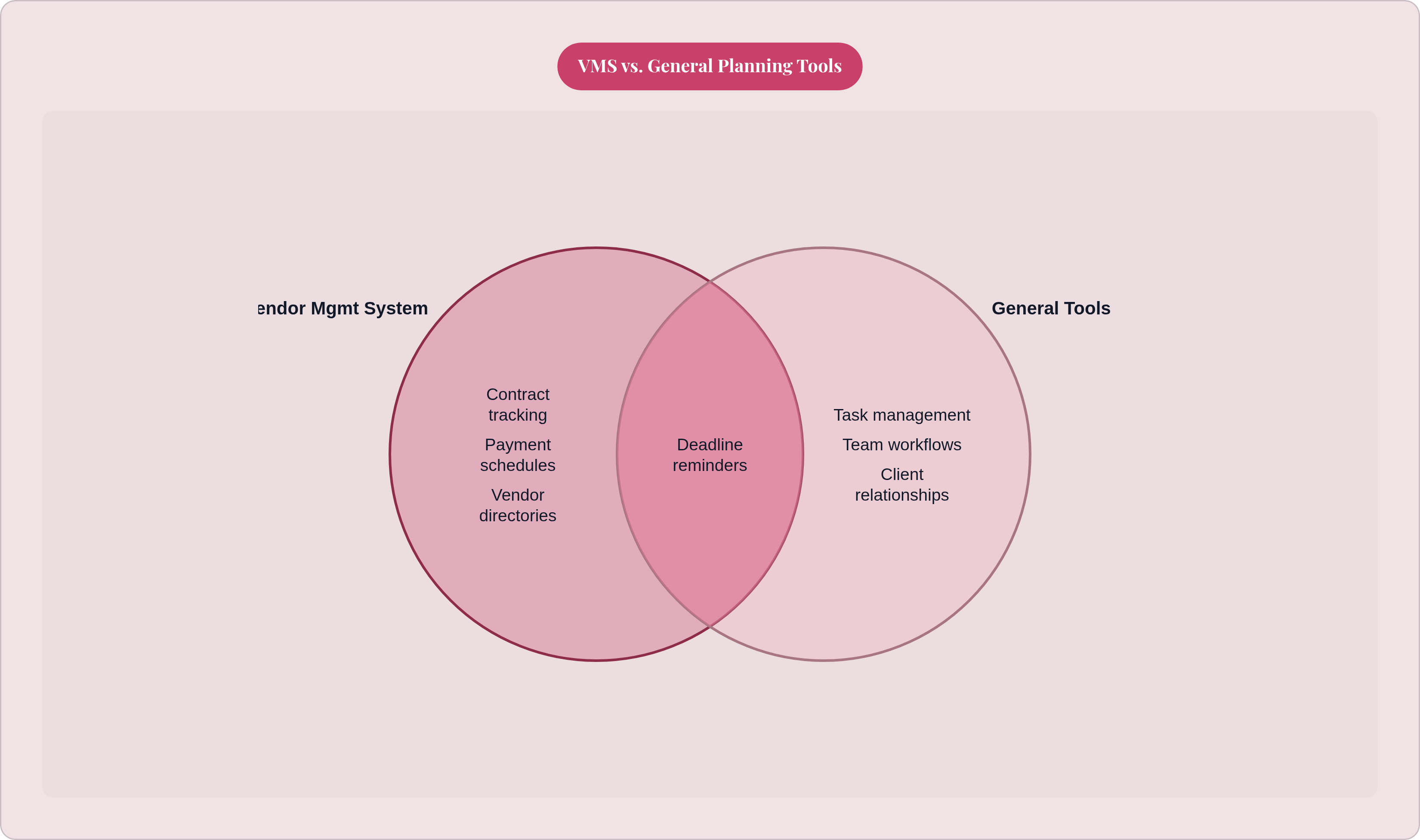
A CRM manages client relationships
A project management tool manages tasks and internal team workflows
A VMS manages the vendor layer. Documents, money, communication, timing. With outside parties.
In practice, most event planning platforms bundle VMS functionality into a broader suite. It's a module, not usually a standalone product. But the core promise stays consistent: one place to see every vendor's status across every active event. Who is confirmed. Who is unpaid. Who still hasn't returned a signed contract.
The shift to cloud-based platforms matters here too. Over 65% of the planning software market was cloud-based as of 2024. That means real-time access from any device, live data shared across a whole planning team. Not a spreadsheet emailed back and forth with "FINAL v3" in the subject line, which we all know becomes "FINAL v3 (1)" within 48 hours anyway.
Centralising vendor contacts and documents so nothing requires hunting
Every vendor relationship generates a trail. The original quote, the signed contract (not the draft, the actual final version), invoices, deposit receipts, amendments, and the occasional email where someone quietly changed a deliverable three weeks before the event and acted like it was always that way.
Without a system, that trail is scattered. Across an inbox. A desktop folder. One team member's memory. A vendor directory in a proper VMS gives you a single record per vendor:
Contact details and category
Pricing notes and history from previous events
The full document history of the current engagement
Any correspondence that changed a deliverable or deadline
The document history piece matters for a specific reason. When something goes sideways on event day, and something always does, you need to know exactly what was agreed. Not try to reconstruct it from an email chain at 7am while the venue is already calling you.
There's also an institutional memory angle that planners running multiple concurrent events will recognize immediately. Which florist was excellent last year. Which caterer needed three follow-up calls to confirm anything. That history is searchable in a good system. It doesn't disappear when a team member leaves or clears their inbox in a fit of organizational ambition.
Platforms like Aisle Planner and Planning Pod build this directly into the event record. Documents attach to the event itself, not filed somewhere generic that nobody can find six months later.
Tracking quotes and comparing vendor options before a commitment is made
Quote collection is where vendor chaos usually begins. Three photographers, each sending a differently formatted proposal with different inclusions, different payment terms, and an expiry window that lands on a different date. Comparing them without a structured layer means building a spreadsheet from scratch, forwarding PDFs to the client, and narrating the differences verbally. Every. Single. Time.
A VMS adds a consistent record format. Quote received, under review, shortlisted, accepted or declined. Notes attached, conversations logged, validity dates visible.
The practical payoff: when a client asks why you're recommending one vendor over another, you can show them a structured comparison. That's a very different conversation than "I just think they're better, trust me."
There's also a less obvious risk that a quote tracker protects against. It's genuinely easy to get deep into negotiations with one vendor and quietly lose track of the fact that another's quote expired two weeks ago. You go back expecting the original price and find out it's gone up. A status tracker with visible expiry dates prevents that specific situation from blindsiding you at the worst possible moment. In this industry, that moment is always right before something else goes wrong.
Structure beats scrambling every time.
Managing contracts, deposits, and payment schedules across every vendor at once
Once a vendor is booked, three things need tracking. The contract (the signed version, specifically). The deposit, amount and date. And the full remaining payment schedule, because every vendor category structures this differently.
Venues typically take a deposit, a mid-point installment, and a final balance. Photographers often do 50% upfront and 50% on delivery. Caterers usually require a per-head confirmation closer to the event date. A planner managing ten vendors across three concurrent events is tracking thirty or more individual payment milestones. This is exactly where spreadsheets fall apart the fastest, because they require constant manual updating and they don't alert you to anything on their own. They just sit there, silently wrong.
A VMS records each payment obligation against the vendor record, flags upcoming due dates in a dashboard view, and tracks what's been paid versus what's outstanding. Planning Pod includes digital contract sending, signature collection, invoice automation, and payment tracking as integrated functions. Not separate steps, not separate tools.
The risk of letting this slip isn't just administrative. Missing a deposit deadline can void a booking under many vendor contracts. That's a paperwork failure with a real logistical consequence on event day, and it's an extremely difficult thing to explain to a client.
Keeping vendor communications out of a general inbox and inside the event record
The general inbox problem is one every planner knows personally. A caterer confirms a dietary change via email. That email lands between a client note and a supplier invoice. Three weeks later, nobody can find it, and nobody's entirely sure the conversation happened at all. This is not a failure of effort. It's a failure of structure.
Modern event platforms address this in two ways:
A centralised inbox that routes event-related communication through a single channel, tagged by event and vendor
Message boards or shared notes attached to the vendor record itself, so the conversation lives alongside the contract and payment data
The operational benefits are real:
A new team member can read the full vendor communication history without needing anything forwarded
A dispute about what was agreed gets resolved by checking the record, not by reconstructing a timeline from personal email archives
Day-of briefings can be sent from within the system with a full trail of what was communicated and when
Planning Pod allows planners to send, receive, and track all event-related emails through a centralised inbox. Message boards and shared notes handle internal coordination on top of that.
When communication lives in the system, nothing depends on one person's memory or their particular approach to inbox organization. The record is the source of truth. That's worth more than it sounds, especially at 6am on event day.
Automating deadline reminders and follow-up sequences instead of relying on manual chasing
Manual follow-up is one of the biggest time sinks in vendor coordination. Reminding a vendor to return a signed contract. Chasing a supplier who hasn't confirmed a call time. Prompting a caterer to acknowledge a dietary update. All of it is real work, and a lot of it is work that a good system can absorb.
What automated reminders replace:
Calendar-based manual reminders set individually, per vendor, per task
Guesswork about when to follow up, which gets inconsistent fast when a planner is stretched thin
Email drafts written from scratch each time, often at inconvenient hours
Automated reminders can trigger at event milestones: twelve weeks out, six weeks out, two weeks out, forty-eight hours before. Contract signature reminders fire automatically if a vendor hasn't signed within a set window. Payment due-date alerts go to the planner and, optionally, to the vendor.
Here's the compounding benefit for planners running multiple events at once (and this is the part that actually matters day-to-day): automation means the quieter event doesn't get neglected because the noisier one is consuming all your attention. The system runs follow-up sequences across every active file, completely indifferent to which client has been texting you since 8am. It doesn't have favorites. It doesn't get tired.
Timeline Genius, used by day-of coordinators, takes a related approach. It builds vendor sync directly into the event timeline so all parties are working from the same schedule. Different form, same underlying logic: coordination should be systematic, not dependent on someone remembering to send one more email before they finally go to sleep.
How vendor data connects to the broader event — budget, seating, and day-of logistics
In a disconnected toolset, vendor data sits in one place and budget data sits somewhere else entirely. Reconciling them means re-entering numbers by hand, which introduces lag and invites mistakes. In an integrated platform, the connections that matter most happen automatically, and you stop wasting time manually bridging information that should never have been separated.
Here's what that looks like in practice:
Budget: Confirmed vendor quotes flow directly into the budget tracker. You don't re-enter a number that was already captured at the quote stage.
Dietary requirements: The catering vendor record holds the dietary summary collected through RSVP. No separate document to send, no risk of an outdated version reaching the caterer.
Floor plan: The venue vendor record connects to the seating chart. The space and the guest arrangement are planned in relation to each other.
Day-of timeline: Vendor call times feed in directly. Every supplier's arrival, setup, and departure is coordinated from the same source.
The dietary-to-seating connection deserves a bit more attention, because it's where manual processes fail the most visibly. Dietary requirements collected at RSVP need to reach the caterer in a form that maps a specific seat or table to a specific restriction. A manual transfer step is exactly where that information gets lost, outdated, or quietly garbled. Some planning tools address exactly this kind of failure point by ensuring data collected once at RSVP flows to the seating plan without anyone manually reconciling it in between.
The broader shift toward cloud-based platforms reflects this. Real-time shared data requires a cloud layer. Locally saved files don't hold up when three people on a planning team need to see the same record simultaneously.
What planners actually gain when vendor management is structured rather than improvised
The gains are operational, but they show up in ways clients notice.
A planner who can pull up any vendor's contract, payment status, and full communication history in under a minute looks more capable to a client. Because they are. Automated reminders mean fewer last-minute scrambles, which means calmer event days with less firefighting. Structured quote comparison means vendor recommendations can be explained with evidence, not just asserted with confidence and a smile.
Capacity is the less obvious gain. A planner managing vendor relationships through a structured system can handle more concurrent events without proportionally more administrative overhead. The system absorbs the tracking burden. That's not a minor thing when your business depends on volume.
The accuracy gains are the hardest to see until something goes wrong. A dietary requirement that was recorded but never reached the caterer. A payment made but not logged. A contract version that wasn't actually the final one. Structured systems make these failures visible before they become day-of disasters, not after. After is a very bad time to find out.
Wedding planners make up over 41% of planning software market share as of 2024, which reflects how central vendor coordination is to their entire workflow. Per The Knot's 2024 data, 78% of couples used online tools to plan their weddings, with organization and time-saving as the top cited benefits. Client expectations around digital coordination are high enough now that a planner's tooling is itself a signal of professionalism.
Vendor management stops being something a planner manually maintains between crises and becomes something the system handles continuously. That frees up the planner for the work that actually requires a human: building relationships, making judgment calls, solving the problems no checklist anticipated. Which, to be clear, there will always be.