VMS Platforms Compared for Small Wedding Businesses
Two platform categories divide the market: pick the one that matches your workflow, not both.

If you are running a small wedding business, you are probably managing client relationships out of a combination of email threads, a spreadsheet you made at 11pm, a notes app, and sheer willpower. That works until it doesn't. And when it stops working, it usually costs you either money, a client relationship, or both. The fix is a vendor management system (VMS). The hard part is that there are quite a few of them, they all claim to do everything, and the feature lists start blurring together after about twenty minutes of research. This article cuts through that. It maps the leading platforms against the four things that matter most at small-business scale — contracts, invoicing, client communication, and workflow automation — so you can make a grounded, practical choice instead of a hopeful one.
First, a quick definition of who this is actually for. Small wedding business means sole-operator planners, boutique studios doing roughly 15 to 50 weddings a year, photographers, florists, and caterers who also manage their own client relationships. You are not running a multi-location venue. You do not have a franchise-level team that needs tiered permissions. You need to get booked, get paid, keep your clients informed, and stop dropping balls. Those four things — contracts, invoicing, communication, and automation — are where dropped balls hurt most directly. A missing contract is a legal exposure. A late invoice is a cash flow problem. A scattered client record costs you the repeat booking. A manual follow-up process just costs you time you do not have.
The other thing worth naming upfront: fragmentation is expensive. When operators stitch together separate tools for contracts, invoicing, email sequences, and planning, the monthly cost can exceed $330. For a business doing fewer than 50 weddings a year, that is a real number. The right platform should consolidate, not add to, that stack.
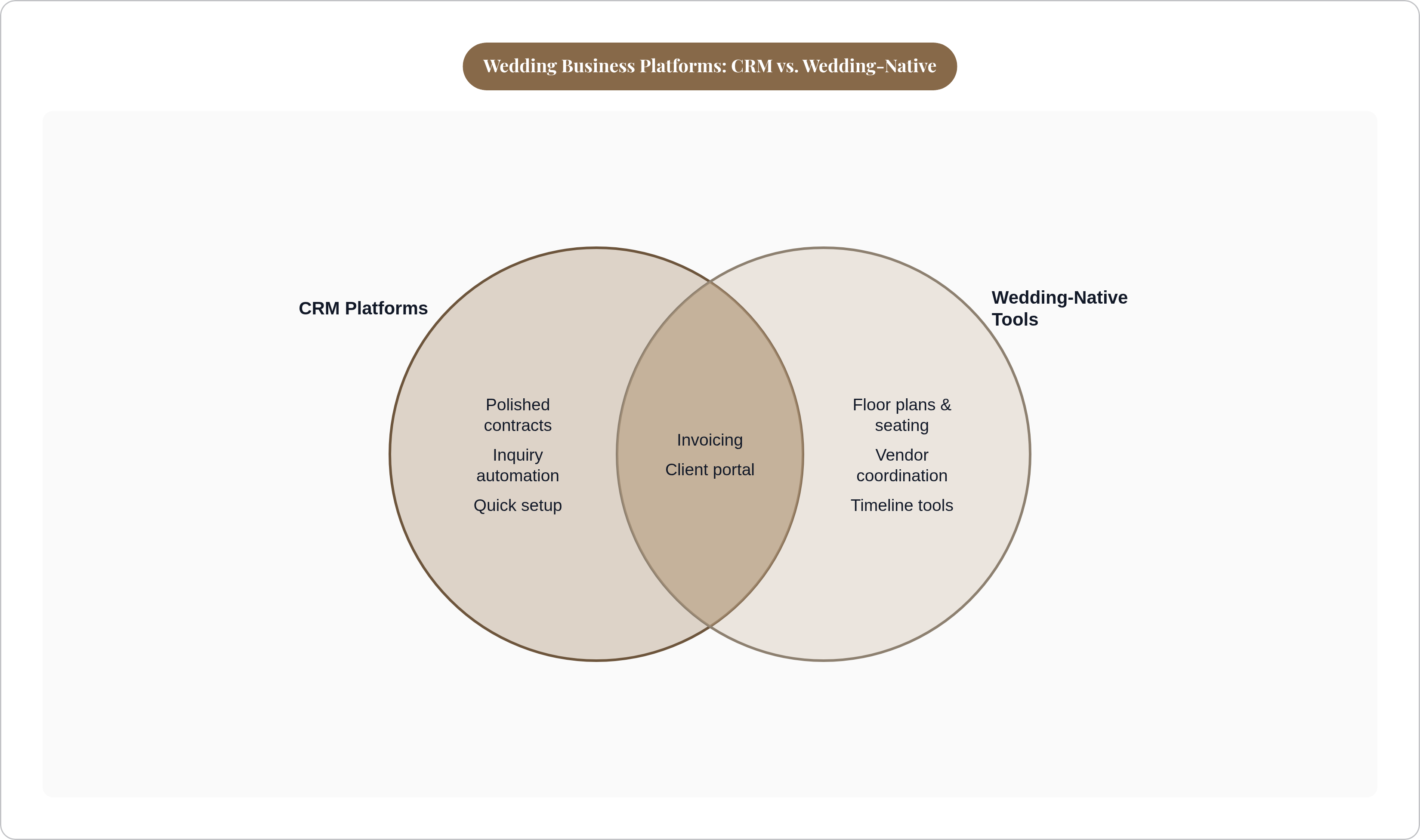
How the leading platforms divide into two broad categories before you compare features
Before you compare any specific features, it helps to know that all the major players split cleanly into two groups. Think of it like a wedding itself: you have the ceremony side and the reception side — both essential, but serving very different purposes. Understanding which group a platform belongs to tells you a lot about what it will do well and where it will leave you hanging.
Category one: general client management CRMs adapted for wedding businesses. This is HoneyBook and Dubsado. They are strong on contracts, invoicing, and inquiry-to-booking automation. They are weak on anything wedding-specific. No native timelines. No floor plans. No RSVP management. No seating charts. They are usually the first real step up from spreadsheets because they make getting paid and tracking inquiries dramatically easier. But they were not built around how a wedding actually runs.
Category two: wedding-native platforms built around the planning workflow. This is Aisle Planner, Harpsen, TTO, and Rock Paper Coin. These were built with wedding-specific objects baked in: timelines, vendor coordination, questionnaires, seating. Their planning execution is their strength. Their pure CRM side is more variable, and some of them require pairing with a separate payment tool to handle the business-admin side cleanly.
Here is the practical consequence of that split. A planner who picks a category-one tool for its polished contracts often ends up adding a category-two tool for planning execution. Which recreates the exact fragmentation problem they were trying to solve. This two-category structure is the real driver behind the "all-in-one versus best-of-breed" decision. The sections below unpack it platform by platform.
HoneyBook and Dubsado: where each fits and where each falls short
These two get compared constantly, and the comparison is fair. They are solving the same core problem. But they are not interchangeable, and picking the wrong one costs you either time or capability.
HoneyBook is the strongest fit for planners running up to roughly 30 to 40 weddings a year who want a clean inquiry-to-invoice flow without a complicated setup.
Visually attractive proposals that hold up at the point of booking
Digital contracts with e-signature built in
Automated email sequences that do not require a computer science degree to configure
Payment processing in the same place as everything else
The client-facing experience is polished. That matters. First impressions at the booking stage are doing real work for your brand. The hard ceiling is that HoneyBook has no native floor plans, RSVPs, seating charts, or event-day timelines. Planners who need those things are adding tools on top, and fragmentation is back.
Dubsado is more configurable than HoneyBook. That is genuinely useful if you have a very specific, repeatable process and the time to set it up properly. Workflow automation is more granular. You can build out conditional logic that HoneyBook does not support. The recurring description from practitioners is "flexible yet sometimes overwhelming," which is an accurate summary. Steeper setup, steeper learning curve, bigger payoff if you invest in it.
The same ceiling applies. Dubsado has no native wedding-specific planning tools. Both platforms leave that gap open.
The honest comparison: HoneyBook is faster to get productive in. Dubsado rewards the time invested in customisation. If you have a stable, repeatable process and the bandwidth to build it out properly, Dubsado gives you more. If you need to be operational fast and your process is still evolving, HoneyBook is the easier call. Neither is the wrong answer for a small wedding business. Both require an honest accounting of what they do not cover.
Aisle Planner and Harpsen: purpose-built platforms for planners running complex events
If the gap that HoneyBook and Dubsado leave is the problem you need to solve, these are the tools that fill it.
Aisle Planner was built by event-industry practitioners. That shows in the feature set.
Mood boards and design tools
Collaborative planning with couples directly inside the platform
Checklists and timelines
Interactive 2D and 3D floor plans
Drag-and-drop seating with guest-list integration
It is a strong fit for design-driven planners who work closely with couples through the planning process. The trade-off is setup time. Aisle Planner is not the fastest platform to get operational. And its CRM and invoicing side, while present, is not where it competes. Some operators pair it with a separate payment tool, which is worth factoring into your cost model.
Harpsen skews more toward logistics-heavy events where timelines, floor plans, questionnaires, workflows, and team collaboration all need to live in one place simultaneously. If you are coordinating multiple vendors and internal team members at once, Harpsen was built for that kind of operational weight. Its emphasis is planning operations rather than design collaboration, which is a different problem than Aisle Planner is solving.
The relevant question for a small operator is direct: do you actually need full team coordination tooling at your current scale? If you are a solo planner, a lot of Harpsen's power is more than you need right now. If you are running a small team across complex events, it fits well.
Where both platforms sit in the market: they solve the planning-execution gap that HoneyBook and Dubsado leave open. The trade-off is that their CRM and invoicing are less polished than the category-one tools. You are making a swap, not a pure upgrade.
TTO and Rock Paper Coin: the cases for simplicity and scope at different ends
These two do not really compete with each other. They sit at opposite ends of the spectrum, which is exactly why they are worth understanding side by side.
That's The One (TTO) was founded in London in 2020 and positions itself as an all-in-one platform from client interaction through vendor and guest management. It is available in six languages and twenty currencies, which is meaningful for operators working across borders or with international clients. Practitioner reviews give it a 4.9-star rating. It is priced at $55 per month as an all-in platform.
That price point is the primary value argument. Against fragmented tool stacks that can exceed $330 per month, the math is fairly simple. TTO is a newer entrant. It has a smaller established user community and fewer third-party integrations than HoneyBook or Dubsado, both of which have been in the market significantly longer. That is not a dealbreaker. It is just a real consideration if you rely heavily on integrations or community support forums.
Rock Paper Coin is the deliberately narrow option. Contracts, invoices, and payments. That is it. Minimal configuration. No broader platform ambition. The right framing is "contract and payment tool" rather than "vendor management system," because that is actually what it is.
It is particularly useful when vendors and venues in the same market are already using it. Shared platform reduces friction at the contract-exchange stage, which is a practical benefit that gets underrated. The honest use case is a photographer or florist who handles planning elsewhere and just needs the business-admin layer sorted cleanly. If that is your situation, Rock Paper Coin is clean and focused. If you need more than that, it is not trying to be more than that.
Contracts and e-signatures: what small businesses should verify before committing to a platform
Contracts are the highest-stakes feature category on this list. A missing or unenforceable contract is a direct legal and financial exposure. This is not a nice-to-have. It is the thing that protects you when a client disputes a cancellation or a payment.
Here is what to actually check when you are evaluating a platform's contract tooling:
Legally recognised e-signature. Audit trail, timestamp, IP capture. Not just a typed name in a text box. Those are not the same thing legally.
Customisable templates. The platform's default contract language should be a starting point, not the final word. You need to be able to insert your own clauses. If you cannot, that is a problem.
Contract and invoice linkage. Are contracts and invoices in the same client record, or housed separately? Separation creates reconciliation work and increases the chance of errors.
Dashboard-level contract status. You should be able to see at a glance what is signed, what is awaiting signature, and what is overdue. Without opening each file individually.
HoneyBook and Dubsado are the strongest performers on contract UX in the CRM category. Rock Paper Coin's entire value proposition is this feature, and it does it well. Aisle Planner and Harpsen include contracts, but their depth here is secondary to their planning-execution strengths.
One practical flag: during any free trial, ask whether your contract templates are portable if you leave the platform. Some tools lock your template formatting into proprietary formats. Finding that out after you have built ten templates is an unpleasant surprise.
Invoicing and payment processing: the fees and workflows that affect real cash flow
Most planners run on a three-stage payment model: a retainer at booking (typically somewhere between 25 and 50 percent), a mid-point payment, and the balance before the event. That structure has real cash-flow implications for both sides of the relationship. Your platform needs to support it cleanly.
What actually matters in a platform's invoicing layer:
Automatic payment schedule creation. Can the platform generate instalment invoices from a single project total, or do you have to build each invoice manually? Manual is fine once. Manual across 40 weddings is a time drain.
Payment reminders. Automated nudges reduce the manual follow-up that small operators consistently describe as one of the most time-consuming parts of the job. The awkward "just checking in" email is a solved problem if your platform handles it.
Processing fees. Most platforms charge around 2.9% plus $0.30 per transaction, which is the standard card rate. Check whether the platform adds its own margin on top of that. Some do. It matters more than it looks on paper, especially on large retainer amounts.
ACH and bank transfer options. These carry lower fees than card payments. On a large retainer, that difference is real money.
The cleanest platforms send a contract for signature and then unlock the deposit invoice once it is signed. That sequence prevents the common error of a client paying before a contract is executed. It sounds like a small thing until it isn't.
HoneyBook handles this sequence well and is the most cited platform for clean payment flow among solo and small-team operators. Dubsado supports it with more configuration effort.
One flag worth naming: if your platform charges a monthly fee AND a transaction percentage, model your actual annual cost at your real booking volume before you sign up. The all-in cost is rarely visible in the headline pricing. Run the numbers on what you actually did last year.
Client communication: what "centralised" actually means in practice
"Centralised communication" is one of those phrases that every platform uses in its marketing. It does not mean the same thing across all of them. Here is what it actually looks like when it is working.
The problem being solved is real. Small operators typically field client questions across email, Instagram DMs, text, and whatever portal the platform provides. The result is a scattered record that is difficult to reference six months later and nearly impossible to hand off to someone else. A client file without centralised communication is like a wedding without a seating chart — technically possible, but guaranteed to cause confusion at the worst possible moment.
Genuine centralisation means:
A single client portal where the couple can see their contract, invoices, questionnaire responses, and message thread in one place. This alone cuts down the "did you get my email?" follow-up significantly.
Communication linked to a project record, not just a contact. So searching a client's name surfaces the full history of the relationship, not just a name field.
Automated touchpoints that fire from the workflow without manual sends. Welcome email, contract notification, payment reminder, wedding-week check-in. These should happen without you touching them.
HoneyBook's client portal is one of its most consistently praised features. Couples log in to a co-branded page and see their full file. For small operators, that reduces back-and-forth in a way that is genuinely noticeable.
Aisle Planner's collaborative model goes further. Couples can work directly inside the planning tools alongside the planner, not just receive documents. That is a different kind of centralisation, and it is valuable specifically when your role includes co-creating the event rather than just executing it.
The real test of any platform's communication layer is this: could a new team member, or you returning from a week away, pick up a client relationship from the platform record alone without asking the same questions again? If the answer is yes, the centralisation is real. If the answer is "mostly, but I'd need to check my email too," it isn't.
Workflow automation: where small businesses recover the most time
At 15 to 50 weddings a year, automation is not a luxury. It is the difference between a business that scales and one that plateaus at whatever volume you can personally manage.
The highest-value automation targets at this scale:
Inquiry response. Automatic reply with availability confirmation and a link to book a discovery call. Captures leads that arrive at 9pm on a Sunday.
Onboarding sequence. Contract sent, contract signed, deposit invoice triggered, questionnaire sent. All without manual steps in between.
Payment reminders. Scheduled nudges at seven days out, three days out, and day-of-due. No manual tracking.
Post-event sequence. Thank-you email, review request, and referral ask on a set delay. This one gets skipped constantly by operators who run it manually, because there is always something more urgent.
Dubsado's automation is the most granular of the CRM-category tools. Operators who invest in the setup can build conditional workflows. For example: if the couple selects a full-planning package, trigger a different onboarding sequence than you would for day-of coordination. That level of logic is useful if your service offerings are distinct enough to warrant it.
HoneyBook's automation is simpler and faster to configure. It covers most of what operators under 30 to 40 weddings a year actually need. It becomes limiting if you need complex branching.
Aisle Planner and Harpsen include task and checklist automation tied to event dates. Things like "send floor plan to venue seven days before the event." That is a type of automation the CRM-category tools do not natively provide. It is also extremely useful for preventing the last-minute scrambles that are entirely predictable but still happen constantly.
The compounding effect matters here. At 30 weddings a year, saving 45 minutes of admin per project per month adds up to more than 22 hours recovered annually. That is enough time to take on two or three additional bookings. The automation is not just convenient. It is revenue.
How to match platform to business type when the feature lists look similar
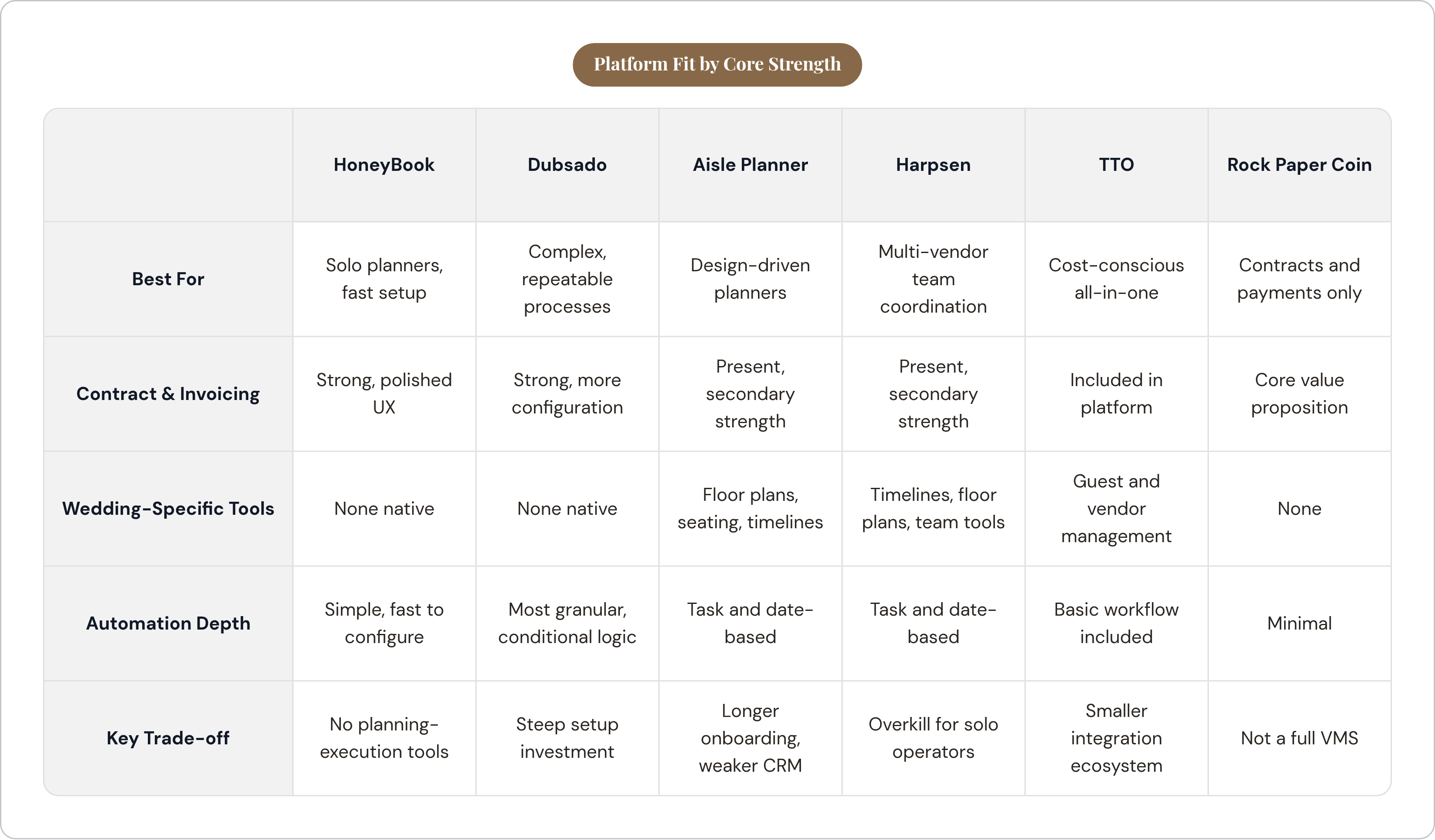
The most useful sorting question is not "which platform has the most features." It is "where is my biggest operational drag right now?"
If the drag is in booking and getting paid: HoneyBook is the fastest path to relief. Polished contracts, clean payment flow, quick setup. You will be operational in a meaningful way within a week.
If the drag is in planning execution and vendor coordination across complex events: Aisle Planner or Harpsen. Accept the longer setup in exchange for the planning tooling that the CRM-category tools simply do not provide.
If the drag is cost and platform sprawl: TTO's all-in pricing at $55 per month, against fragmented stacks that can exceed $330 per month, is a legitimate cost argument. Model it against your actual booking volume and see what the math says.
If the only real need is clean contracts and payment collection: Rock Paper Coin. It is not a full VMS. It is not trying to be. But if that narrow job is the one you need done, it does it cleanly and without overcomplicating anything.
The wrong move is picking the platform with the most impressive demo and then discovering six months in that it does not actually match how you work. Start with your operational drag. Work backwards from there. The right platform is the one that solves your specific problem, at your actual scale, without charging you for a dozen features you will never use.