Vendor Management System Examples Used in Wedding Planning
Standalone trackers save money but require manual work as vendor counts grow.

The simplest version of a wedding VMS does exactly one job. It holds your vendor information, tracks your contracts, logs your payments, and reminds you when something is due. That's it. No frills, no extras. Think of it as a filing cabinet that actually reminds you when to open it.
Loverly's vendor manager is the clearest example. It's free. You can upload contracts, set reminders for payment due dates, log each payment, track the payment method, and see what's outstanding at a glance. It also connects payment data to a budget tracker automatically, which sounds small but actually saves you from maintaining two separate documents that drift apart. What it doesn't do: no guest management, no seating chart, no day-of timeline. It's a vendor file. A well-organized one, but still a vendor file.
WeddingWire's vendor manager follows the same pattern. Keeps your vendor checklist organized from first contact through final payment. It just doesn't connect to anything outside itself. Priori Digital Studio's vendor tracker approach works the same way: upload contracts, log payment milestones, store key contacts. Clean, simple, and capped.
The ceiling on all standalone trackers is structural. When your florist shifts their delivery window by an hour, you update the timeline yourself. Then the day-of schedule. Then you contact whoever else needs to know. Nothing propagates automatically. You are the propagation — the human middleware no one budgeted for.
For couples with a smaller vendor count, or with a professional planner handling coordination, that's a perfectly reasonable trade-off. The tool earns its keep. But every new vendor you add multiplies the manual reconciliation you're doing yourself, and that adds up faster than most people expect.
Vendor modules inside dedicated wedding planning platforms
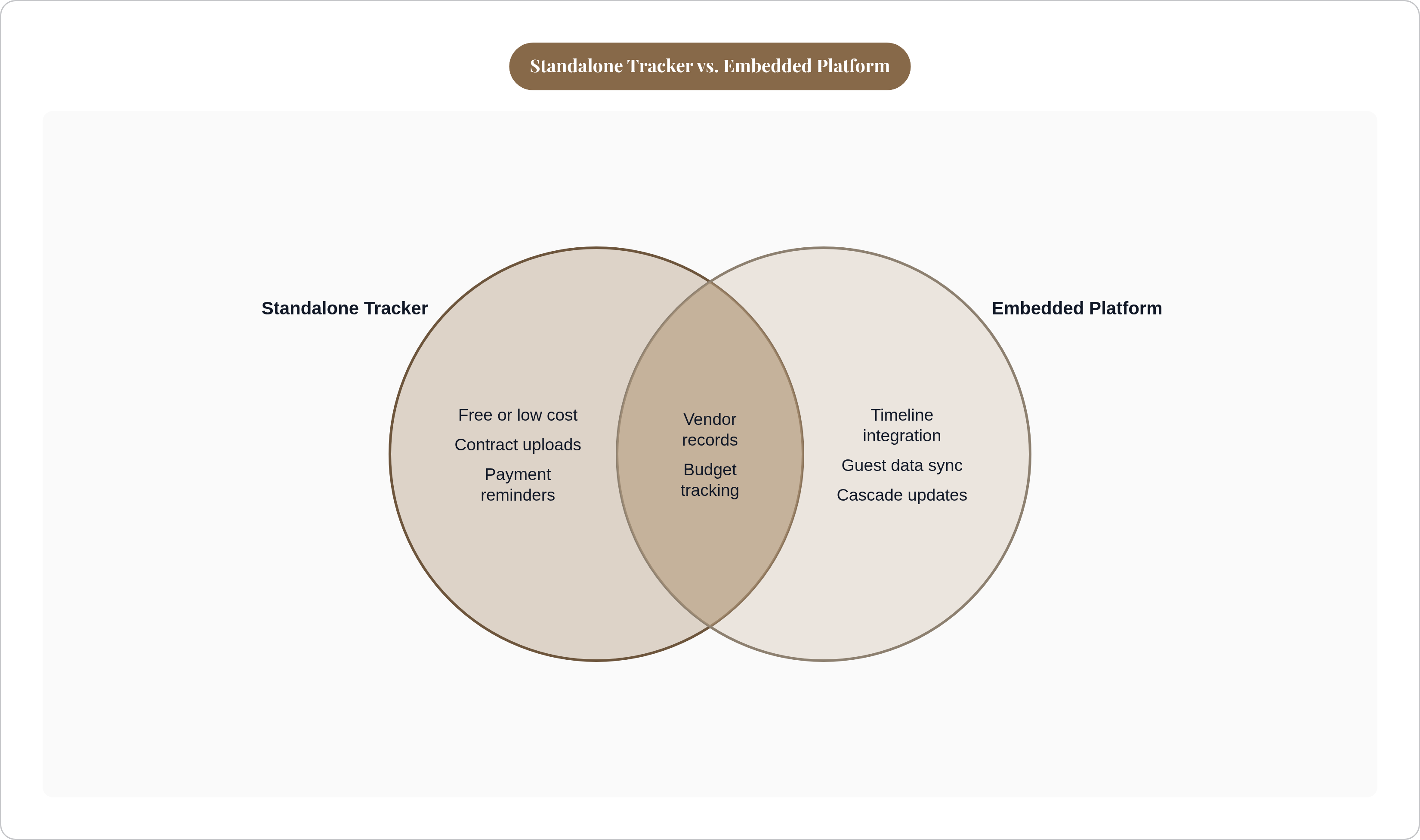
The meaningful difference between a standalone tracker and an embedded vendor module isn't cosmetic. It's whether vendor data actually talks to the rest of your planning or just lives nearby without communicating. Co-location is not integration, and that distinction matters more than it sounds. A standalone tracker is a sticky note on your fridge; an embedded module is a conversation between everyone in the kitchen.
Planning Pod is the most complete example of the embedded approach. Vendor management sits alongside event timelines, budgets, and guest lists inside one platform. Build a day-of timeline with vendor assignments and arrival reminders, and when a vendor's arrival time changes, the timeline reflects it. Vendor payments feed into the overall event budget rather than a separate spreadsheet you maintain yourself. Planning Pod skews toward professional planners because the coordination volume justifies a platform that thorough, but couples planning independently get the same integration benefits.
What an embedded module solves that a standalone tracker can't is the cascade. Final headcount gets confirmed, and a connected platform can update the caterer's numbers, adjust the budget line, and unlock the seating chart for finalization. In a standalone setup, you do each of those updates yourself, in sequence, and you just hope nothing slips.
The question worth asking of any platform that claims to offer vendor management: does the data actually move between modules, or does it just sit in the same app without doing anything useful together? Ask someone who uses it before you pay for it.
General business platforms adapted for wedding vendor coordination
These tools weren't built for weddings. They were built for freelancers, agencies, and small businesses managing client projects. Some of them get pressed into wedding planning anyway, and sometimes the fit is surprisingly good. Sometimes the gaps are obvious from day one.
Plutio, at $19 per month, connects proposals, contracts, timelines, vendor tracking, and invoicing inside one project-based platform. Treating the wedding as a single project keeps all the financial and contractual pieces tied together in a way that's genuinely useful. The gaps are real though: no guest management, no seating functionality, no dietary tracking. A planner using Plutio still needs separate tools for those jobs.
HoneyBook (priced at $36 to $129 per month as of its February 2025 update) is strong on proposals, contracts, AI-assisted communication, and payment workflows. Planners managing the business side of client relationships find it useful for exactly those things. But it has no guest management, no seating plans, no event timelines, no dietary tracking. It handles part of the job well and leaves the rest to other tools.
Maroo sits in its own lane as a payment specialist. It's grown to serve more than 13,000 wedding businesses and has processed over $350 million in invoices. It pairs with other tools rather than replacing them, which is an honest positioning.
The practical reality with general business platforms: they often have better contract and payment workflows than wedding-specific tools do. They also require a second or third tool to cover guest logistics, seating, and day-of coordination. Planners running five to seven disconnected tools spend $79 to $180 per month combined, and none of those tools share data with each other. That's the trade-off. Better individual components, more manual assembly required.
How vendor payment tracking connects to the wedding budget
According to a LendingTree survey, 67% of newlyweds took on some form of debt to pay for their wedding. Nearly half of couples find their initial budget falls short of what they actually spend. Vendor payments are the specific mechanism by which that overspending happens, and the pattern is almost always the same.
A deposit goes out early. The balance is due weeks or months later. Final payments land two to three weeks before the wedding, right when couples are already buried in logistics and least likely to be running budget reconciliations. By the time the final invoices hit, the damage is usually done.
What good payment tracking inside a VMS actually looks like in practice:
- Each vendor record holds the total contract value, the deposit paid, the balance outstanding, the due date for that balance, and the payment method used
- Payment due dates surface as reminders, not buried in an email thread from four months ago
- Running total of committed spend versus remaining budget updates automatically as payments are logged
Loverly does this at the standalone level. Log a payment and the budget updates. Planning Pod does it at the platform level, where vendor payments feed into an event budget both the planner and couple can see in real time.
The most common failure mode isn't complicated. Couples track the deposit, then forget to calendar the balance due date. A VMS with automated reminders removes that failure entirely. The goal is to make the two-to-three-week-out vendor check a five-minute review rather than an hour of inbox archaeology. A well-configured system gets you there. A scattered spreadsheet situation does not.
Where vendor data and guest data need to meet. Dietary and seating as the test case
The caterer is a vendor. They get a contract, payments, and a stream of back-and-forth messages. The caterer is also the recipient of guest data: final headcount, dietary restrictions, table assignments. In a disconnected setup those run as two completely separate streams, and you manually reconcile them before the wedding. That reconciliation is where errors happen, usually quietly, usually at the worst possible time.
RSVPify bridges this gap better than most tools at its price point. Meal selections, dietary restrictions, and accessibility needs are visible directly within the seating chart view. Exports for caterers include table names, seat numbers, guest details, and dietary notes in one document. QR-coded check-in tickets let venue staff see assigned seats at the door without anyone needing to print a master list.
SeatPlan.io takes the seating side seriously. You import your guest list via CSV, tag dietary needs, drag guests to seats, and export A3 PDFs for the venue or Excel seat lists formatted for catering. Most couples using the tool seat 100 guests in 30 to 60 minutes. Doing that same work on paper typically takes four to six hours for the same headcount.
A vendor tracker that doesn't connect to guest data still leaves the caterer coordination problem unsolved. You've organized the contract side. The data handoff remains a manual job.
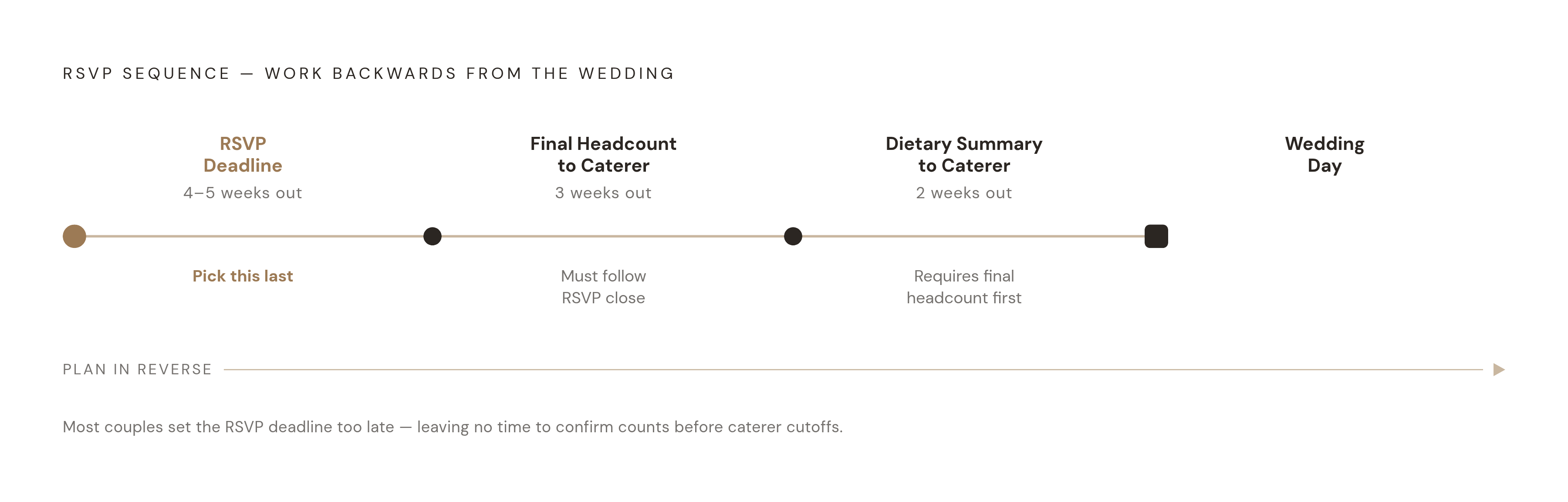
The timing sequence matters here and most people set it up wrong:
- Caterers need final headcount roughly three weeks before the wedding
- Dietary summaries should reach them at least two weeks out
- That means your RSVP deadline needs to be four to five weeks before the wedding to make the whole sequence work
Most couples set the RSVP deadline too late and then scramble. Work backwards from the caterer's deadlines when you pick the date. Don't pick a date that feels reasonable and hope it works out.
What timeline and communication tools add to vendor coordination
The cross-vendor timing problem is genuinely underrated. When the florist shifts their delivery window, the photographer's arrival window shifts with it. Which changes when the coordinator needs to be on site. Which affects the caterer's setup window. In a connected system, one update propagates. In disconnected tools, someone updates four or five documents manually and hopes nothing is missed.
Timeline Genius is a specialist tool built specifically for creating detailed wedding day schedules with vendor assignments. Wedding planners reportedly save 65% of their time building complete timelines using it. It's not a full VMS. It's the timeline layer that a good VMS should connect to, and if your VMS doesn't connect to it, you're maintaining two separate documents that will eventually diverge.
Planning Pod's timeline feature handles this natively. The day-of schedule includes vendor assignments and reminders, and changes update the timeline directly without requiring a separate document or manual re-entry.
Communication tracking is the other piece that gets overlooked. The best VMS setups keep vendor emails, notes, and conversation history attached to the vendor's record. When you need to remember what was agreed about the rehearsal dinner setup, you open the vendor record, not your personal inbox from eight months ago.
Per The Knot's 2025 Planner Survey, 78% of wedding professionals using dedicated software report happier clients and fewer logistical problems. That outcome doesn't come from having better contracts. It comes from the timeline and communication layer being organized so that nothing falls through the cracks at the moment it matters most.
For couples, not professional planners, the relevant question is simpler: does your planning tool let you attach notes and messages to each vendor record? Or are you still searching email when you can't remember what was agreed?
How to evaluate which VMS example fits a couple's actual planning situation
Three questions cut through most of the noise.
How many vendors are you coordinating? Below eight, a standalone tracker handles the load without much trouble. Above ten or twelve, the coordination between vendors, including timing, dietary data, and payment sequencing, becomes the real bottleneck. A connected platform starts paying for itself in time saved at that scale.
Are you using a professional wedding planner? If yes, your planner likely already has their own platform, Planning Pod, Plutio, or something similar. You need a tool that complements what they're already using, not one that duplicates it. If no, you're carrying the full stack yourself, VMS plus guest management plus budget. The integration requirements go up considerably.
Which data needs to flow automatically rather than be re-entered? If dietary requirements from RSVPs need to reach the caterer, the seating chart, and the venue coordinator without you manually moving that information across three different tools, a connected platform is the right call. A standalone tracker won't cut it.
On cost: free standalone tools are genuinely useful for couples who want basic organization without committing to a subscription. General business platforms charge monthly and weren't designed for weddings, so you'll need additional tools to cover the guest and seating gaps anyway. The real cost comparison isn't the subscription price in isolation. It's total tool spend plus the time you spend manually moving data between tools that don't talk to each other.
Here's the most useful test before committing to any tool: if a guest changes their dietary requirement after the RSVP deadline, how many places do you have to update? If the answer is more than one, you're using co-located tools rather than an integrated system — like a wedding binder where every page is written in a different language. Knowing that going in is fine. Discovering it two weeks before the wedding while you're chasing a spreadsheet is not.