Wedding Planning Apps With the Best Guest List Management
Real guest list management connects RSVPs, dietary data, and seating charts so nothing gets lost.

Most apps give you a place to store names and addresses. That's filing. Filing is not management.
Real guest list management means every piece of data about every guest (RSVP status, meal choice, dietary restriction, table assignment) lives in one place and updates everywhere the moment anything changes. Most apps only do the first thing. The distinction feels minor until it isn't.
The named plus-one problem illustrates this fast. Recording that someone is "bringing a guest" gives you a headcount. Recording that guest's full name, meal preference, and gluten intolerance gives you what the caterer, the seating chart, and the place cards actually need. Per-guest meal selection works the same way. Collecting starter, main, and dessert choices at RSVP time is straightforward when the system is built for it. Chasing those choices later through a mix of texts, follow-up emails, and a notes field someone has to manually parse at 7am on the wedding day is not a system. It is a punishment.
Dietary requirements deserve their own paragraph. Allergies, intolerances, preferences like vegan or halal or gluten-free. These need to be captured per guest and per companion, and they need to be readable by the seating chart without the couple re-entering them somewhere else. A free-text notes field is a liability. A real one, with real consequences, when the caterer misreads a scribble and serves shellfish to someone who cannot have it.
The real test of any guest list tool comes down to two questions. Can the seating chart see the dietary data without the couple manually moving it there? Does the day-of view reflect the current guest list, or last week's version? Everything else is interface.
How the all-in-one platforms handle guest management
The all-in-ones are where most couples start, and the reasons make sense. One login, one interface, one place where the wedding website and the guest list and the budget at least theoretically talk to each other. The appeal is real.
The Knot (free) is probably the most familiar starting point. Guest list manager, wedding website, online RSVP, and budget tools all under one account. The guest list and seating functions are relatively basic compared to dedicated tools, but for couples who want a single hub and aren't navigating unusually complex dietary or seating needs, it covers the ground without demanding much.
WeddingWire (free) is worth calling out specifically because its guest list manager integrates directly with its seating chart. Guests confirmed in the list can be pulled straight into a floor plan, which sounds obvious but is genuinely not how most free tools work. If your primary anxiety is vendor vetting, WeddingWire's review ecosystem is strong, and it handles both functions without requiring a second app.
PlanWed takes a different approach to the RSVP experience. Guests respond through a one-tap email link with no account required, no app to install. Responses, meal choices, and notes flow directly into the couple's guest list. The frictionless guest experience matters more than it sounds. The easier RSVPing is, the less time couples spend sending the same follow-up text to the same twelve people who haven't responded in three weeks.
That's The One (subscription-based) connects budget tracking with guest management and RSVP in a centralised dashboard. The subscription cost is the real trade-off, and it's worth doing the math across the full engagement rather than just looking at the monthly rate. A 14-month engagement can add up to a significant total cost. Know what you're paying before you commit.
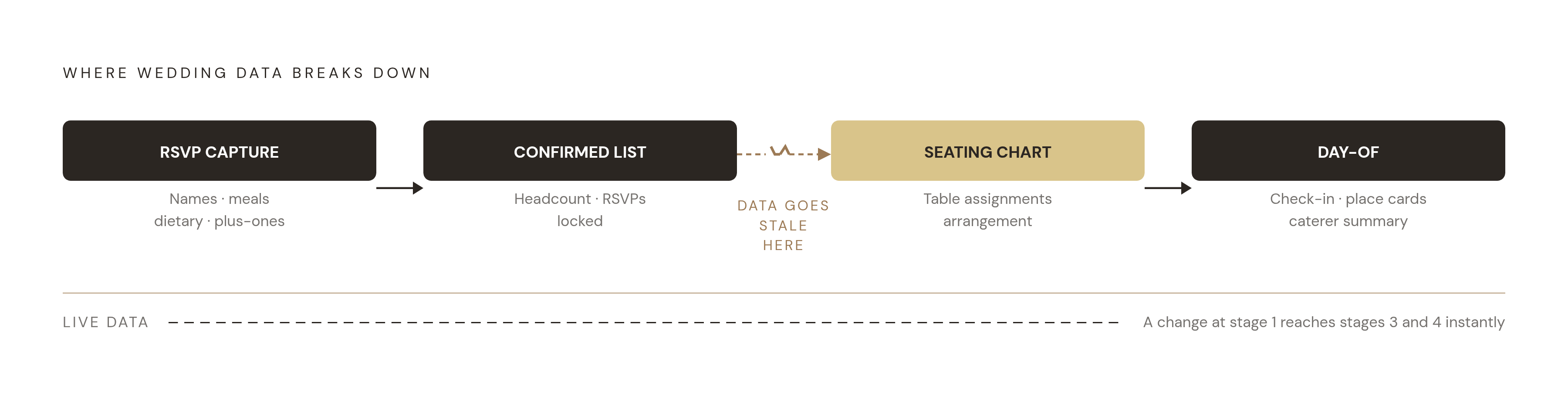
The guest list connects reasonably well to the website and RSVP layer on all of these platforms. The weaker link is almost always the jump from confirmed guest data to a working seating chart. That jump is where data gets stale and stays stale.
Where seating charts break the chain, and the tools built to fix it
The seating chart gets built in the final weeks of planning, goes through more revisions than anyone expects, and gets finalized precisely when RSVPs are still changing and dietary data is still arriving. It is the highest-stakes moment for data integrity. It is exactly when most tools start showing their cracks.
The core problem is a familiar one. A couple who manages RSVPs in one tool and builds their seating chart in a different one has to manually sync the two. That sync is almost always imperfect. And the version guests encounter on the night is often not the version that's current.
Seat Puzzle (free basic, paid for advanced features) is built for the complexity that shows up at the seating stage. It tags guests with accessibility needs, marks attendance, assigns meals, shows per-table dietary totals, and handles plus-ones as attached pairs rather than separate entries. The export and print functions are professional-grade, which is why planners use it to draft mockups and share work-in-progress with venues.
SimplifyTables (free up to 30 guests, $9.99 one-time for unlimited) has one feature that genuinely changes how the day-of works. It generates a real-time QR code for each guest that updates the moment that guest is moved to a different table. No reprinting. No resharing. The version guests scan at the door is always the current version. For a one-time cost, that is a meaningful reduction in morning-of chaos.
Prismm (formerly AllSeated, rebranded in 2022 and acquired by Cvent in April 2025) is the professional tier. To-scale floor plans, 3D photorealistic visualisations, live vendor collaboration. Starts at a higher monthly rate and is built for planners managing larger events. Worth knowing it exists. Not the right call for most people planning a single wedding on a finite budget.
The key distinction when comparing any two seating tools: does the seating chart import a static guest list, or does it share live data with the guest list? Only the latter means a last-minute change propagates automatically. Everything else requires the couple to catch it manually, which is a bet on human attention at the worst possible time.
Named plus-one capture resurfaces here in a specific way. A headcount won't generate accurate place cards or per-table dietary summaries. Individual names attached to individual dietary records will.
Day-of coordination: the final test of how well the data held together
Here is the scenario that exposes every gap in a guest list system. A guest drops out at 11pm the night before. Another guest arrives with a dietary requirement that was never collected. The seating chart that was printed three days ago already has two wrong tables. Managing day-of coordination without a live, connected system means the couple is working from a snapshot that stopped being accurate the moment it was taken.
The tools that perform best on the day are the ones where RSVP data, dietary data, and seating data were never separated in the first place. That sounds obvious. It is surprisingly rare in practice.
QR code check-in is now a realistic option for self-planning couples. Apps like GuestlistOnline's GO Scanner can be installed as a PWA on iOS and Android without going through an app store. Guests get checked in from a phone, tied to the live list rather than a printed one. It is faster, more accurate, and considerably more professional than ticking names off a clipboard while also trying to direct people toward the bar.
SimplifyTables' real-time QR seat finder is worth repeating here. Because the chart is live, the version guests scan when they walk in reflects any change made right up until that moment. Move someone at 9am that morning and the QR code already knows.
What the caterer actually needs is a per-table dietary summary, not a full guest list. The systems that generate that summary automatically, rather than requiring the couple to compile it from an RSVP spreadsheet at 7am, are the ones that earn their keep. That summary is also the document most likely to get lost or misread when it's a handmade export rather than a structured output. The caterer will not chase you for clarification during service.
Guest count and its direct line to budget, the number that drives everything else
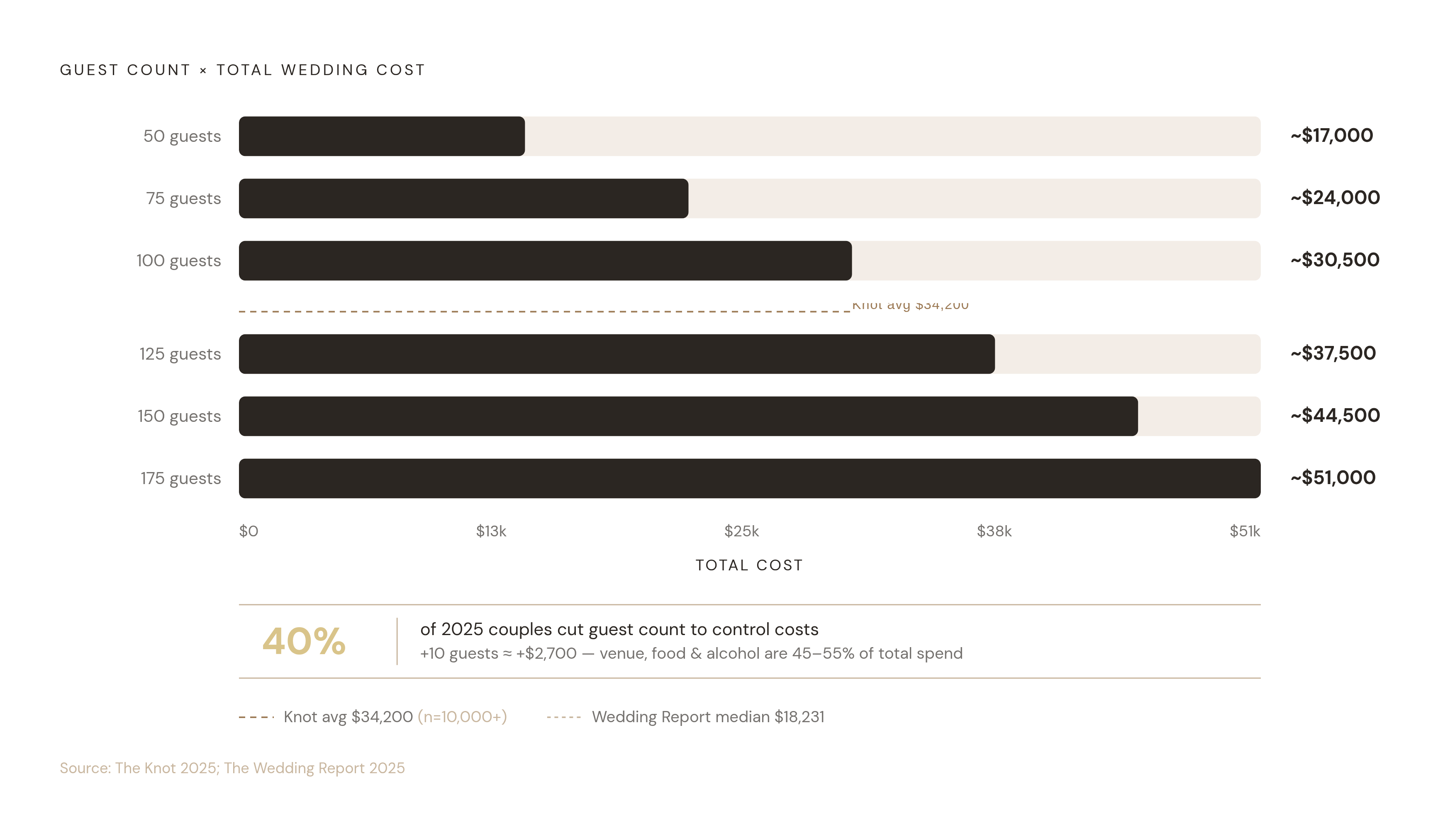
Venue, food, and alcohol together make up between 45 and 55 percent of total wedding spend, and all three scale directly with the number of people attending. The guest list is the single biggest lever on the total budget. Moving it by 10 people moves costs by thousands of dollars before any secondary effects on table count, centerpieces, or invitation costs even enter the picture.
The Knot's 2025 Real Weddings Study, which surveyed more than 10,000 couples, puts the average U.S. wedding cost at $34,200. The Wedding Report's contract-level data puts the median at $18,231, meaning roughly half of U.S. couples spent less than that. Both numbers are correct. The spread reflects the enormous range in wedding scale and geography, and it matters for couples trying to figure out where they actually sit on that curve.
Fifty-nine percent of couples said the broader economic environment affected their planning budget in 2025, and 40% responded by cutting their guest count directly. Couples are figuring out, sometimes painfully late, that the guest list is the most effective budget control they have. It's blunt, it's uncomfortable, and it works.
A budget planner that cannot see the confirmed guest count is missing its most important input. The tools that connect live RSVP totals to per-category cost projections give couples the earliest possible warning when they're drifting over budget. Tracking spend without tracking the guest count that drives it covers only half the picture, and the other half tends to show up as a very unpleasant surprise.
How to evaluate any guest list tool against your actual planning needs
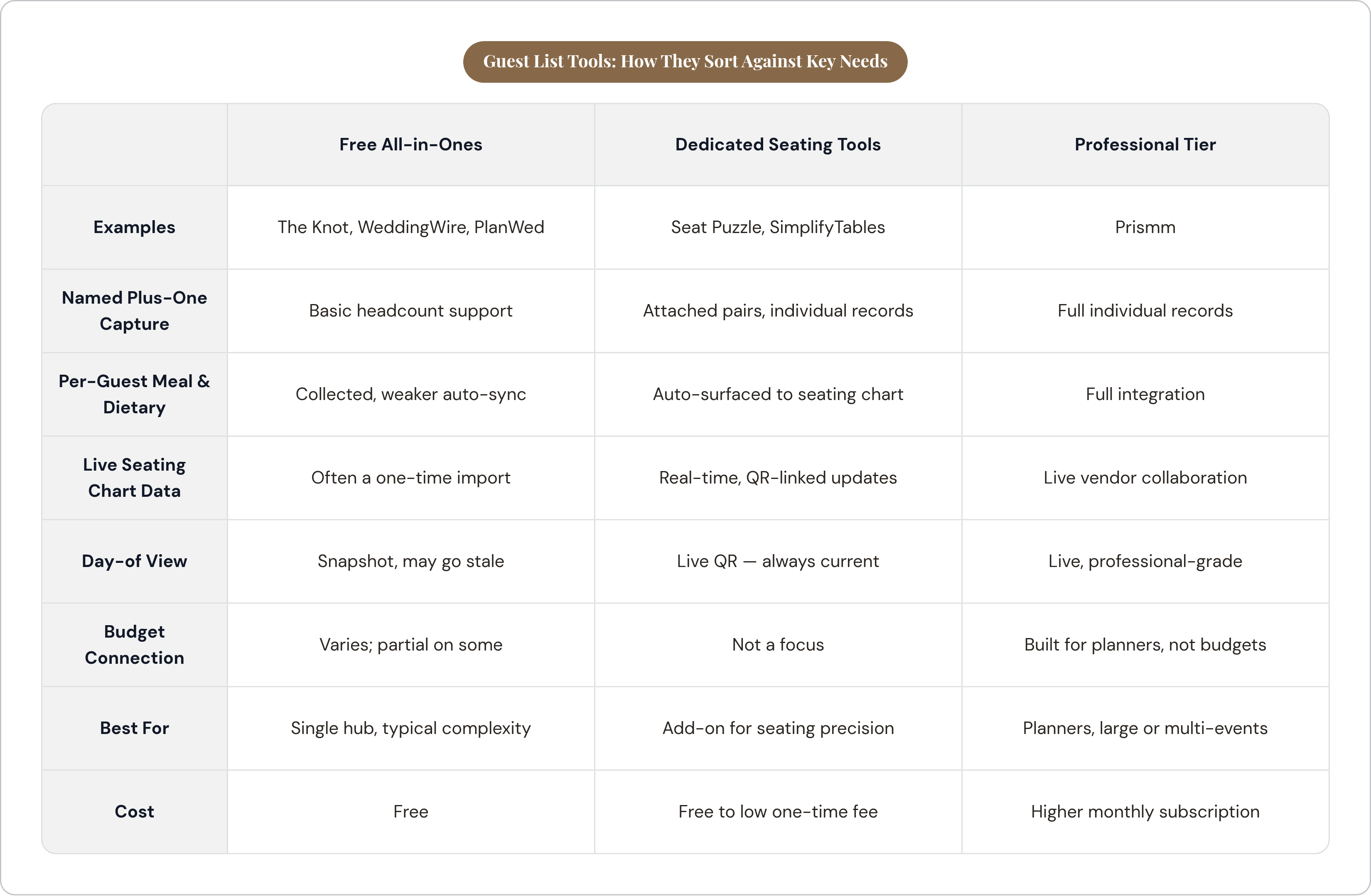
Before looking at any specific app, run through this list. It reflects what the data and the day-of reality actually require.
- Named plus-one capture. Individual names attached to individual records, not a headcount.
- Per-guest meal selection at RSVP time. Not collected separately afterward in a separate email thread.
- Dietary requirements per guest and per companion. Auto-surfaced to the seating chart, not buried in a free-text notes field.
- A seating chart that reads live guest data. Not a one-time import that goes stale the moment someone changes their RSVP.
- A day-of view that reflects the current version. QR or check-in tied to the live list, not a PDF from three days ago.
- A budget connection. Confirmed RSVP count feeding into cost projections automatically.
Here is how the tools in this piece actually sort against those needs.
Free all-in-ones (The Knot, WeddingWire, PlanWed): Broad coverage, weaker seating-to-dietary connection. Best for couples who want one interface and a manageable guest list without unusual complexity.
Dedicated seating tools (Seat Puzzle, SimplifyTables): Deeper seating functionality, especially around real-time QR and dietary summaries. Worth adding on top of a platform that already holds the RSVP data, but only if the data coming in is clean and complete to begin with.
Professional-tier tools (Prismm at $35/month): Built for planners managing multiple events. Feature-rich and priced accordingly, which puts it out of range for most self-planning couples.
Subscription vs. one-time cost: Couples with longer engagements will pay more in recurring fees than the feature set justifies for a single event. Calculate the total cost over the engagement length, not just the monthly rate.
The single best question to ask of any tool before committing to it: if a guest changes their dietary requirement two days before the wedding, how many places does the couple have to update? The answer should be one. If it's more than one, the system isn't actually connected, regardless of what the marketing says. Test it before you sign up, because almost no one does, and that is exactly how the gap gets missed.