Wedding Budget Tracker Apps Compared for Couples
Most couples waste time toggling between apps instead of tracking what they actually spend.

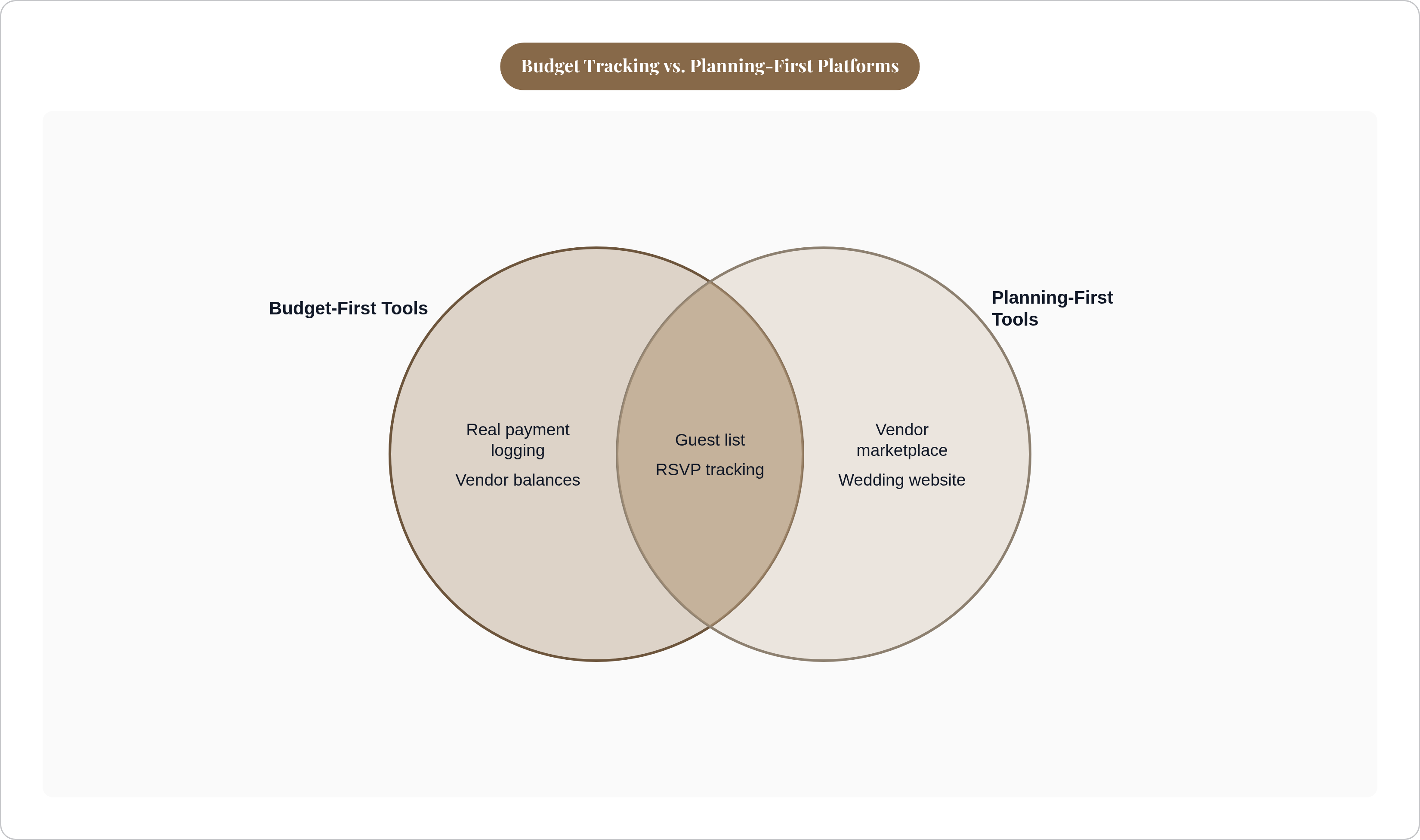
Integration and live accuracy. That's it. A glorified spreadsheet gives you categories and asks you to fill them in. A useful tracker keeps those categories connected to the decisions that change them. Static versus living. A photograph versus a document that moves when reality moves.
The average couple hires around 13 vendors and invites around 117 guests. At $292 per guest in 2025, a guest list change of 10 people is a $2,920 swing. If your budget app doesn't connect headcount to cost, you're recalculating that manually every time something shifts. And something always shifts. Usually twice in the same week.
The features that actually reduce financial stress:
Logging real payments. Deposits, final balances, and pending amounts per vendor. Actual numbers, not estimates.
Guest count tied to per-head cost. When the list grows or shrinks, the budget moves with it automatically.
One place for everything. RSVP data, dietary requirements, vendor quotes, seating. Four apps held together with hope and a color-coded spreadsheet is not one place for everything, no matter how many times you tell yourself otherwise.
Clear visibility at a glance. What's committed, what's outstanding, what's still unallocated.
The multi-app problem is where planning quietly falls apart. One app for budgeting, another for the wedding website, another for RSVPs, and none of them talk to each other. Re-entry is where errors pile up. It's also where wedding planning stops feeling exciting and starts feeling like a second job you somehow accepted without reading the offer letter.
AI budget estimation tools have gotten popular fast, and they're useful for early-stage research. But estimation and tracking are two completely different problems. You still need somewhere to log what you actually spend. Knowing roughly what things might cost is not the same as knowing what you owe and when.
How the Major Free Platforms Handle Budget Tracking in Practice
Zola
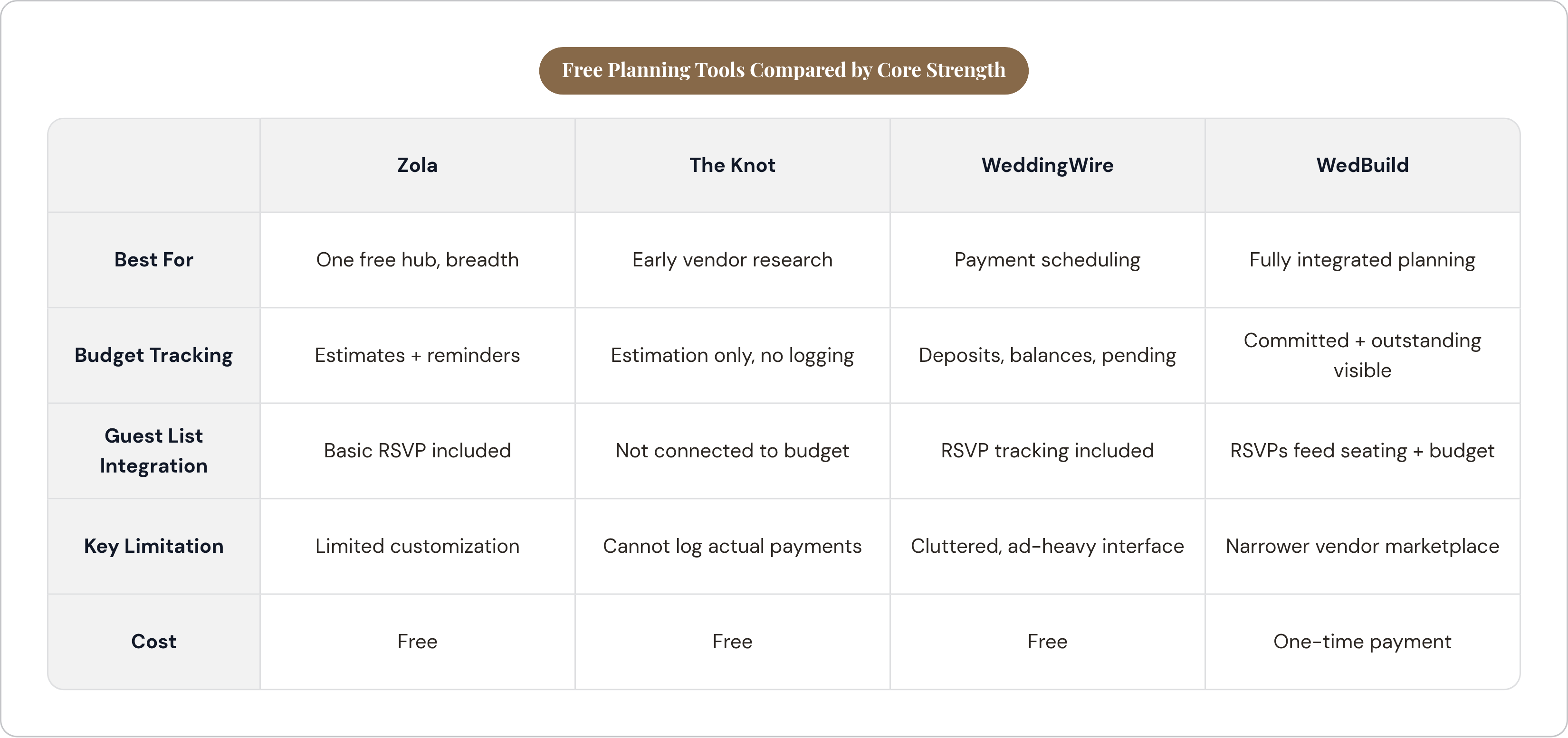
Zola's budget tool is free, includes payment reminders and phone notifications, and sits inside a broader platform that also covers your guest list, registry, and vendor search. For couples who want one free hub without toggling between apps, that consolidation does real work.
The limitations are real but specific. Customization is constrained. Certain text fields are locked, which matters less for budgeting than it does elsewhere, but it reflects the platform's broader trade-off: simplicity over flexibility. Seating charts and premium guest texting cost extra, though budget tracking itself stays free. If you want breadth rather than depth, Zola delivers.
The Knot
The Knot runs the largest vendor marketplace in the U.S., which is genuinely useful context for budgeting. You can see what real vendors in your area charge while you're building your plan. A generic template can't do that.
A 2025 update replaced the traditional budget tracker with an AI "Budget Advisor" that estimates costs based on location and guest count, pulling from real contracts in The Knot's database. For early research, that's useful. But the Budget Advisor is estimation-only. It no longer lets couples log actual payments.
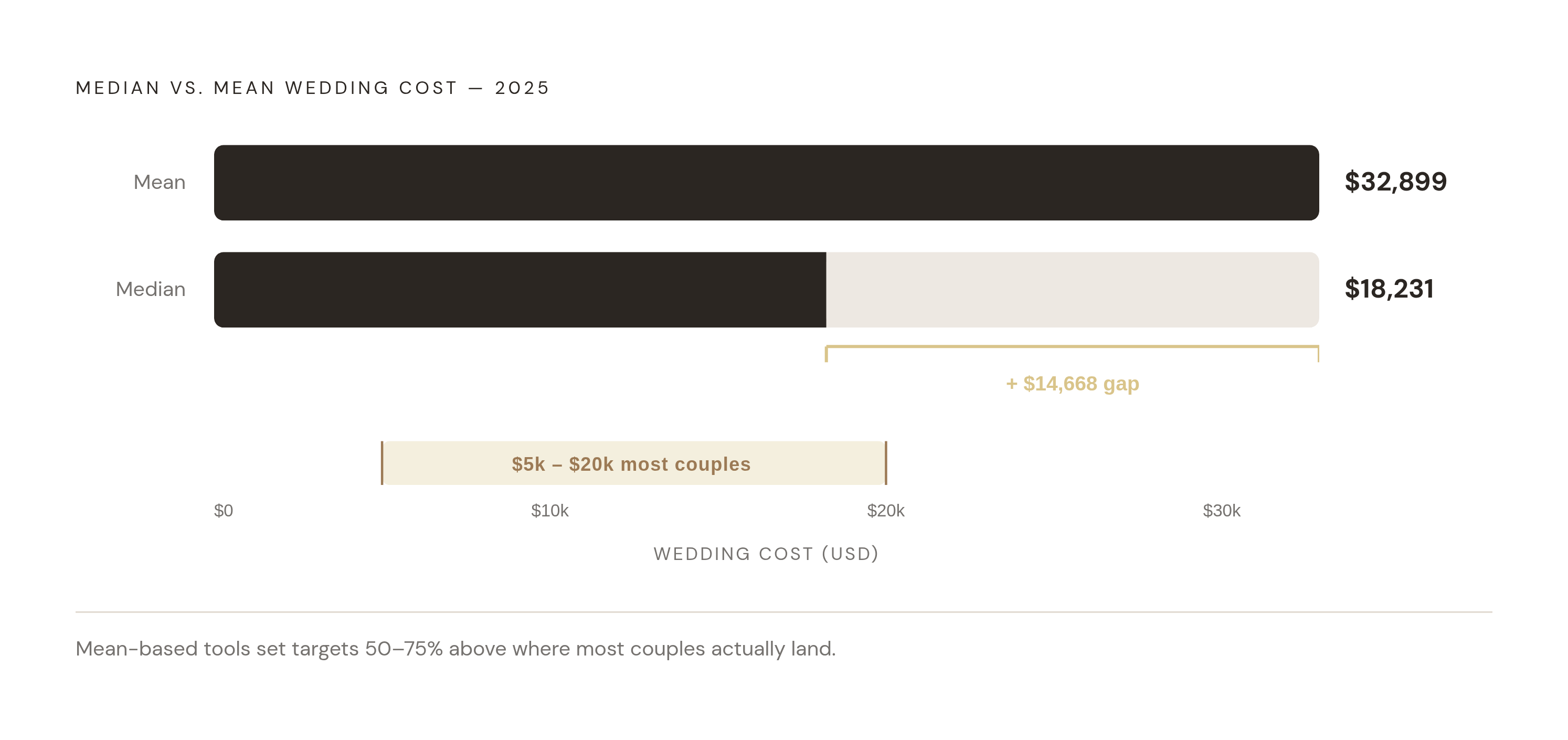
In one documented case, the tool set a default venue budget of $11,270 for a market where most couples spent between $3,320 and $12,190. That default was pulled upward by the mean, landing above where most couples actually end up. The Knot's ecosystem is excellent for finding vendors. It is not the right tool if you need to track what you are actually spending.
WeddingWire
WeddingWire has the strongest vendor payment management of the free options. Deposits, final balances, and pending payments all tracked in one dashboard. It also includes RSVP tracking and a drag-and-drop seating chart that exports cleanly for coordinators or print.
The interface can feel cluttered, and vendor promotions are woven throughout, which undercuts the experience. But if you need to manage payment schedules across a large vendor roster, WeddingWire is the best free tool for that specific job. It's not pretty. It works.
Folia Planner
Folia sits in a middle category. Technically paid (free plan available, full access from $11.99 per month or $89 per year), but the pricing is accessible and the feature set is meaningfully different from the free options.
It covers budgets, guest lists, RSVPs, vendors, and to-dos in one space with a visual, collaborative interface. The standout feature is a ceremony and processional planner that maps aisle flow, seating, and order of the day in detail most tools skip entirely. It's designed for couples who want spreadsheet-level control without living inside an actual spreadsheet. The subscription model means you're paying for every month of your engagement, so do that math before you commit.
When a Budget-First Approach Outperforms a Planning-First One
Most tools ask you to pick your categories, then estimate how much to allocate to each. That works fine if your number is already fixed. But a lot of couples don't actually know their number yet, and they start building a plan before they have one. That's where things go sideways fast and quietly.
Married, Not Broke flips the process. You enter your total budget, and the app builds a realistic plan within it, drawing from real venue, food, and service data. Guest count gets calculated from your budget, rather than set arbitrarily before the numbers exist to support it.
This matters most for weddings in the $5,000 to $20,000 range. That's exactly where the gap between the median ($18,231) and the mean ($32,899) does the most damage. A couple in that range using an average-inflated tool could easily be planning toward a number that's 50 to 75 percent above where they need to land. Starting with your real number and building outward is a fundamentally different process. It's also a more honest one.
The trade-off is real. Married, Not Broke has a narrower feature set outside of budgeting. You'll still need separate solutions for your website, RSVPs, and vendor communication. But as a starting point, before you open anything else, it does something most planning apps never bother to do. It treats the budget as the foundation instead of the thing you fill in later, after you've already made six decisions that depend on it.
Paid and Specialist Options Worth Knowing About
Appy Couple
Appy Couple is a paid app ($99 per year or $12 per month) focused on high-end design and multi-event guest management. It earns its cost for destination weddings or multi-day celebrations where coordinating guests across several events is a genuine logistical challenge. For a single-venue, single-day wedding, it's probably more than you need, and that mismatch becomes obvious pretty quickly.
Aisle Planner
Aisle Planner is built primarily for wedding planners, not couples. It's a professional-tier platform, and the feature set reflects that. Worth knowing about because some hired planners use it and will give couples shared access. If your planner works in Aisle Planner, that collaboration has real value. As a self-service tool for couples going it alone, it's not designed for that use case, and it shows.
What Paid Tools Generally Deliver
What you actually get for paying:
Deeper customization without hitting feature walls every other click
Collaborative editing that works the way you expect it to
Cleaner exports for coordinators and vendors
No ads or vendor promotions baked into every screen
A subscription running 12 to 18 months adds up. Whether the added features justify recurring costs versus a one-time payment or a free solution is worth actually calculating before you hand over a card number. Do the math. Don't assume the premium version earns its price just because it feels more polished.
How Connecting Budget to Guest List, RSVPs, and Vendors Removes the Biggest Source of Planning Errors
When your guest list lives in one app, dietary requirements sit in your email, and vendor quotes are buried in your inbox, you have to manually reconcile all three every time anything changes. Errors follow from that structure as reliably as anything in wedding planning.
Dietary requirements are a good example of how fast this compounds. They're collected at RSVP. They need to reach the caterer's quote, show up in the seating chart, and land in day-of coordination. That's four separate steps if the tools don't share data. Multiply that across 13 vendors and 117 guests and it becomes very clear why planning can start to feel like it has quietly consumed your entire life.
WedBuild connects budget planning, guest list, RSVPs, dietary requirements, seating, vendor comparison, and your wedding website in a single flow. RSVP data feeds the seating chart automatically. Dietary requirements sync without re-entry. Vendor quotes flow into the budget rather than waiting in a separate inbox to be manually copied over.
The budget tool itself is built around visibility: every committed payment logged, every outstanding balance visible, no ambiguity about where you stand. WedBuild runs on a one-time payment rather than a subscription, which matters given how recurring fees accumulate across a long engagement. It's free to start and available worldwide, with a particular focus on Australian couples.
Integration is not a premium feature. It's the mechanism by which a budget tracker stays accurate as plans evolve. A tool that tracks your budget in isolation will always be running slightly behind reality, because reality doesn't hold still long enough for manual updates to keep up.
How to Choose Based on Where You Actually Are in Planning
The right tool depends on your stage. Not on which app has the longest feature list or the most downloads.
You don't know your budget yet. Start with Married, Not Broke. Build a realistic plan from a real number before you open anything else.
Budget is set and you need to manage payments across many vendors. WeddingWire's deposit-and-balance dashboard is the strongest free option for that specific task.
You want everything in one place and are willing to trade some depth for simplicity. Zola covers budgeting, registry, website, and RSVPs at no cost. Strong for couples who value consolidation over granularity.
You're planning a destination or multi-day event. Appy Couple's paid tier earns its cost when the coordination surface is genuinely complex.
You want one connected platform where the budget, guest list, RSVPs, dietary requirements, seating, and vendor comparison all share the same data. Look for a tool built around that integration, particularly if you've already tried stitching multiple free tools together and found yourself re-entering the same information in three different places.
Before you commit to any tool, ask this: when my guest count changes, does my budget update automatically? If the answer involves the phrase "you'll need to update that manually," the app is a spreadsheet with a better interface. Three months from now, after plans have changed six times, that distinction will matter more than you expect.