Wedding Invitation Templates With Built-In RSVP Collection
Built-in RSVP tools only work if dietary data and guest counts actually reach your caterer on time.
The RSVP spreadsheet is where most couples lose their minds during wedding planning. A wedding invitation template with a built-in RSVP is really about one question: does that guest response ever talk to your seating chart or your caterer's dietary count? Most couples find out the hard way, three weeks out, when the "system" turns out to be a spreadsheet nobody's touched since March.
Here's how it usually goes. Invitations go out, and replies come back however guests feel like sending them: a text, a voicemail, an email, a paper card, or an aunt confirming verbally in the cereal aisle. The couple then spends an evening (or four) folding all of that into one spreadsheet, which is already out of date by the time the last entry gets typed in. Dietary questions come up constantly in these responses, food is one of the things couples get asked about most, and yet the people gathering that information by text and voicemail almost never end up with something a caterer can actually use. Caterers want confirmed numbers weeks out. A couple without that in hand is suddenly chasing thirty individual replies at the worst possible moment.
The formats available for wedding invitation templates with built-in RSVP
They don't behave the same once you get past the paper stock.
Physical all-in-one, or seal-and-send, is the classic move. Minted and Basic Invite both sell an invitation with a tear-off RSVP postcard folded right in. It's cheap, postcard return postage costs less than a full letter, so you get invite plus reply card for close to the price of one piece of stationery. The ceiling shows up fast, though. Every response comes back on paper, and somebody, meaning you, still has to type each one into a list by hand.
Digital invitation platforms skip the mail carrier entirely. Paperless Post lets guests open an invite and respond through email, text, or a link, no stamp required. Text-RSVP templates push further, building the reply wording into the invite itself and pairing it with a unique link per guest so the response lands against the right name automatically. Guest friction drops a lot. What happens to that response once it lands, though, depends entirely on the platform underneath.
Then there's the DIY hybrid, a pretty template stapled to a separate form. Plenty of Etsy sellers bundle a Canva invitation with a linked Google Form or Google Sheet, so replies land in a spreadsheet without anyone touching a line of code. Cheap, flexible, it works, right up until you realize the spreadsheet is an island. It has no idea your seating chart exists. VistaPrint's customizable RSVP cards go one step further, letting you slap a free QR code onto a physical card so guests scan into a digital form instead of mailing anything back. Still just its own separate room in the house.
"Built-in RSVP" ends up meaning something different depending on where the response actually lands, and what happens to it after that.
What RSVP responses actually need to capture — and why most templates fall short
Attendance confirmation is the baseline, obviously. After that, dietary questions come up a lot, covering vegetarian, vegan, halal, kosher, gluten-free, almost always marked optional. Allergies deserve their own line, separate from preferences, because severity changes what a caterer actually has to do. A guest who'd rather skip red meat is a preference. A guest with a nut allergy means dedicated prep surfaces, no shared oils, a briefing for kitchen staff before service starts. Same shirt, completely different problem underneath.
A message-to-the-couple field is worth keeping too, honestly. It's the one part of the form that makes the thing feel like a wedding instead of an intake survey at the DMV. Accessibility needs (wheelchair access, high chairs, hearing assistance) show up more than people expect. Song requests too, low stakes, but guests like being asked.
Most food and dietary questions on these forms get marked optional, and that's the right instinct. Couples want the information. They just don't want the form to feel like a border crossing.
Most generic templates stop at "attending: yes/no" plus maybe a meal choice. They skip allergy severity, they skip accessibility, and those happen to be exactly the fields that cause the scrambling later when they're missing. A meaningful chunk of wedding guests carry at least one dietary preference, restriction, or allergy. At a 100-person wedding, that's dozens of requirements that need to reach a caterer in organized form, not scattered across forty different text threads.
Collecting this at RSVP time is the easy part. What happens to the data afterward is the part almost nobody plans for.
The timing that makes or breaks RSVP data collection
Standard advice: send invitations 6 to 8 weeks out (10 to 12 for destination weddings), set an RSVP deadline 3 to 4 weeks before the wedding. Fine on paper.
In practice, guests take their time. Responses don't trickle in steadily the way people assume. They bunch up right at the deadline, or they slide past it entirely, and then you're sending reminder texts to your college roommate a week before you fly out.
That collides with something else. Most caterers need confirmed dietary counts and a final headcount 2 to 4 weeks out. Line those two windows up and the problem's obvious: the RSVP deadline and the caterer's deadline can land almost on top of each other, leaving no room to process anything, chase down blanks, or hand the caterer something organized.
A cleaner version looks like this. Collect dietary info right on the RSVP form itself. Close RSVPs with enough runway to follow up on the blanks. Send the caterer an organized summary well ahead of their own cutoff. A template that captures dietary data at the RSVP stage and routes it automatically cuts out a whole manual step from a window that's already too tight.
Why a siloed RSVP form creates three separate problems at once
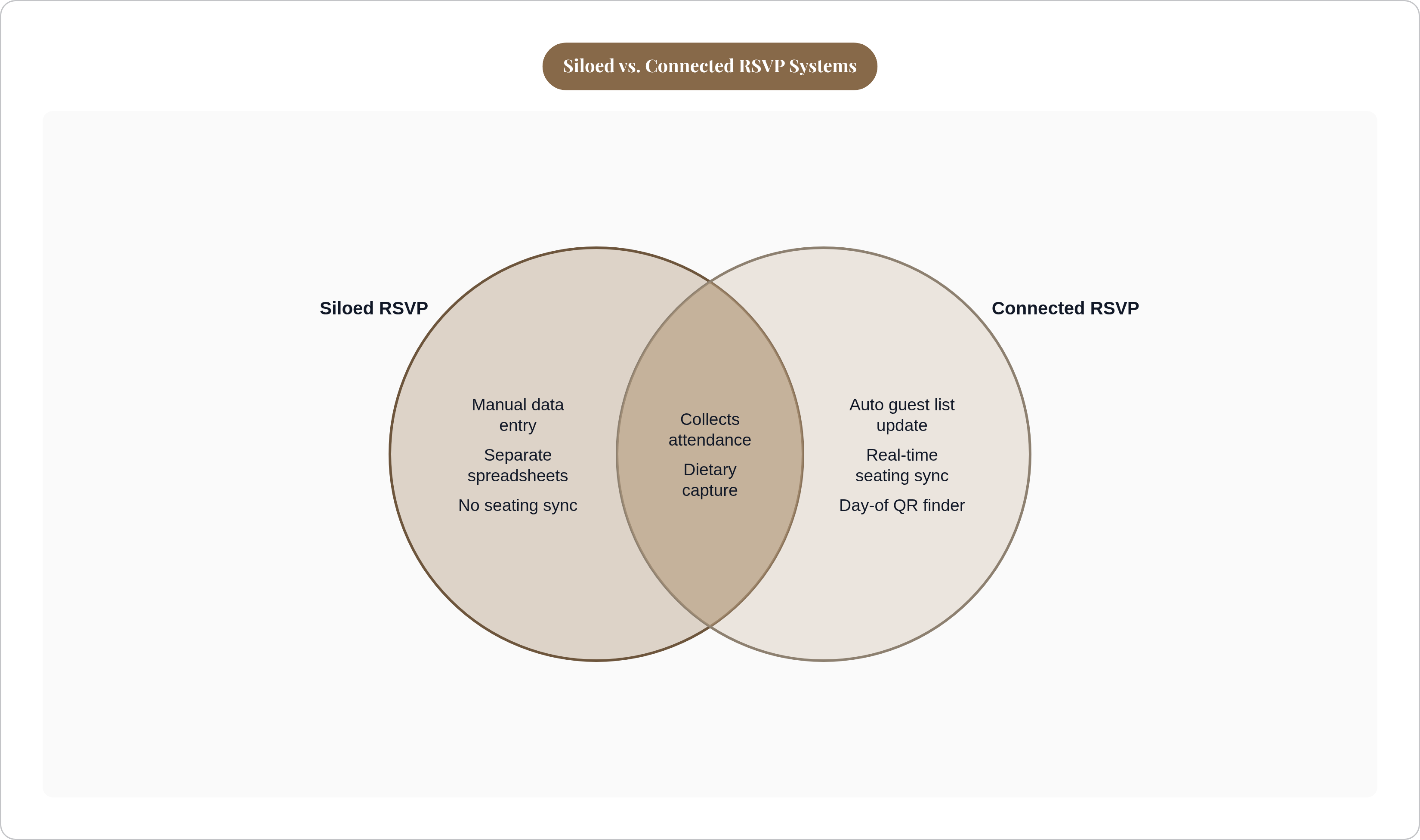
Say your RSVP form works fine and captures everything you need. It still causes trouble if it lives alone, cut off from everything else.
Dietary data gets typed in twice, for starters. The couple exports a spreadsheet, builds a separate dietary summary by hand for the caterer, then reconciles the whole thing again once late responses trickle in after the form's technically closed.
The seating chart, meanwhile, has no idea who actually said yes. If RSVPs live in one tool and seating lives in another, every "no" has to get manually pulled from the pool, and every plus-one manually added back in. Some seating tools don't update automatically when an RSVP changes, so meal choices need a manual review, which turns into a real headache once the guest list climbs past a hundred people. Tools built around a connected model pull declined guests out of the seating pool on their own and surface new plus-ones without anyone typing a thing.
And then day-of logistics get assembled from scratch, under a clock. If dietary needs, table assignments, and guest details live in three different tools, someone (probably you, or your coordinator, or your suddenly-drafted cousin) has to stitch it all into one usable document the morning of the wedding.
Here's the thing underneath all three problems: attendance, dietary needs, and seat assignment are the same guest record, just at different stages of its life. When your tools don't share that record, you become the connector. Congratulations, you've been drafted into unpaid data entry for the day. Nobody signed up for this. Nobody's getting paid for it either, which is the part that stings most around midnight.
What a connected invitation-to-seating flow actually looks like
Picture the version where none of that stitching happens by hand. The invitation template links to (or holds) an RSVP form that grabs attendance, dietary needs, allergies, plus-ones, and accessibility in one pass. Each response updates the guest list right away, no exporting, no copy-pasting into a second document. The seating chart pulls straight from that same confirmed list, so only guests who said yes even show up in the seating pool, and a decline removes someone automatically instead of leaving a ghost chair at table 12.
Dietary and allergy details travel with the guest record itself. When someone gets assigned to Table 9, their allergy note is already attached to their name. The caterer's summary comes from that same underlying data, not a spreadsheet somebody built separately at 11pm the night before, running on cold coffee and dwindling patience. On the day itself, a QR code or digital seat finder lets guests locate their table without hunting down a printed chart that's already one plus-one out of date.
Compare that to the DIY Canva-plus-Google-Form setup. It gets responses into a spreadsheet just fine, but that spreadsheet doesn't update a seating chart, doesn't flag that two guests at the same table both have shellfish allergies, and doesn't power any kind of day-of QR finder. The couple is still connecting the dots, manually, every single time something changes.
Other tools fill in different corners of this puzzle. Some sell a QR sign guests scan to find their own seat. Others generate meal count sheets and seat assignment lists straight from the chart, or sync seating to the guest list for drag-and-drop assignments. The real test, for any of these, is whether a response collected on day one still lives inside the same system by the time you're building the seating chart weeks later.
How to evaluate invitation-and-RSVP platforms against what you actually need
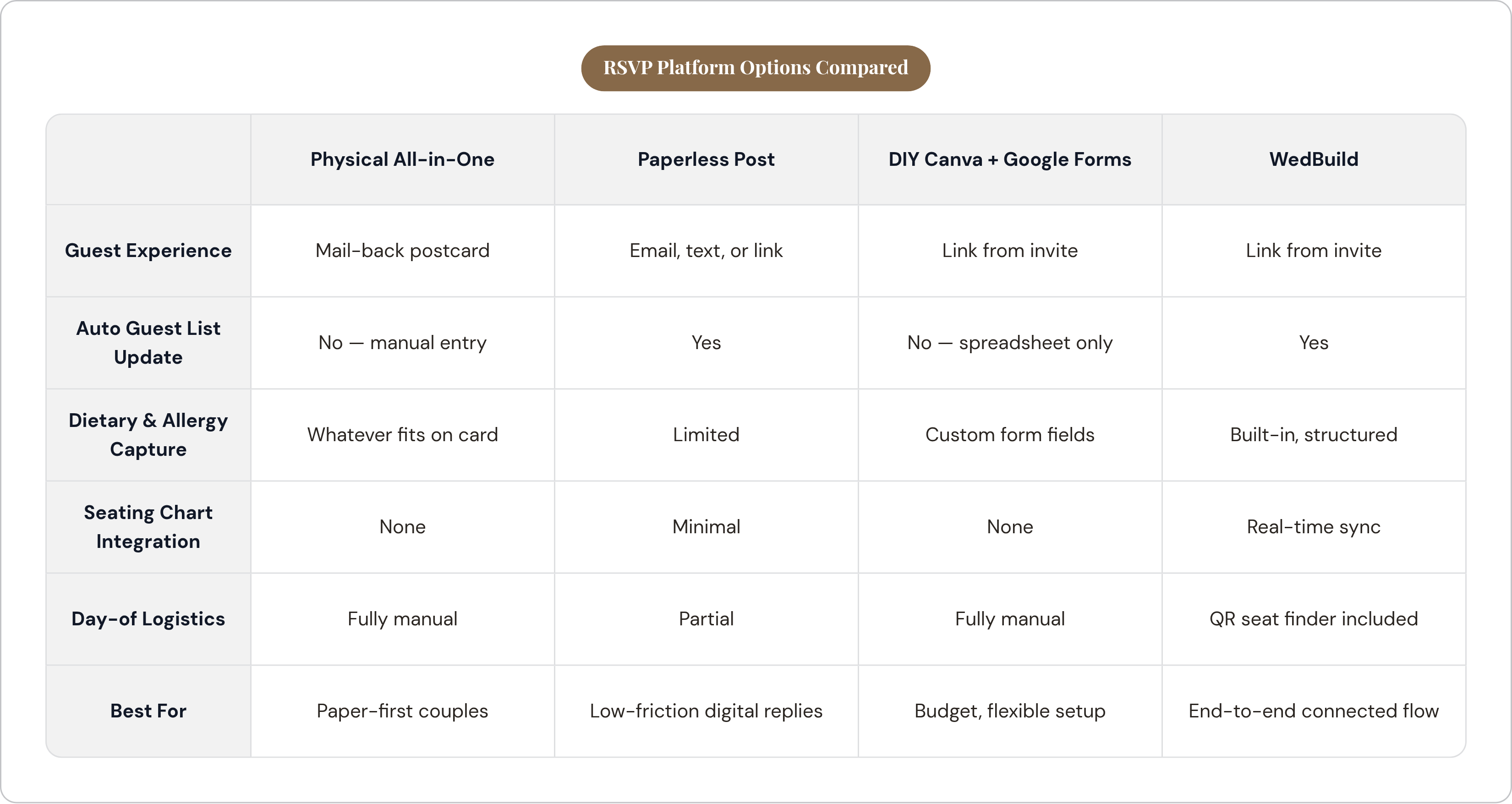
A few questions cut through the marketing fast. Does the RSVP form ask about dietary needs and allergy severity, not just a meal dropdown? Do responses update your guest list automatically, or does someone still export a CSV and paste it somewhere by hand? Does the seating tool see RSVP status in real time, so a decline drops out of the pool without you touching it?
Does dietary data ride along with the guest record all the way to a caterer-ready summary? And is there a day-of mechanism, a QR code, a digital seat finder, that doesn't require reprinting everything if three people cancel the week before?
Run the major options through that filter and they sort themselves fast. Physical all-in-one cards from Minted or Basic Invite look great and cost you nothing in connectivity, because there is none; every response needs manual entry afterward. Fine if paper's non-negotiable, less fine once you're managing 150 guests. Paperless Post removes friction for the guest and tracks opens and responses well, but its ties to seating or dietary logistics stop short of the finish line.
Some platforms sit at the connected end of the spectrum, with website, RSVP, guest list, seating chart, dietary tracking, and a day-of QR seat finder built as one flow from the start, dietary data syncing to the chart without manual reconciliation. The DIY Canva-plus-Google-Forms route stays the cheapest and most flexible option on paper, but the bridge between form responses, seating, and dietary summaries doesn't exist unless you build it yourself. By hand. Again, at 11pm, with cold coffee.
Template design ends up being the least important variable in this whole equation, even though it's the one that gets all the attention on Pinterest. The prettiest invitation still has you doing reconciliation work the night before if the responses land in a silo. What you're really buying, whether the packaging says so or not, is the system underneath the design.