Wedding Website Builders Compared for Couples in 2024
Pick a platform that connects RSVPs, seating, and budgets in one place.

Nine out of ten couples build a wedding website now, so that part's not really a decision anymore. The actual decision, the one nobody sits you down and explains, is which platform gets trusted with the mechanics behind that pretty homepage. The wedding tech market has grown crowded alongside the industry itself, and every new app insists it does everything.
None of them do everything. A few come close. Most just have a nicer font, which, fine, fonts matter, but a caterer knowing who's allergic to shellfish matters more.
The four criteria that separate genuinely useful platforms from pretty landing pages
Ignore the template count. Ignore the color palette too, honestly, because those are the two things marketing teams push in front of you first, since they screenshot well and nobody argues with a nice swatch. What actually matters is smaller and less photogenic than that.
Design flexibility. Can you change what you want to change, or are you stuck with someone else's hero image forever? And does fixing that require CSS knowledge, or can a regular person handle it on a Tuesday night with a glass of wine and zero coding background?
RSVP collection. Does the form ask about meal choice, dietary needs, and attendance in one place? Or does it just forward you a stack of emails and call that a system?
Guest list and seating integration. When a guest RSVPs, does that show up in your seating chart automatically? Or are you the one retyping "Aunt Carol, chicken, no nuts" into a spreadsheet at midnight, questioning your choices?
Connection to the rest of your planning. Is the website its own little island, or does it actually talk to your budget tracker and vendor list?
There's a fifth question too, and it's the one people skip because it involves math: how does this thing charge you, and what does that number look like stretched across thirteen months instead of one signup afternoon? Skip that question and you'll find out the hard way, usually by retyping the same 150 names into three different tools, or digging through an email thread the morning of the wedding trying to remember who can't eat nuts. Some apps cover RSVPs, seating, and budgets under one login and use a one-time payment precisely to sidestep that monthly-fee math.
What the dedicated wedding platforms do well and where each one stops short
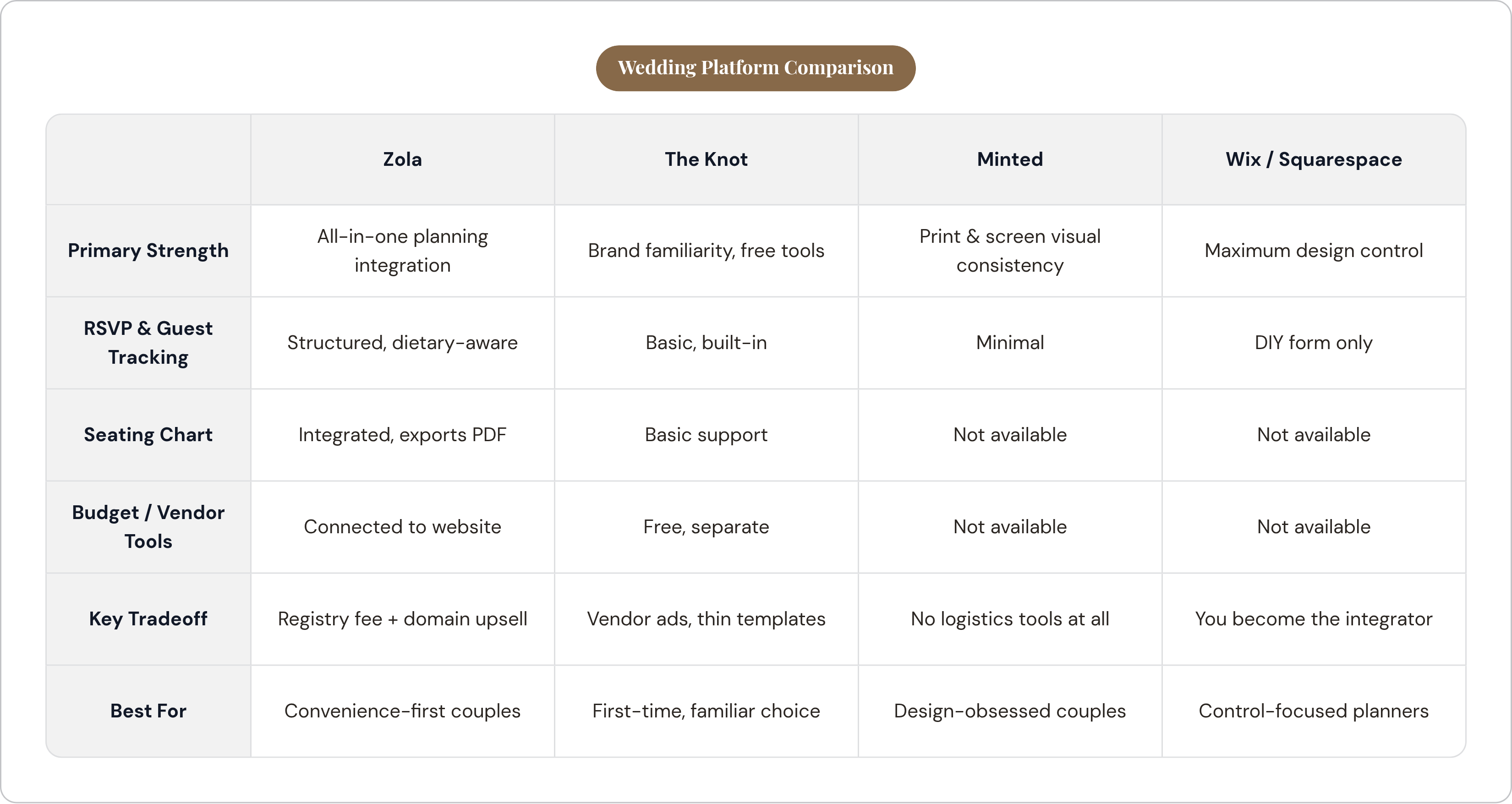
Zola earns its reputation as the cleanest all-in-one option because the registry, the website, and the planning tools were actually built together, not bolted on in sequence over five product cycles. The budget tool tracks payment deadlines and vendor costs right alongside the site, which puts Zola in a small club of platforms that even bother connecting money to the website at all. The seating chart takes group tags and dietary notes, handles last-minute swaps without a full rebuild, and exports a print-ready PDF a coordinator can actually use without squinting. The catch: Zola takes a cut of cash registry funds, and a custom domain means an annual fee stacked on top of the "free" site. Strong tool, though not fully wired end to end.
The Knot is the default, in the sense that gravity is the default. More couples land there than anywhere else, largely because everyone's seen it before. The planning tools are free, the editor is smooth, and there's real comfort in using something your bridesmaids already know how to navigate. The template library runs thinner than the competition, though, and the visual polish trails behind. The interface also carries a fair amount of vendor advertising, since vendor directory revenue keeps the lights on. Worth knowing: WeddingWire shares a parent company and a vendor database with The Knot, so you're inside one ecosystem whether you clocked that or not. Guests also eat a percentage fee on registry purchases, dressed up as a card-processing cost.
Minted isn't pretending to be a planning platform, and give it credit for that honesty. It's a stationery company first, with a website builder attached so your save-the-dates, invitations, signage, and thank-you cards all match. If visual consistency across print and screen matters more to you than logistics, this is your lane. Just don't go looking for a budget tracker or seating tool here, because it isn't coming.
Different tools solving different problems. Knowing which problem you actually have saves a weekend of setup you'll never get back.
When a general-purpose website builder makes sense and when it doesn't
Wix gives you the most design control on this list, letting you drag, drop, and rearrange across two dozen-plus wedding templates. RSVP collection, though, means building your own form or duct-taping on a third-party app, and there's no guest list manager, no seating tool, no dietary tracking anywhere in sight. You become the systems integrator. The billing is monthly, not one-time, so keep that in mind before you get too attached to your hero image.
Squarespace is the design purist's pick, and its template quality holds up consistently. The 2024 Blueprint AI update speeds up setup by generating a starting site from a short description, which is genuinely useful at 11pm when you'd rather be doing anything else. RSVPs run through a form block that dumps responses into an email inbox, a Google Drive folder, or Mailchimp. Workable, though still just a form, with no wedding-aware RSVP system and no native guest list or seating chart. Subscription pricing, and no free tier.
Emergent, the newer AI-native builder, skips templates altogether: you describe the wedding, it generates the site. Planning integration is thin right now. The product's strength is speed and design personalization, and guest logistics clearly take a back seat.
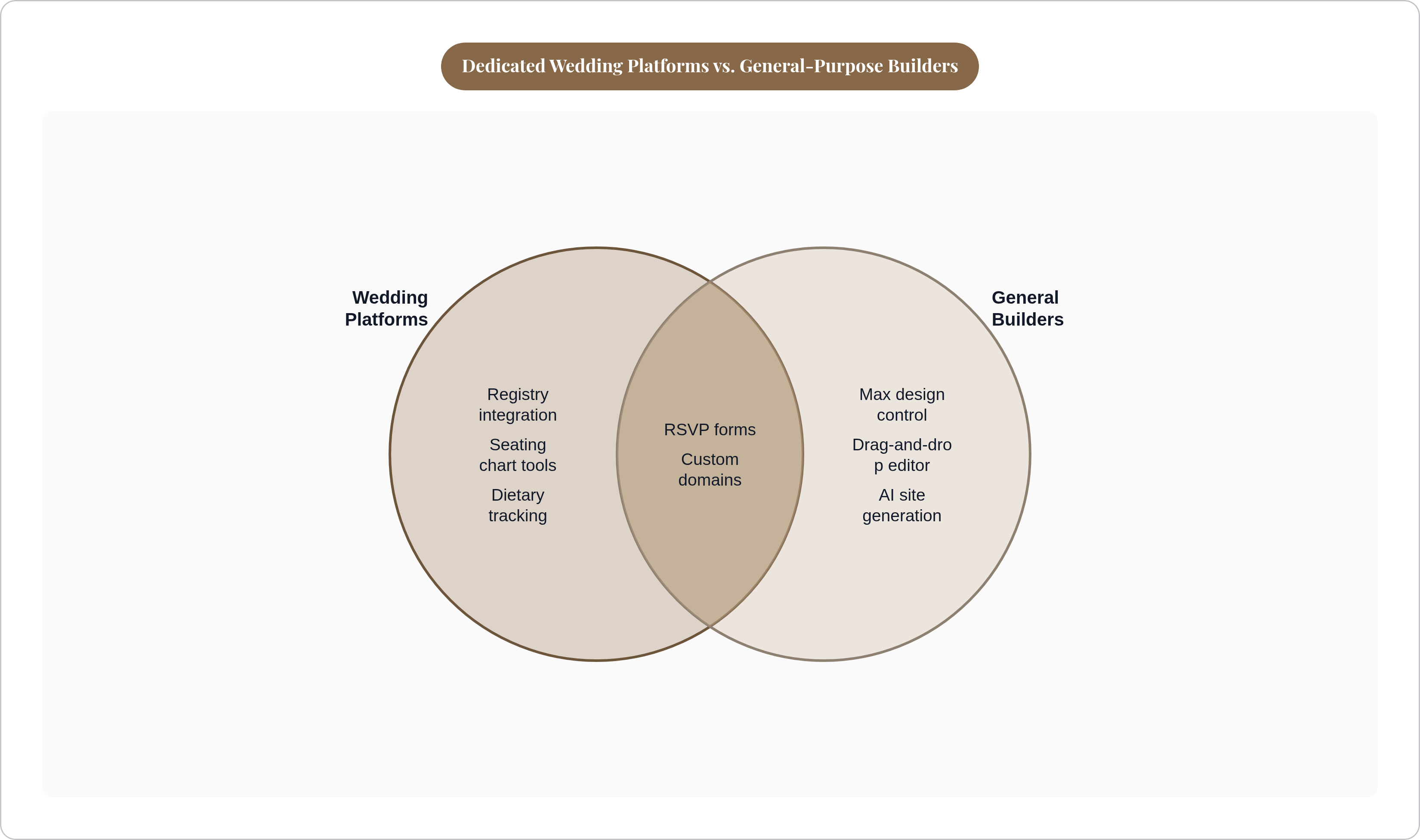
Same story across all three: the design ceiling climbs, but everything past the homepage (RSVPs, guest lists, seating, allergies) turns into a separate errand you have to go run yourself. If your planning already lives across four spreadsheets and one increasingly unhinged group text, a gorgeous website with zero integration doesn't fix that. It just adds a fifth thing to check.
Why RSVP collection is the hinge between a beautiful website and a functional planning process
Most people treat the RSVP like a headcount formality, a yes-or-no you click past on the way to picking a font for the menu cards. In practice, it's the moment your entire guest database gets built: names, attendance, meal picks, allergies, accessibility needs, all funneling into one form. Whatever happens to that data afterward decides how much work is waiting for you in month eleven.
This breaks in three ways, and all three are common enough to have a name if anyone bothered. One: the platform collects RSVPs and just emails you each response, so you're building your own spreadsheet by hand anyway, defeating the entire point of using software. Two: the dietary field is free text instead of structured categories, so your caterer gets a document full of inconsistent handwritten-style notes instead of clean counts. Three, and this one's the sneaky one: meal choice and allergy tracking sit in separate, disconnected fields, so a guest who picked vegetarian and also has a nut allergy becomes invisible unless someone manually cross-checks both lists by hand.
That third failure matters more than it sounds like it should. A meal preference is a preference; an allergy can put someone in the hospital. Ask about them separately, always, and make sure whatever platform you pick treats them as separate too. A well-built RSVP system tallies dietary categories across the whole guest list automatically and spits out a clean summary the caterer can use without a translator. That's the bar, and everything past that is decoration.
Specialist RSVP tools exist specifically because most general platforms miss this. Such tools aim to capture meal choices, allergies, and accessibility needs in a structured way, with exports designed to feed directly into seating and catering workflows. The tradeoff is that it lives outside your wedding website entirely, so now there's another login, another export, one more thing to keep in sync with everything else.
How seating charts break down without guest data integration — and what a connected workflow actually looks like
Almost everyone finalizes seating in the last one to two weeks before the wedding, right after RSVPs close. It's one of the last big tasks on the list and also the most time-pressured. Rough combination, that.
Late changes aren't the exception here; they're the whole game. Someone declines last minute. Someone adds a plus-one nobody warned you about. Someone's flight gets canceled and now there's an empty seat at table 9. The real question was never whether changes happen. It's how much extra work each one drags in behind it.
On a disconnected platform, one decline means manually updating the guest list, pulling that person off the chart, rechecking table capacity, and re-exporting a fresh document for the venue, all on you, all by hand. On a connected platform, that same decline ripples through on its own: the seat opens, the dietary count adjusts, and the caterer export already reflects it without anyone touching a spreadsheet.
A few tools are worth naming because they show how differently this can go. Zola's seating builder pulls in RSVP-linked dietary tags and exports that print-ready PDF, which counts as partial integration, and partial is still better than none. A well-designed tool keeps meal choice and allergy in two distinct fields, so a guest can be vegetarian and carry a nut allergy without one fact erasing the other. Some standalone seating tools add day-of conveniences like digital signage, genuinely handy on the day itself, though they run outside your main platform rather than as part of anything bigger.
Picture the actual morning of the wedding. The venue coordinator needs a final caterer count by 8am. A couple whose RSVP, seating, and dietary data are wired together generates that list before finishing their coffee. A couple juggling three separate tools is cross-referencing spreadsheets at 7:45am instead, which is a genuinely terrible way to spend the morning you've been planning for a year.
How pricing models shape a couple's relationship with a platform across a full engagement
Engagements stretch across many months, and whatever looks cheap on signup day doesn't necessarily stay cheap by month thirteen.
Two models dominate here. Free-core-with-upgrades runs most of the dedicated platforms: the website costs nothing, but a custom domain carries an annual fee, and registry structures vary in ways that reward actually reading the fine print instead of skimming it. Monthly subscription runs the general-purpose builders instead; Wix, Squarespace, and Emergent's paid tiers all bill monthly, so a longer engagement just means more months paying for a website you finished building in week one and haven't opened since.
Registry fees deserve their own look, separate from whatever the website itself costs. Some platforms take a cut when couples withdraw cash funds. Others charge the guest at checkout instead. What you actually pay depends far more on how the registry gets used than on whatever number sits on the homepage in large friendly letters.
Custom domains are more consistent, at least: a modest annual fee across most dedicated platforms, but still an upsell riding on top of something marketed as free. Worth remembering next time a homepage promises "free" like it's a magic word.
The question that actually matters isn't the sticker price. It's what this costs across the full engagement, start to finish, and whether you're paying monthly for something that was done on day one.
How to choose based on what kind of planner you actually are
Some people want full creative control and don't mind handling logistics somewhere else entirely. That's Wix or Squarespace territory, especially if there's already a separate system for guest tracking, or if building a spreadsheet from scratch sounds relaxing rather than horrifying.
Some people want the registry, website, and guest tools under one login and are happy to trade some design range for that convenience. That's Zola or The Knot, depending on whether brand familiarity or tighter planning tools matters more.
Some people care most about how the wedding looks on paper: the save-the-dates matching the signage matching the thank-you cards down to the exact shade of sage green. Minted exists for exactly that person.
And some people just want the dietary list to match the seating chart without three hours of manual cross-checking the week of the wedding. That instinct is worth trusting more than any template or color scheme ever will be. Pick the platform that matches how you actually plan, over the one with the prettiest homepage, because nobody's admiring a homepage at 8am on the wedding day. They're checking if the caterer got the right number.